

Inbox on the Member's Own Profile
Each member sees a dedicated inbox of every contact message they have received, on their own BuddyPress profile.
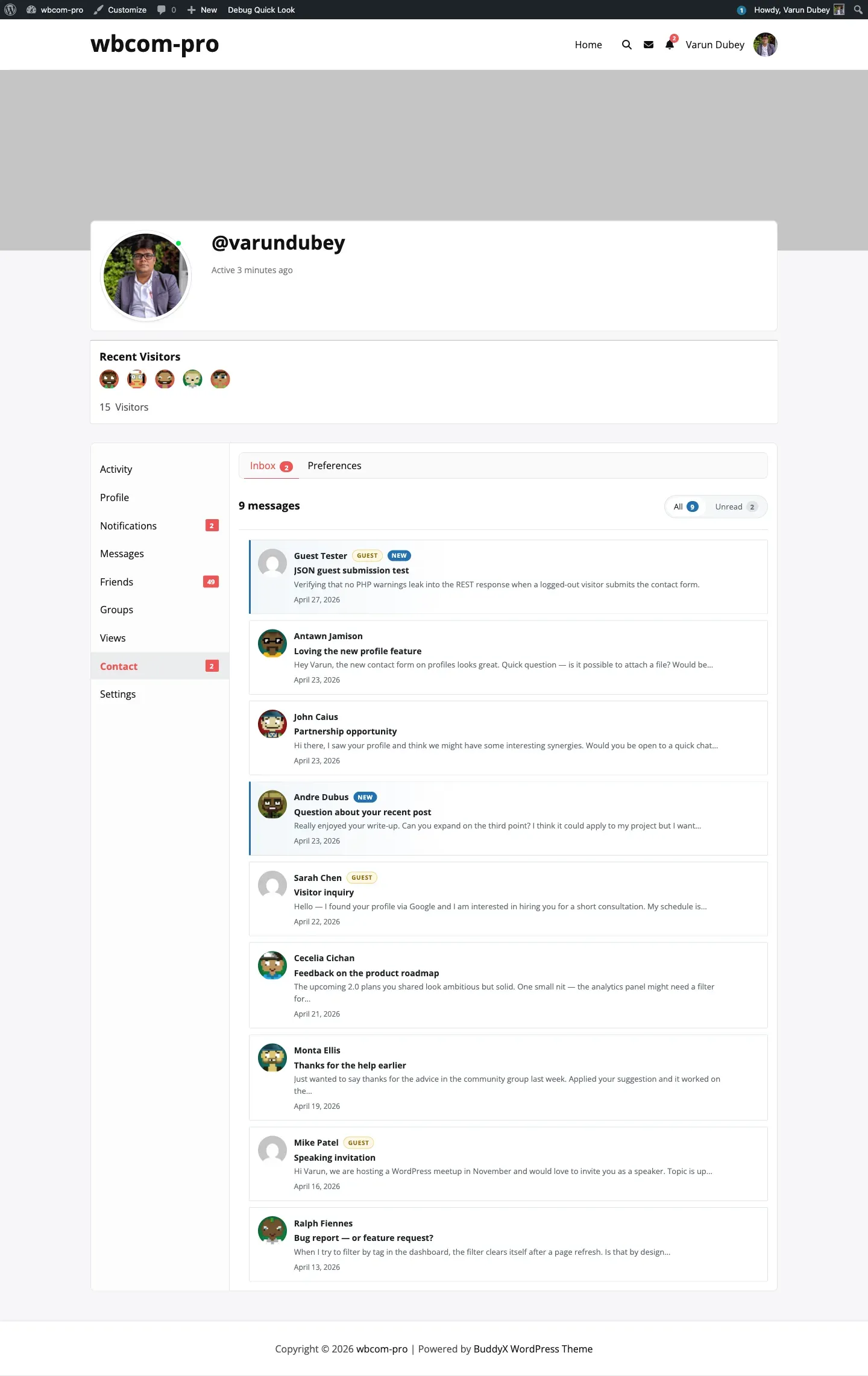
How members reach it
Section titled “How members reach it”- Click Contact on their own profile and then Inbox in the sub-nav.
- Click a notification bell entry — the link goes straight to the single-message view.
- Click Contact in the WordPress admin bar (under “My Account”) — same destination.
The inbox URL is /{user-slug}/contact/inbox/. The default sub-nav slug for the Contact tab on the member’s own profile is inbox, so a bare /contact/ URL also lands here.
Layout
Section titled “Layout”Each row in the listing shows:
- The sender’s avatar (or a generic guest avatar for non-member submissions).
- The sender’s display name, with a Guest badge for non-member submissions and a New badge for unread messages.
- The subject, bold.
- The first line of the message, trimmed.
- The submission date.
Unread filter
Section titled “Unread filter”The inbox has two filters at the top:
- All — every message the member has ever received.
- Unread — only messages with an active BuddyPress notification (i.e. the recipient has not yet opened them).
The Unread filter relies on the BuddyPress Notifications component. If notifications are disabled site-wide the filter still renders but always returns an empty list — the inbox itself is unaffected.
Unread badge in the nav
Section titled “Unread badge in the nav”The “Contact” parent nav item shows a count badge when the inbox has unread messages. The number tracks the same data the Unread filter uses: BuddyPress notifications belonging to the bcm_user_notifications component that are still flagged is_new = 1.
Pagination
Section titled “Pagination”Messages render 10 per page in newest-first order. Older pages link via standard BuddyPress pagination at the bottom of the listing.
Privacy
Section titled “Privacy”Only the recipient can read their inbox. The single-message view enforces this via delete_for_recipient() in BCM_Messages_Repo and the require_message_owner permission callback on the REST delete endpoint — even direct URL access to a stranger’s message ID returns “Message not found”.