

Drip Sequences
A drip sequence is an automated series of emails that goes out to a member over time, on a schedule you set. You build the sequence once, choose what starts it, and BuddyNext sends each step at the right moment without any further work from you. Drip Sequences is a Pro feature.
Why use it
Section titled “Why use it”The first days after someone joins decide whether they stick around. A new member who hears nothing usually drifts away; a new member who gets a warm welcome, a nudge toward their first post, and a check-in a week later is far more likely to become active. Doing that by hand for every signup does not scale.
A drip sequence handles it for you. Write a welcome on day zero, a “here is how to get started” on day three, and a “you have been with us a week” on day seven, then turn the sequence on. Every new member walks through the same thoughtful onboarding automatically, and you keep your community warm without watching the registration list. Owners reach for this to onboard new members, re-engage quiet ones, and run any timed email journey (a course intro, an event countdown) where the timing matters more than the moment.
How it works (for members)
Section titled “How it works (for members)”Members do not set anything up. Once you enable a sequence with a matching trigger, the member is enrolled and starts receiving the steps:
- When a member registers (or finishes onboarding, depending on the sequence’s trigger), they are enrolled automatically.
- Each step arrives after its own delay. The first step can go out immediately (a delay of zero days); later steps follow on their own schedule.
- The emails are sent through BuddyNext’s normal email system, so they carry your community’s branding and From address.
Unsubscribing
Section titled “Unsubscribing”Members stay in control of their inbox:
- A member who unsubscribes from all community email stops receiving drip steps. The sequence is paused for them rather than deleted, so if they ever opt back in, it can resume.
- A member can also unsubscribe from one specific sequence (every drip email carries a per-sequence unsubscribe link). Their opt-out is recorded and their enrollment is kept - it is skipped, not erased - so the history is preserved and it can resume if they re-subscribe.
Setting it up (for owners)
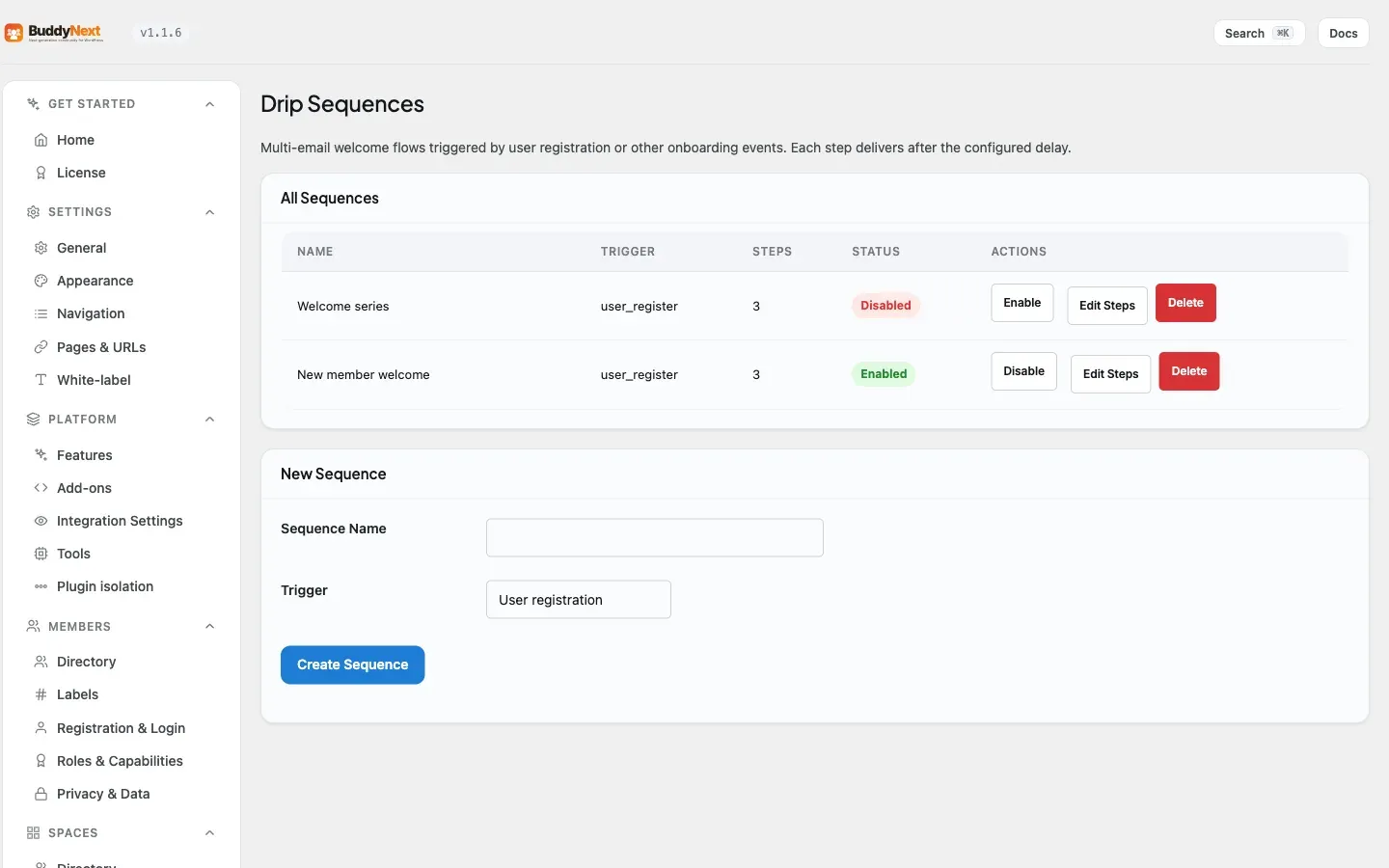
Section titled “Setting it up (for owners)”Drip sequences are managed under the BuddyNext admin menu, on the Drip Sequences page.
Create a sequence
Section titled “Create a sequence”- Open the Drip Sequences page. If you have none yet, you will see an empty state inviting you to create one.
- Give the sequence a name (for example, “Welcome Journey”) and choose a trigger.
- Save it. The new sequence starts disabled so you can build its steps first; the step editor opens so you can add them. Enable it from the list when it is ready to go live.
A sequence has these top-level settings:
| Setting | What it does | Default |
|---|---|---|
| Name | A label so you can recognize the sequence in the list. Required. | Empty (you must set it) |
| Trigger | What starts the sequence for a member. See the trigger table below. Required. | Empty (you must choose one) |
| Enabled | Whether the sequence is live. While disabled, no member is auto-enrolled and no steps go out. | Disabled when created (turn it on from the list once your steps are ready) |
Triggers
Section titled “Triggers”| Trigger | When a member is enrolled |
|---|---|
| New member registers | The moment a new account is created. |
| Onboarding completed | When a member finishes the onboarding flow. |
| Manual | Never automatically; members are enrolled through the REST API (see Manage enrollments). |
Add steps
Section titled “Add steps”Each step is one email in the sequence. Add as many as you need; they are sent in the order you add them.
| Setting | What it does | Default |
|---|---|---|
| Delay (days) | How long to wait before this step is sent, measured from the previous step (or from enrollment, for the first step). Use 0 to send right away. | 0 |
| Subject | The email subject line. Required and must not be empty. | Empty (you must set it) |
| Body | The email content. Accepts HTML and supports merge tags such as {{first_name}}. Required and must not be empty. |
Empty (you must set it) |
Note: A step will not save with a blank subject or body. This is deliberate - it stops the sequence from emailing members an empty message.
You can edit a step, reorder steps, and remove a step from the editor. Because each step’s delay is measured from the previous step, reordering changes when later steps go out.
Enable, disable, and delete
Section titled “Enable, disable, and delete”- Toggle a sequence on or off from its row in the list or from the editor. Disabling stops new auto-enrollments and pauses delivery; it does not delete anything.
- Deleting a sequence removes it permanently along with every enrollment tied to it. There is no separate delete for a single member’s enrollment from here - deleting the whole sequence is the only removal path.
Manage enrollments
Section titled “Manage enrollments”- Members who match a sequence’s trigger are enrolled automatically while the sequence is enabled.
- You can also enroll a member through the REST API (
POST /drip-sequences/{id}/enroll). This is the only way members enter a “Manual” sequence, and it is useful for adding existing members to a sequence built after they joined. - If you enroll someone who is already in the sequence, their progress resets to the first step rather than creating a duplicate. A member is never enrolled twice in the same sequence.
Good to know
Section titled “Good to know”- One step per run. Delivery is handled by a background task that runs on a schedule. Each time it runs, it advances each active member by at most one step. After a step’s delay has passed, that member’s next step goes out on the following run - steps do not all fire at once. If the background task was paused for a while and several steps are overdue, members catch up one step per run rather than receiving a burst of emails.
- The schedule arms itself. The background task only runs while there are active enrollments. When the last enrollment finishes, it stops on its own, and it starts again the next time someone is enrolled. There is nothing to turn on.
- Duplicate enrollment is prevented. Re-triggering enrollment for a member who is already in a sequence resets their progress instead of adding a second copy.
- Global opt-out wins. A member who has unsubscribed from all community email is skipped by the sequence without losing their place, so they resume if they re-subscribe.
- Completed sequences stop. Once a member receives the last step, their enrollment is marked complete and they get nothing further from that sequence unless you re-enroll them.
Free vs Pro
Section titled “Free vs Pro”Drip Sequences is a Pro feature in full - the sequence builder, triggers, step scheduling, automatic and manual enrollment, and the delivery engine. The free plugin sends transactional and notification email but does not offer timed, multi-step sequences. For one-off newsletters to a segment rather than a timed series, see Broadcast Email.
Related
Section titled “Related”- Broadcast Email - one-off campaigns rather than a timed series.
- Member Onboarding - the onboarding-completed trigger that can enroll members.
- Grow with Email - the email-growth recipe.