

Gradebook
Gradebook
Section titled “Gradebook”Pro feature. Available in Learnomy Pro.
The Gradebook computes a weighted per-course grade from the scores you already collect - quizzes, assignments, and SCORM packages - and shows it to instructors and students. It does not invent a fourth score store. You set how much each source counts and the pass threshold; optionally override a student’s final grade by hand with a required reason.
What you can do
Section titled “What you can do”- Set per-course weights for quizzes, assignments, and standards (SCORM). A weight of 0 excludes that source. Weights are scaled to 100 on save.
- See every enrolled student’s weighted grade in a paginated admin grid: filter by pass/fail, sort, export CSV.
- Override a final grade with a required reason (audit trail). Delete the override to restore the computed grade. Component scores are never rewritten.
- Let students open Account → Grades (
/account/grades/) for their own per-course breakdown and pass / in-progress badge. - Trust fixed query cost per page: one batched course scan feeds the grid and the class-average summary.
How to use it
Section titled “How to use it”Step 1 - turn the module on
Section titled “Step 1 - turn the module on”Enable the Gradebook module under LMS Settings > Modules (Reports / Pro).
Step 2 - pick a course
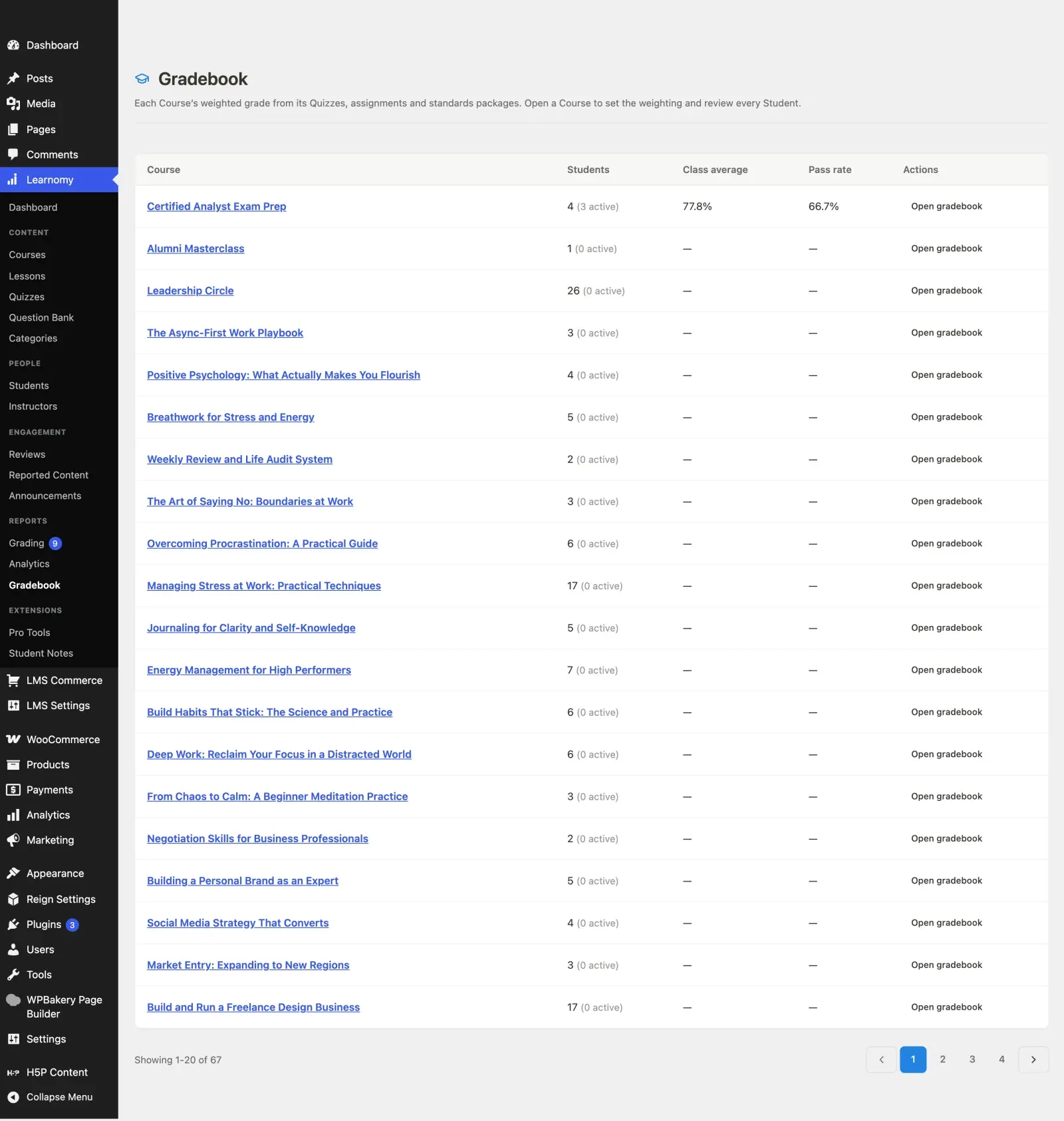
Section titled “Step 2 - pick a course”Open Learnomy > Gradebook in the Reports section. Every course is listed with its student count, class average, and pass rate. The average counts only students with graded activity, shown as “N active” beside the enrolment count, so a course nobody has started yet does not read as a class average of zero.
Step 3 - set the weighting
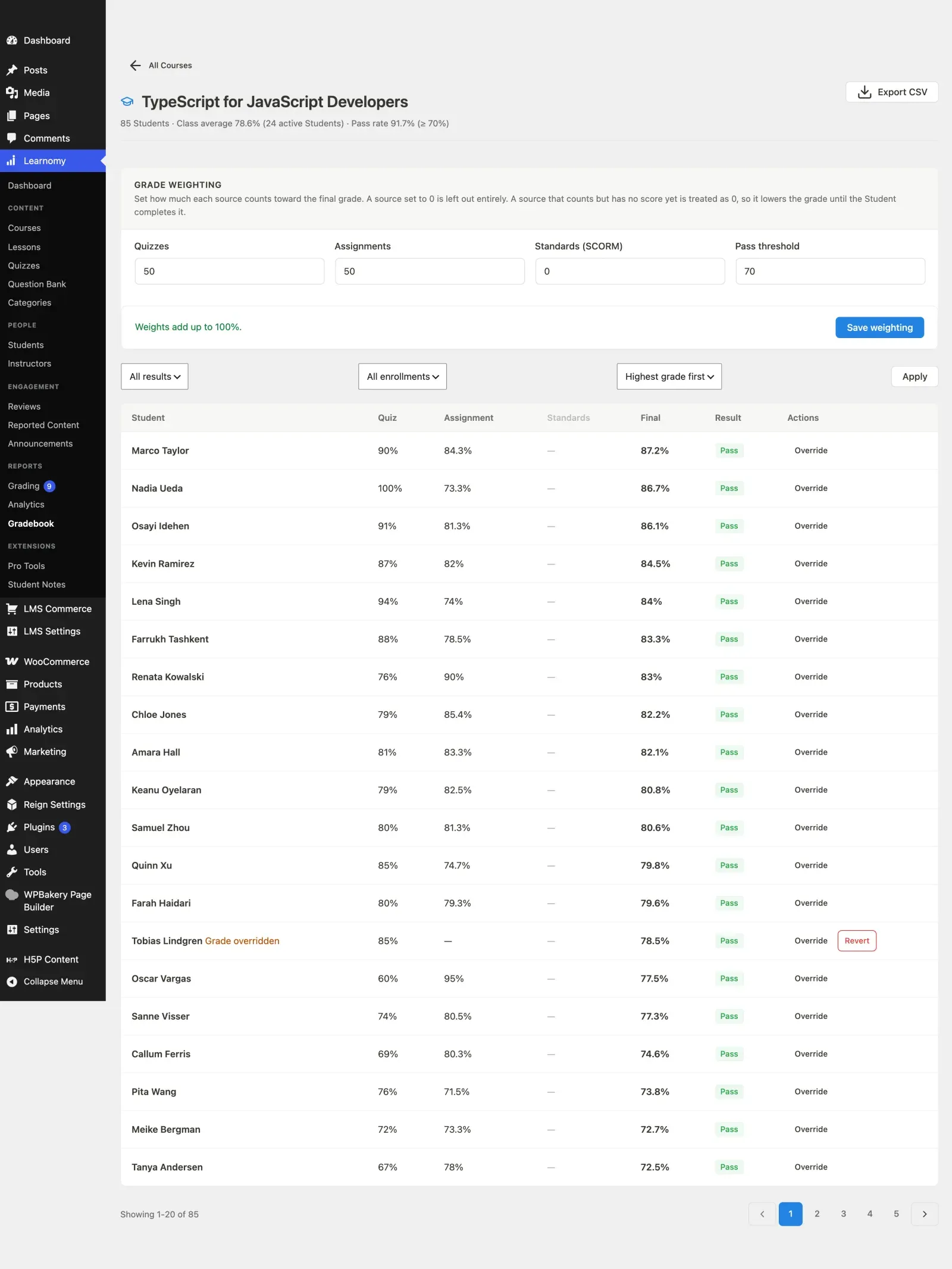
Section titled “Step 3 - set the weighting”Open a course. The Grade weighting card at the top has four fields.
| Field | What to put in it |
|---|---|
| Quizzes | How much quiz results count, 0-100 |
| Assignments | How much assignment marks count, 0-100 |
| Standards (SCORM) | How much a SCORM package’s score counts, 0-100 |
| Pass threshold | The final percentage a student needs to pass, commonly 70 |
Set a source to 0 if the course does not use it. This is the setting people get wrong. A source that carries weight but has no score is treated as zero and drags the grade down, so a course with no SCORM package but Standards left at 20 marks every student a fifth lower and the whole class reads as failing. The card tells you when the weights add up to 100%.
Click Save weighting.
Step 4 - read the grid
Section titled “Step 4 - read the grid”Below the weighting are every enrolled student’s component scores, their weighted final, and a pass or fail badge. Filter by result or enrolment, sort, and page through. Export CSV downloads the current course’s grid.
A dash in a column means that student has no score from that source yet.
Step 5 - override a grade if you have to
Section titled “Step 5 - override a grade if you have to”Click Override on a student’s row, enter the final percentage and a reason, and save. The row is marked Grade overridden and a Revert button appears. The reason is required because the override is an audit record, and reverting removes only the override - the underlying quiz and assignment scores are never rewritten.
Step 6 - point students at their grades
Section titled “Step 6 - point students at their grades”Students see their own breakdown at /account/grades/, under Grades in the account menu.
How the grade is computed
Section titled “How the grade is computed”| Source | Where the score lives |
|---|---|
| Quizzes | Best/latest quiz attempt percentage for the course |
| Assignments | Assignment score / max for the course |
| Standards (SCORM) | SCORM CMI scaled score |
A weighted source with no data yet counts as 0, so an incomplete student does not look like a perfect grade until they finish that work. Class averages on the course list cover students with graded activity, not the whole enrollment roster padded with zeros.
REST (for developers)
Section titled “REST (for developers)”Namespace learnomy-pro/v1, ownership-gated:
| Method | Route | Purpose |
|---|---|---|
GET |
/gradebook/courses/{id} |
Paginated student grid |
PUT |
/gradebook/courses/{id}/config |
Weights + pass threshold |
GET |
/gradebook/courses/{id}/users/{user_id} |
One student |
PUT / DELETE |
/gradebook/courses/{id}/users/{user_id}/override |
Set / clear override |
GET |
/gradebook/courses/{id}/export |
CSV |
GET |
/gradebook/me |
Current learner’s grades |