

Email Notifications
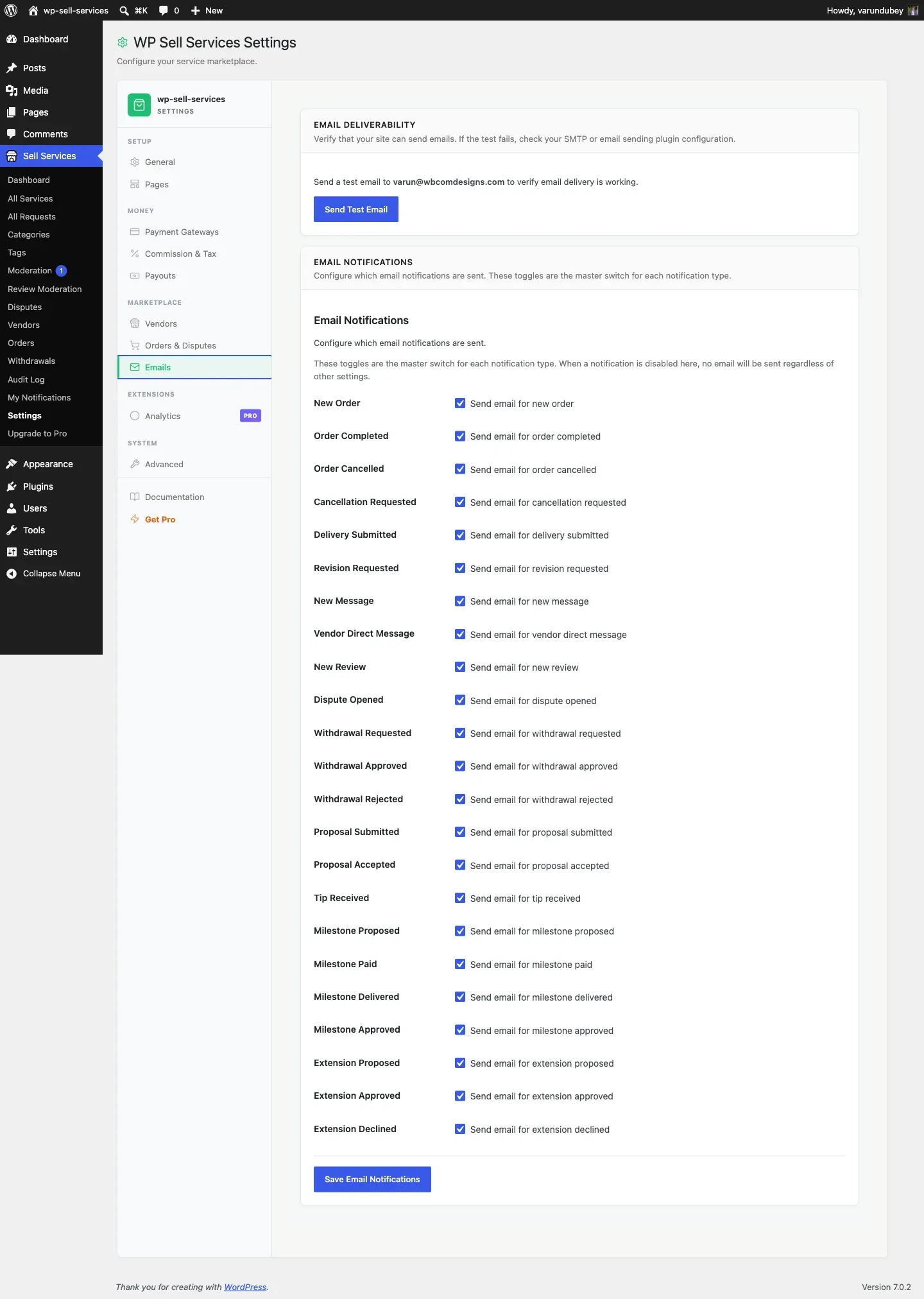
WP Sell Services emails buyers, vendors, and admins at every stage of an order. 23 notification types have their own on/off switch in Sell Services > Settings > Emails, and all 23 are on by default. A handful of operational emails (requirement reminders, seller-level promotions, proposal rejections) send automatically and are not individually switchable. Every email has both an HTML and a plain text version.
Emails Vendors Receive
Section titled “Emails Vendors Receive”These keep your sellers informed about their business activity.
| When It Is Sent | |
|---|---|
| New Order | A buyer places an order for the vendor’s service |
| Requirements Submitted | The buyer submits project requirements for an order |
| Revision Requested | The buyer requests changes to a submitted delivery |
| New Message | A new message arrives in an order conversation |
| Cancellation Requested | The buyer or admin requests to cancel an order |
| Dispute Opened | A dispute is filed on one of the vendor’s orders |
| Withdrawal Approved | The admin approves a payout withdrawal request |
| Withdrawal Rejected | The admin declines a payout withdrawal request |
| Proposal Accepted | A buyer accepts the vendor’s proposal on a request |
| Vendor Contact | Someone sends a message through the vendor’s contact form |
| Level Promotion | The vendor reaches a new seller level |
| Moderation Approved | A submitted service passes admin review and goes live |
| Moderation Rejected | A submitted service is declined during admin review |
| Auto-Withdrawal Processed | An automatic withdrawal runs and processes a payout for the vendor |
| Service Pending Moderation | The vendor submits a service for admin review |
| Moderation Response | The vendor responds to moderation feedback on a submitted service |
Emails Buyers Receive
Section titled “Emails Buyers Receive”These keep your customers updated on their purchases and activity.
| When It Is Sent | |
|---|---|
| Order In Progress | The vendor starts working on the buyer’s order |
| Delivery Ready | The vendor submits completed work for review |
| Order Completed | The order is marked complete (manual or automatic) |
| Order Cancelled | An order is cancelled by any party |
| Proposal Submitted | A vendor submits a proposal on the buyer’s request |
| Requirements Reminder | The buyer has not yet submitted requirements for their order |
| Cancellation Requested | A cancellation request has been filed on the buyer’s order |
Emails Admins Receive
Section titled “Emails Admins Receive”These alert you to actions that need your attention.
| When It Is Sent | |
|---|---|
| Withdrawal Requested | A vendor requests a payout from their earnings |
| Dispute Opened | A dispute is filed on any order in the marketplace |
| Dispute Escalated | A dispute is escalated to admin for further investigation |
Enabling and Disabling Emails
Section titled “Enabling and Disabling Emails”Every email type can be turned on or off individually.
- Go to Sell Services > Settings > Emails
- You will see a list of all notification types with checkboxes
- Uncheck any email you do not want sent
- Click Save Changes
When you disable an email type, no emails of that type are sent to anyone. In-app notifications are still created regardless of email settings, so users will still see alerts in their dashboard.
All email types are enabled by default when you first activate the plugin.
What Every Email Includes
Section titled “What Every Email Includes”Each email is professionally designed with:
- Your marketplace name in the header
- A clear subject line describing the event
- The relevant details (order number, service name, vendor/buyer name, amounts)
- A call-to-action button linking to the relevant page (e.g., “View Order”)
- Your site footer with branding
Emails are responsive and display well on both desktop and mobile email clients.
How Emails Are Delivered
Section titled “How Emails Are Delivered”Emails are sent through WordPress’s built-in email system. This works with any SMTP plugin you may already have installed (WP Mail SMTP, FluentSMTP, Post SMTP, etc.).
If you are not using an SMTP plugin, emails are sent via your server’s default mail function. For better deliverability and to avoid spam folders, we recommend installing an SMTP plugin and connecting it to a proper email service.
Email Templates
Section titled “Email Templates”Every email is rendered from an HTML template file in templates/emails/. Each template is theme-overridable – copy it to yourtheme/wp-sell-services/emails/ to customize the design.
There are also plain text variants in templates/emails/plain/ for email clients that do not support HTML.
All emails share a common header (email-header.php) and footer (email-footer.php) that you can override to match your brand.
Customizing Email Content
Section titled “Customizing Email Content”For developers who want to modify email content, sender details, or headers without overriding template files, see the Email Customization Guide. It covers:
- Changing the “From” name and email address
- Filtering email content for specific notification types
- Customizing the email header variables and branding
- Using plain text vs HTML variants
Related Guides
Section titled “Related Guides”- In-App Notifications – Dashboard notification bell and alerts
- Email Configuration – SMTP setup and email settings
- Email Customization (Developer) – Template overrides and content filters