

Community Insights
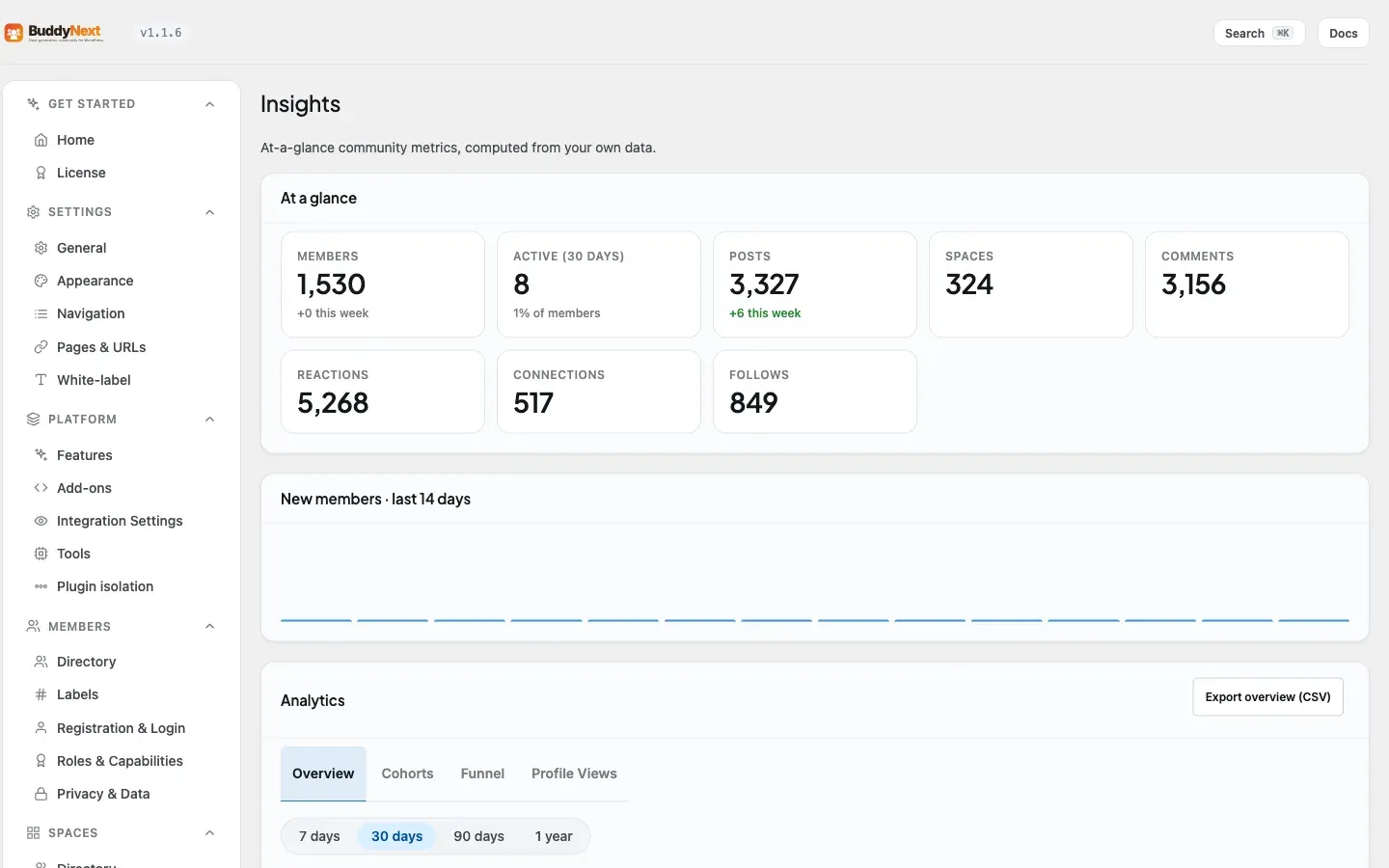
Community Insights is your at-a-glance view of how the community is doing, computed from your own data and shown right inside wp-admin. It answers the questions every owner asks - how many members do I have, are they active, is anyone posting - without exporting anything or connecting a third-party analytics tool. You find it under BuddyNext > Engagement > Insights, and a compact version also appears on your main WordPress dashboard.
Why use it
Section titled “Why use it”Running a community is easier when you can see whether it is growing or stalling. A single number - “12 members” - tells you little; “12 members, up 4 this week, 8 active in the last 30 days” tells you the community is small but alive. Insights gives you that context in a few cards so you can spot momentum, notice a quiet week, and decide when to nudge things along with an announcement or a new space. It is included free, so every owner has the basics from day one.
The metrics
Section titled “The metrics”The At a glance panel shows the headline numbers, several with a short-term trend:
| Metric | What it tells you |
|---|---|
| Members | Total members, with how many joined this week. |
| Active (30 days) | How many members did something in the last month, shown as a share of your total. |
| Posts | Total posts, with how many were published this week. |
| Spaces | How many spaces exist in the community. |
| Comments | Total comments across the community. |
| Reactions | Total reactions members have given. |
| Connections | Total accepted connections between members. |
| Follows | Total follow relationships. |
Below the cards, a New members chart plots signups across the last 14 days, so you can see growth as a shape rather than a single figure.
The dashboard widget
Section titled “The dashboard widget”BuddyNext also adds a small BuddyNext community widget to the standard WordPress dashboard - the first screen you see when you log in. It lists your key totals (members, active members, posts, spaces) with the same weekly trends, plus a “View all insights” link that takes you to the full screen. If you only ever glance at the dashboard, the pulse of your community is still right there.
Free Insights vs Pro Analytics
Section titled “Free Insights vs Pro Analytics”Community Insights covers the essentials every owner needs and is part of the free plugin. If you want deeper reporting - trends over longer periods, breakdowns, and more detailed engagement views - that lives in BuddyNext Pro Analytics. Insights is the quick daily read; Analytics is the full report. See the Pro documentation for what Analytics adds.
Note: Every number here is calculated from your own community data on your own site. Nothing is sent anywhere, and there is nothing to set up - the figures appear as soon as members start using the community.
Related
Section titled “Related”- Admin Overview - where Insights sits in the admin.
- Tools and Maintenance - the other Platform health screens.
- Analytics - the deeper reporting Pro adds on top of Insights.