

Settings — General tab
The General tab controls how visits are captured. Every setting here affects what gets written to the {prefix}bp_profile_views table.
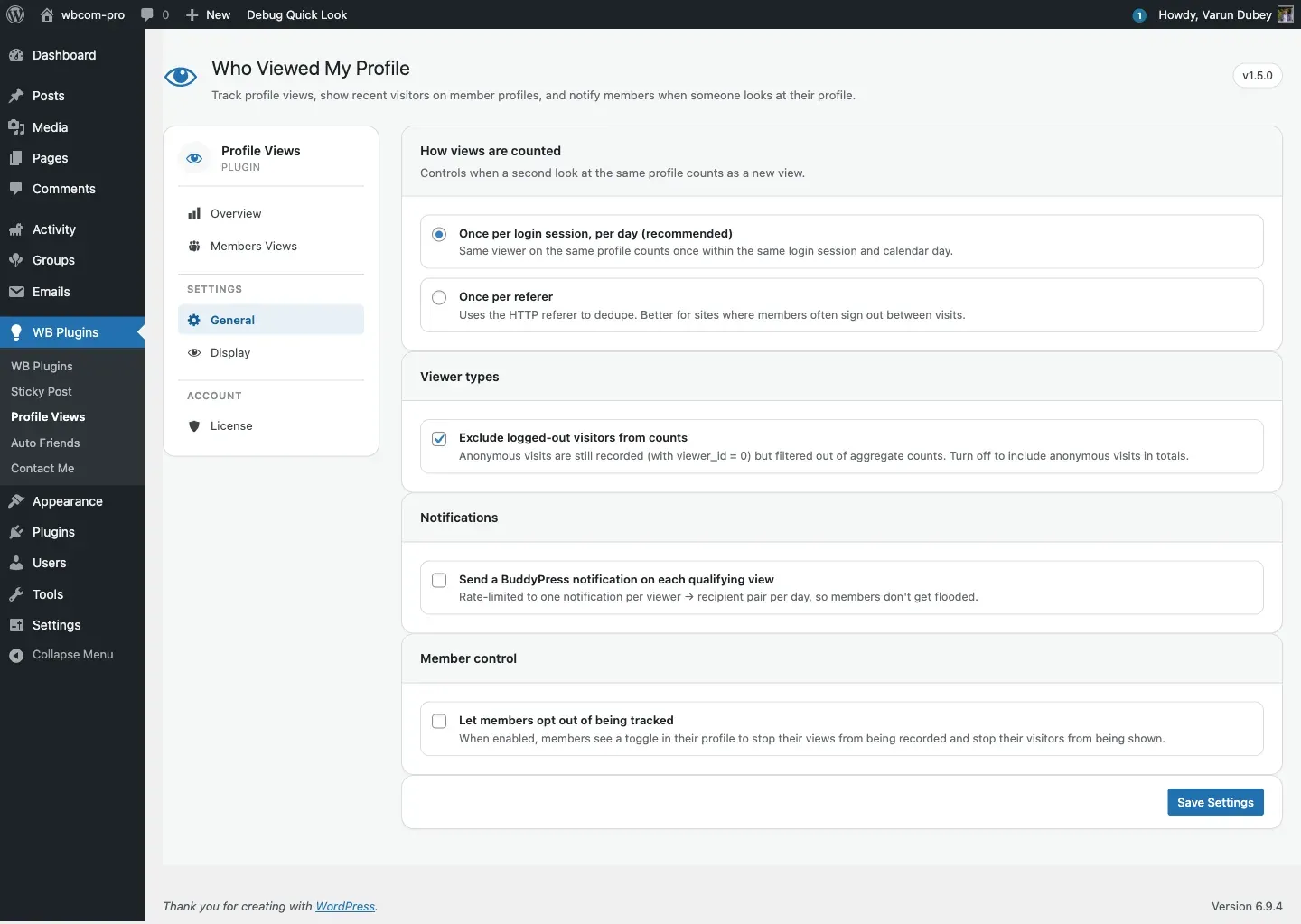
How views are counted
Section titled “How views are counted”Choose when a second look at the same profile by the same viewer counts as a new view.
| Option | Key + value | Behaviour |
|---|---|---|
| Once per login session, per day (recommended) | save_count_by = session |
The same logged-in viewer visiting the same profile counts once within the same login session and calendar day. Dedupe key: user meta bp_profile_views_user_login_session plus the WordPress session token. |
| Once per referer | save_count_by = referer |
Uses the HTTP Referer header and a cookie (BP_IS_USER) to detect re-visits. A bp_profile_views_referer_transient is set for 6 hours (21,600 seconds). Better for communities where members often sign out between visits. |
Default: session.
Viewer types
Section titled “Viewer types”| Option | Key + value | Default | Effect |
|---|---|---|---|
| Exclude logged-out visitors from counts | exclude_logout_user_count = yes |
Yes | Anonymous visits (viewer_id = 0) are still recorded in the table but are filtered out of the counts shown to members and admins. See Where this setting applies below. Turn it off to include anonymous traffic in totals. |
Requests from known bots and crawlers (Googlebot, LinkedInBot, Facebot, curl, ahrefs, etc.) are rejected before a row is ever inserted, regardless of this setting. See the bp_profile_views_bot_user_agents filter if you need to adjust the list.
Where this setting applies
Section titled “Where this setting applies”As of 1.5.3 every surface that shows an aggregate honours this setting:
| Surface | Honours it |
|---|---|
| Views tab chart (member’s own profile) | Yes |
| Views tab visitor list | Yes |
| Members directory view-count badge | Yes |
| Admin → Members Views (7-day / 30-day / total columns) | Yes |
| Recent Visitor widget | Yes |
| Popular User widget | Yes |
| Admin → Overview → Total Views and Views Today | No — by design. These two cards are a raw row count of the table, so they always include anonymous visits. |
| Admin → Overview → Unique Viewers | No — always excludes anonymous, regardless of this setting, because an anonymous visitor has no identity to count. |
If you turn the setting on and a number does not drop, check it against this table before reporting it: the Overview cards are intentionally exempt.
Prior to 1.5.3 several of these surfaces either inverted the setting or ignored it entirely, so counts disagreed with each other. If you are upgrading from an older version, expect the admin Members Views columns and the two widgets to change to match the rest.
Notifications
Section titled “Notifications”| Option | Key + value | Default | Effect |
|---|---|---|---|
| Send a BuddyPress notification on each qualifying view | allow_user_notification = yes |
Off | Fires a BuddyPress notification to the profile owner on each qualifying view, rate-limited to one notification per (viewer, recipient) pair per day. Requires the BuddyPress Notifications component to be active. |
See View notifications for the full notification flow and how to change the rate-limit window.
Member control
Section titled “Member control”| Option | Key + value | Default | Effect |
|---|---|---|---|
| Let members opt out of being tracked | allow_user_settings = yes |
Off | When on, each member gets a Record my visits to other profiles toggle. Members who turn it off stop their own visits from being recorded (the visitor_setting user meta is set to no). The toggle appears in two places: the Views sub-tab on their profile and the Settings → General page. |
See Per-user opt-out for the full member-side flow.
Saving
Section titled “Saving”The General tab submits through the standard WordPress register_setting / options.php flow. Every value is run through a typed sanitiser before update_option writes it:
- Enum settings (
save_count_by) are validated against the allowed list (session,referer). - Toggle settings are coerced to the string
'yes'or'no'.
The sanitiser uses a sentinel mechanism so that saving the General tab does not overwrite keys owned by the Display tab (and vice versa).
Storage
Section titled “Storage”All keys on this tab live in the single option bp_profile_views_general_options (a serialised PHP array). To inspect it:
wp option get bp_profile_views_general_options --format=jsonKey reference
Section titled “Key reference”| Key | Type | Default | Description |
|---|---|---|---|
save_count_by |
session | referer |
session |
Dedupe strategy. |
exclude_logout_user_count |
yes | no |
yes |
Whether anonymous (viewer_id = 0) rows are excluded from counts. |
allow_user_notification |
yes | no |
no |
Enable BuddyPress profile-view notifications. |
allow_user_settings |
yes | no |
no |
Show the per-member opt-out toggle. |
Where to next
Section titled “Where to next”- Display tab — chart style, recent-visitors strip, directory badge, avatar size.
- Members Views tab — top-100 leaderboard.
- License tab — activate your license key.
- View tracking pipeline — detailed walkthrough of what gets recorded vs counted.