

Per-surface sidebar widgets
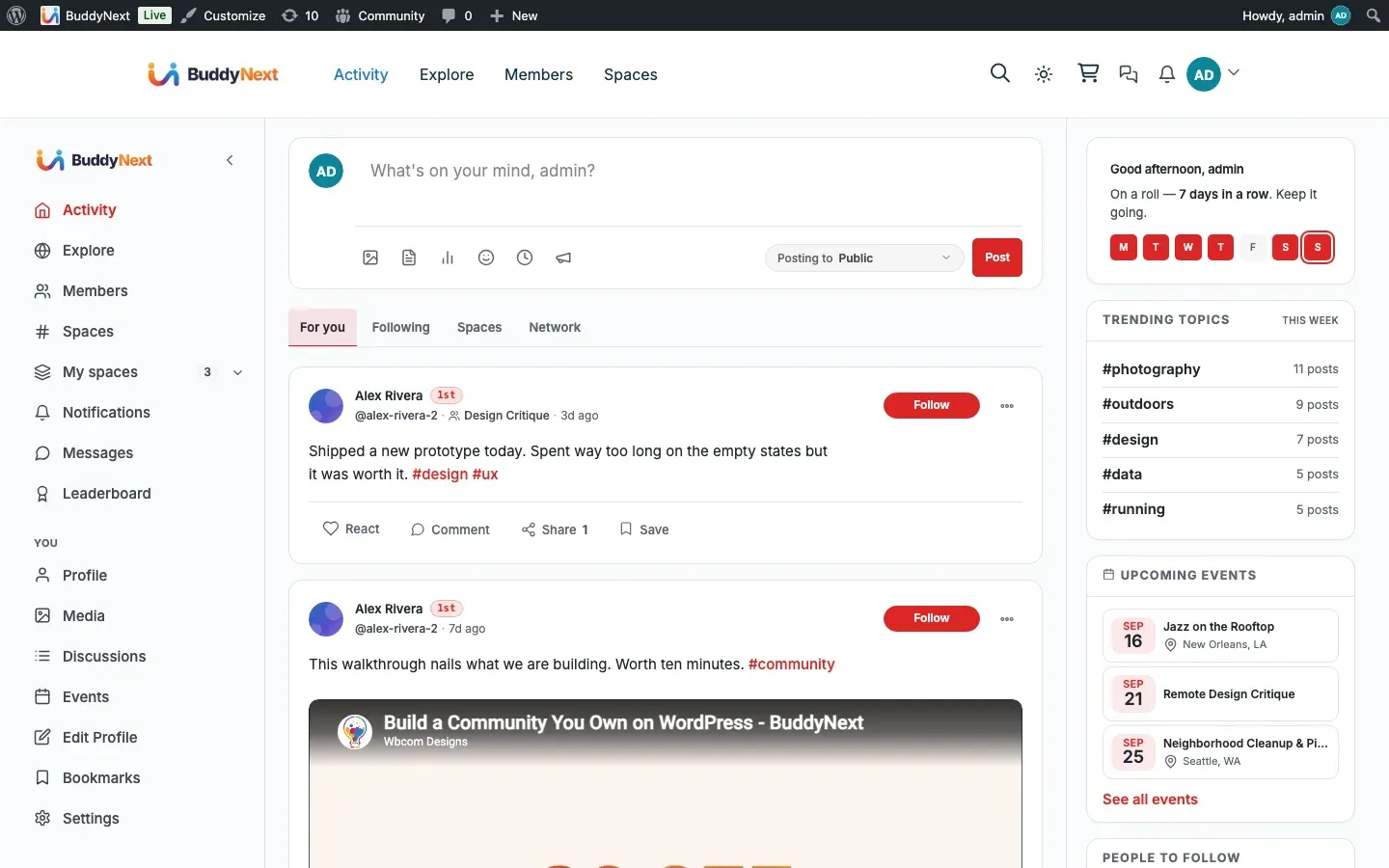
Every main page in your community now carries its own right-hand sidebar, curated for the page a member is looking at. The feed shows people to follow and trending topics; a space shows who runs it and who its top contributors are; the notifications page shows filters and a weekly summary. Each page gets the discovery cards that make sense there, and every card fills itself from live community data, so there is nothing to curate by hand.
Why use it
Section titled “Why use it”A community keeps people engaged by always offering an obvious next step. The per-surface sidebar puts that next step in the right place: a member reading the feed sees who to follow next, a member on a space sees related sub-spaces and the people worth knowing there, a member checking notifications gets tools to filter the noise. Instead of one generic column repeated everywhere, each page answers the question a member is most likely to have while they are on it.
For the site owner this is discovery and retention working in the background. Nobody has to write, order, or refresh these cards. They are built from the same activity, follows, hashtags, and space memberships the community already produces, so they stay current as the community grows and never leave a member at a dead end.
How it works
Section titled “How it works”The sidebar changes with the surface a member is on. Here is what appears where.
Activity feed (and related feed pages)
Section titled “Activity feed (and related feed pages)”The feed discovery set appears on the main activity feed and on the pages that share its layout: bookmarks, a single post, search results, the leaderboard, and hashtag feeds. From the top:
- Greeting and streak - a personal welcome (“Good morning, …”) with the member’s posting streak and a nudge to post today.
- Trending Topics - the hashtags the community is using most right now.
- People to Follow - suggested members to follow, with a follow control on each. Suggestions skip the member, anyone they already follow, and anyone involved in a block.
- Your Spaces - the spaces the member belongs to. Guests see Discover Spaces (popular open spaces) instead.
Explore
Section titled “Explore”The Explore page carries community-heartbeat cards focused on discovery across the whole site:
- Community pulse - a live activity card (Pro).
- Trending tags - the most active hashtags.
- People to discover - members worth following from across the community.
- Browse - a category and all-spaces browser to jump into a topic.
Members directory
Section titled “Members directory”- Online now - members currently active, with a live count in the title.
- People to Follow - suggested members to follow (signed-in members only).
- What’s happening - trending topics to give the directory context.
Spaces directory
Section titled “Spaces directory”- Suggested for you - spaces picked for the signed-in member.
- Your spaces - the spaces they already belong to, grouped by “You manage” and “You joined”.
- Popular this week - shown to guests, or when there is nothing to suggest yet, so the column is never empty.
A single space
Section titled “A single space”- About this space - the space description and key details.
- Sub-spaces - child spaces to explore.
- Owner / Moderators - who runs the space.
- Members - a preview of the roster with a “See all members” link. This card is hidden on the space’s own Members tab, where the full roster is already the page.
- Top contributors - the most active members in that space.
Profile
Section titled “Profile”The profile sidebar is context-aware. It changes depending on whether a member is viewing their own profile or someone else’s, and it carries only discovery cards, never profile field groups (those live on the About tab).
- Own profile - Profile Strength (a checklist of what to complete), People to connect with, What’s happening, and Member of (your spaces).
- Someone else’s profile - People you may know, What’s happening, and Member of (their public spaces).
Notifications
Section titled “Notifications”The notifications page gets tools to make a busy inbox manageable:
- Quick filters - Unread only, Mentions of you, Follows, Spaces.
- By type - a breakdown across Mentions, Reactions, Comments, Follows, Spaces, and Messages.
- Recent actors - the people behind recent notifications.
- Notification preferences - a shortcut to the member’s notification settings.
- This week - a short summary of the week’s activity.
- Muted - anything the member has muted.
Hashtag feed
Section titled “Hashtag feed”A hashtag page shows both the feed discovery set (greeting, Trending Topics, People to Follow, Your Spaces) and three cards specific to the tag:
- About #tag - a follow-hashtag control so members can follow the topic.
- Related hashtags - other tags that appear alongside this one.
- Top contributors - the members posting most under that tag.
What members see when signed out
Section titled “What members see when signed out”Guests get a lighter sidebar. Cards that need a signed-in member - people-to-follow suggestions, a personal “your spaces” list, streaks, and profile strength - are replaced or hidden. Guests still see the public discovery cards: trending topics, popular open spaces (as “Discover Spaces” or “Popular this week”), and the public parts of a space. Private and secret spaces are never revealed to guests.
Setting it up
Section titled “Setting it up”The per-surface sidebar is on by default and needs no configuration. Cards populate themselves from live data, order themselves automatically, and any card whose data is empty simply hides itself rather than showing a blank box - so a new community with little activity shows fewer cards, and they fill in as members post, follow, and join spaces.
Good to know
Section titled “Good to know”- Each page is curated, not generic. The sidebar you see on a space is different from the one on the feed or the notifications page, because each is built for that surface.
- Cards self-hide when empty. A card with no data to show does not render, so the column is never padded with placeholder content.
- Everything is live data. Trending, suggestions, top contributors, and online counts all come from real community activity and refresh on their own.
- Guests see less by design. Personalized cards need a signed-in member; guests get the public discovery cards instead.
- Private spaces stay private. Discovery cards only ever surface open spaces to people who are not members; private and secret spaces are never exposed.
Free vs Pro
Section titled “Free vs Pro”The per-surface sidebar and all of its discovery cards are part of Free. The only Pro addition is the live community pulse card on Explore; every other card - trending, people, spaces, space details, notification filters, hashtag cards - works the same on Free and Pro. Integrations can add their own cards to any surface (for example a “their events” card on a visited profile) through the same sidebar system.
Related
Section titled “Related”- Activity Feed - the feed the discovery cards sit beside
- Explore - the community-heartbeat cards, including the Pro pulse
- Notifications - the filters and summary on the notifications sidebar