

Copyright & Credits Settings Guide
Complete guide to customizing your website’s copyright text, credits, and bottom footer bar in BuddyX Pro theme.
What You Can Do
Section titled “What You Can Do”The copyright section appears below your footer widgets and typically displays:
- Copyright notice with automatic year
- Website name or company name
- Theme or developer credits
- Privacy policy link (automatic)
- Additional legal text or disclaimers
┌────────────────────────────────────────┐│ [Footer Widgets - See Footer Guide] │├────────────────────────────────────────┤│ Copyright © 2026 YourSite.com │ ← Copyright Bar│ Powered by Wbcom Designs │ (This Guide)│ Privacy Policy │└────────────────────────────────────────┘Accessing Copyright Settings
Section titled “Accessing Copyright Settings”- Log into your WordPress dashboard
- Go to Appearance → Customize
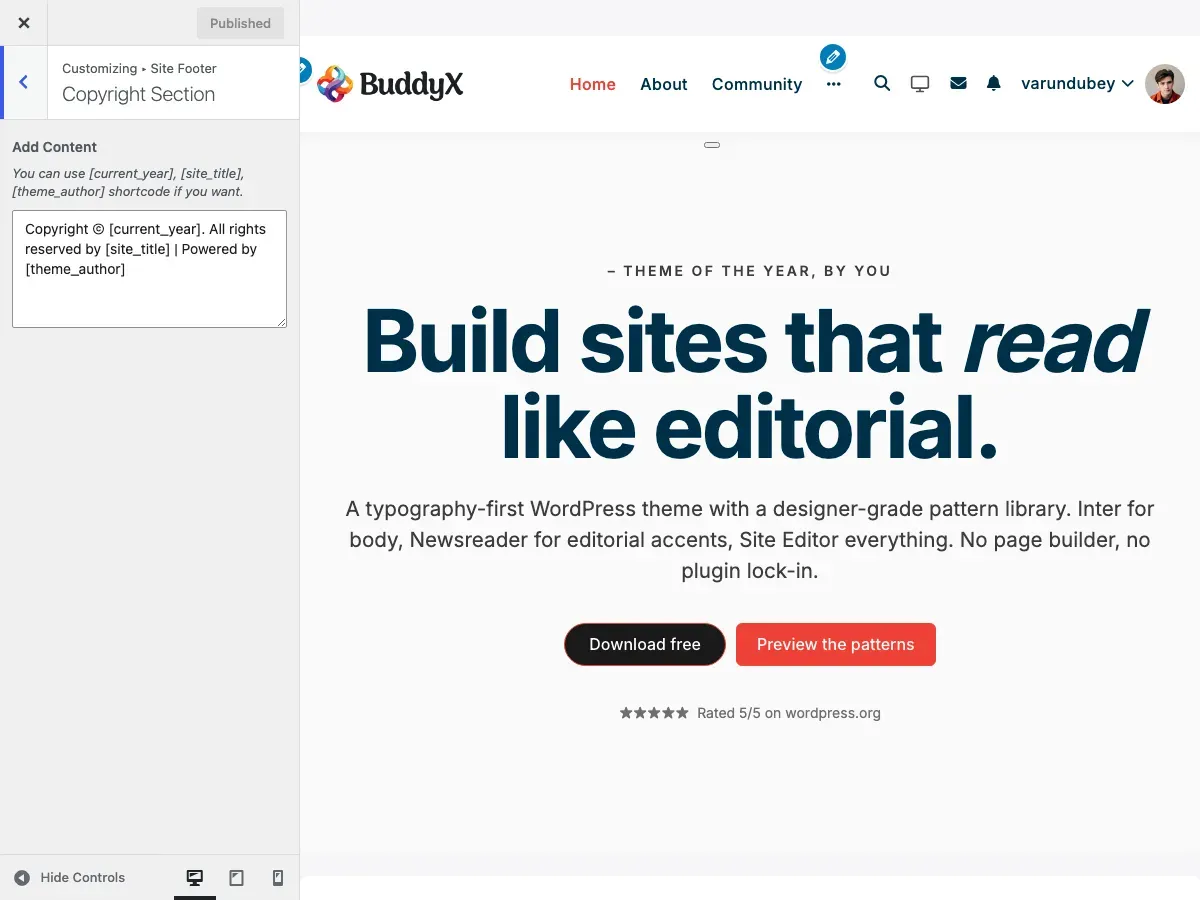
- Open the Site Footer panel, then click the Copyright Section
- Edit the copyright text in the content field
Copyright Text Editor
Section titled “Copyright Text Editor”Default Copyright Text
Section titled “Default Copyright Text”The default format is:
Copyright © [current_year]. All rights reserved by [site_title] | Powered by [theme_author]This automatically displays as:
Copyright © 2026. All rights reserved by Your Site Name | Powered by Wbcom DesignsAvailable Shortcodes
Section titled “Available Shortcodes”Use these special codes in your copyright text. They automatically update with your site information:
| Shortcode | What It Does | Example Output |
|---|---|---|
[current_year] |
Current year (updates automatically) | 2026 |
[site_title] |
Your website name (from Settings → General) | “My Awesome Site” |
[theme_author] |
Theme developer credit | “Wbcom Designs” |
Shortcode Example:
© [current_year] [site_title]. All rights reserved.Displays as:
© 2026 My Awesome Site. All rights reserved.Customizing Copyright Text
Section titled “Customizing Copyright Text”Example 1: Simple Copyright
Section titled “Example 1: Simple Copyright”Input:
Copyright © [current_year] [site_title]Output:
Copyright © 2026 My Business NameExample 2: With Ownership Statement
Section titled “Example 2: With Ownership Statement”Input:
© [current_year] [site_title]. All Rights Reserved. | Powered by [theme_author]Output:
© 2026 My Site. All Rights Reserved. | Powered by Wbcom DesignsExample 3: Multiple Rights Holders
Section titled “Example 3: Multiple Rights Holders”Input:
Copyright © [current_year] [site_title] and Contributors. Some rights reserved.Output:
Copyright © 2026 Community Site and Contributors. Some rights reserved.Example 4: Business with Legal Entity
Section titled “Example 4: Business with Legal Entity”Input:
© [current_year] YourCompany LLC. All rights reserved. Company Reg. #12345678Output:
© 2026 YourCompany LLC. All rights reserved. Company Reg. #12345678Example 5: Creative Commons License
Section titled “Example 5: Creative Commons License”Input:
© [current_year] [site_title]. Content licensed under CC BY-SA 4.0Output:
© 2026 My Blog. Content licensed under CC BY-SA 4.0Example 6: No Theme Credit
Section titled “Example 6: No Theme Credit”Input:
© [current_year] [site_title]. All rights reserved.Output:
© 2026 My Site. All rights reserved.Example 7: Multilingual Copyright
Section titled “Example 7: Multilingual Copyright”Input:
© [current_year] [site_title] | Tous droits réservésOutput:
© 2026 Mon Site | Tous droits réservésAdding Custom Links
Section titled “Adding Custom Links”You can add HTML links to your copyright text for:
- Terms of Service
- About page
- Contact page
- Social media profiles
Link Examples
Section titled “Link Examples”Add a link to Terms:
© [current_year] [site_title]. <a href="/terms">Terms of Service</a>Multiple links:
© [current_year] [site_title] | <a href="/about">About</a> | <a href="/contact">Contact</a>External link (opens in new tab):
© [current_year] [site_title] | Design by <a href="https://example.com" target="_blank">DesignCo</a>Privacy Policy Link
Section titled “Privacy Policy Link”WordPress automatically adds a privacy policy link if you’ve set one in: Settings → Privacy → Privacy Policy Page
This link appears below your copyright text and is managed by WordPress, not the theme.
To hide the privacy policy link:
- Go to Settings → Privacy
- Remove the privacy policy page selection
- Click Save Changes
Recommended Copyright Text by Site Type
Section titled “Recommended Copyright Text by Site Type”Corporate / Business Site
Section titled “Corporate / Business Site”Copyright © [current_year] [site_title]. All rights reserved. | <a href="/terms">Terms</a> | <a href="/privacy">Privacy</a>Why: Professional, includes legal links, establishes ownership.
E-commerce Store
Section titled “E-commerce Store”© [current_year] [site_title]. All product names and trademarks are property of their respective owners.Why: Protects against trademark issues, covers product listings.
Blog / Personal Website
Section titled “Blog / Personal Website”© [current_year] [site_title]. Content licensed under <a href="https://creativecommons.org/licenses/by/4.0/" target="_blank">CC BY 4.0</a>Why: Encourages content sharing while maintaining attribution.
Community Site (BuddyPress)
Section titled “Community Site (BuddyPress)”© [current_year] [site_title] Community. User-generated content belongs to respective authors.Why: Clarifies ownership of user posts and community content.
Educational / Course Site
Section titled “Educational / Course Site”© [current_year] [site_title]. Course materials and content are protected by copyright law.Why: Protects educational materials from unauthorized distribution.
Nonprofit Organization
Section titled “Nonprofit Organization”© [current_year] [site_title]. Registered 501(c)(3) nonprofit organization.Why: Shows legal status and builds credibility.
Portfolio / Creative Work
Section titled “Portfolio / Creative Work”© [current_year] [site_title]. All creative work and imagery are protected by copyright.Why: Protects artwork and photography from unauthorized use.
News / Magazine Site
Section titled “News / Magazine Site”© [current_year] [site_title]. All articles and content are copyright protected.Why: Protects journalistic content and published articles.
Styling the Copyright Bar
Section titled “Styling the Copyright Bar”The copyright text appearance is controlled through color settings:
Accessing Color Settings
Section titled “Accessing Color Settings”- Go to Appearance → Customize → Skin Settings
- Scroll to Site Footer section
- Adjust these color options:
| Setting | What It Controls | Light Mode Default | Dark Mode Default |
|---|---|---|---|
| Footer Background Color | Copyright bar background | #ffffff (white) | #16213E (dark blue) |
| Footer Content Color | Main copyright text color | #505050 (gray) | #bfc2c9 (light gray) |
| Footer Links Color | Link text color | #003049 (blue) | #fcfcfc (white) |
| Footer Links Hover Color | Link color on mouseover | #ee4036 (red) | #E94560 (pink) |
Color Customization Tips
Section titled “Color Customization Tips”High Contrast:
- Dark background (#1a1a1a) with light text (#ffffff)
- Light background (#f5f5f5) with dark text (#333333)
Brand Colors:
- Match your header or primary brand color
- Use 80% opacity for subtle effect
Accessibility:
- Maintain 4.5:1 contrast ratio minimum
- Test with a contrast checker tool
- Ensure links are distinguishable from regular text
Advanced Customization with HTML
Section titled “Advanced Customization with HTML”You can use basic HTML in your copyright text:
Formatting Options
Section titled “Formatting Options”Bold text:
<strong>Important Notice:</strong> © [current_year] [site_title]Italic text:
© [current_year] [site_title]. <em>All rights reserved.</em>Line breaks:
© [current_year] [site_title]<br>123 Business St, City, State 12345Span with class (for custom CSS):
© [current_year] <span class="company-name">[site_title]</span>Complex Example
Section titled “Complex Example”<strong>© [current_year] [site_title]</strong><br>All rights reserved. | <a href="/terms">Terms</a> | <a href="/privacy">Privacy</a><br>Design by <a href="https://example.com" target="_blank">YourAgency</a>Mobile Display
Section titled “Mobile Display”The copyright section automatically adapts for mobile:
- Text scales for readability
- Links remain tap-friendly (44px minimum)
- Line breaks stack naturally
- Colors remain consistent
Mobile Testing Checklist:
- Copyright text doesn’t overflow
- Links are easily tappable
- Text is readable at small sizes
- Background color is appropriate
- Privacy policy link is accessible
Common Questions
Section titled “Common Questions”Q: How do I remove “Powered by Wbcom Designs”?
Section titled “Q: How do I remove “Powered by Wbcom Designs”?”A: Edit your copyright text and remove the [theme_author] shortcode. Replace the entire text with your custom message.
Example:
© [current_year] [site_title]. All rights reserved.Q: The year isn’t updating automatically.
Section titled “Q: The year isn’t updating automatically.”A: Make sure you’re using the [current_year] shortcode, not typing the year manually. The shortcode updates automatically each January.
Q: Can I use an image/logo in the copyright section?
Section titled “Q: Can I use an image/logo in the copyright section?”A: Yes! Use an HTML image tag:
<img src="https://yoursite.com/logo.webp" alt="Company Logo" style="height:30px;"> © [current_year] [site_title]Q: How do I add special characters like ©, ™, or ®?
Section titled “Q: How do I add special characters like ©, ™, or ®?”A: Use HTML entities or copy/paste the symbols:
- Copyright:
©or© - Trademark:
™or™ - Registered:
®or®
Example:
[site_title]® is a registered trademark. © [current_year]Q: My custom HTML isn’t displaying correctly.
Section titled “Q: My custom HTML isn’t displaying correctly.”A: WordPress may strip certain HTML tags for security. Stick to these safe tags:
<a>- Links<strong>/<b>- Bold<em>/<i>- Italic<span>- Inline styling<br>- Line breaks
Q: Can I have different copyright text for different languages?
Section titled “Q: Can I have different copyright text for different languages?”A: Yes! Use a multilingual plugin like:
- WPML
- Polylang
- TranslatePress
The copyright text will translate along with your site content.
Q: How do I center-align the copyright text?
Section titled “Q: How do I center-align the copyright text?”A: Add custom CSS in Appearance → Customize → Additional CSS:
.site-info { text-align: center;}Q: The copyright bar is too tall/short.
Section titled “Q: The copyright bar is too tall/short.”A: Adjust padding with custom CSS:
.site-info { padding: 20px 0; /* Adjust values */}Q: Can I add social media icons to the copyright area?
Section titled “Q: Can I add social media icons to the copyright area?”A: Yes! Use Font Awesome icons or image links:
© [current_year] [site_title] | Follow us:<a href="https://facebook.com/yourpage"><i class="fab fa-facebook"></i></a><a href="https://twitter.com/yourhandle"><i class="fab fa-twitter"></i></a>Legal Considerations
Section titled “Legal Considerations”Important: This guide provides technical instructions only. Consult a legal professional for copyright law advice.
Standard Copyright Notice Elements
Section titled “Standard Copyright Notice Elements”A basic copyright notice typically includes:
- © symbol - Or the word “Copyright”
- Year - Year of first publication (use
[current_year]) - Owner - Copyright owner name (use
[site_title]) - Rights statement - “All rights reserved” or similar
Example:
© 2026 YourCompany Inc. All rights reserved.Additional Legal Elements to Consider
Section titled “Additional Legal Elements to Consider”- Trademark notices - For branded terms (™, ®)
- License information - For open or Creative Commons content
- Disclaimer - Limiting liability when appropriate
- Terms link - Link to Terms of Service
- Privacy link - WordPress adds this automatically
Content Types Needing Special Copyright Language
Section titled “Content Types Needing Special Copyright Language”User-Generated Content (Forums, Communities):
© [current_year] [site_title]. User-contributed content belongs to the respective authors.Licensed Content:
© [current_year] [site_title]. Content licensed under CC BY-NC-SA 4.0 unless otherwise noted.Mixed Ownership:
© [current_year] [site_title]. Some content used with permission from third parties.Accessibility Best Practices
Section titled “Accessibility Best Practices”- Readable text size: Minimum 14px font size
- Color contrast: At least 4.5:1 ratio for normal text
- Link indication: Links should be visually distinct
- Keyboard navigation: All links accessible via Tab key
- Screen readers: Use semantic HTML and descriptive link text
Good link text:
<a href="/privacy">Privacy Policy</a>Avoid:
<a href="/privacy">Click here</a> for our privacy policyPerformance Notes
Section titled “Performance Notes”The copyright section has minimal performance impact:
- Text content is lightweight
- Colors are CSS-based (no images needed)
- Shortcodes process server-side (no JavaScript)
- Cached along with page content
For best performance:
- Keep copyright text under 500 characters
- Minimize external links
- Avoid embedding large images
- Don’t add tracking scripts
Related Settings
Section titled “Related Settings”Connect your copyright customization with these theme areas:
- Footer Widget Settings - Configure footer columns above copyright
- Skin Settings → Site Footer Colors - Customize copyright bar colors
- Typography → Footer Typography - Adjust copyright text fonts
- Settings → Privacy - Set privacy policy page (displays below copyright)
- Settings → General → Site Title - Updates
[site_title]shortcode
Need Help?
Section titled “Need Help?”Getting Started:
- View copyright setup video tutorial (if available)
- Read the BuddyX Pro documentation
Legal Questions:
- Consult with a legal professional for copyright law advice
- Check your country’s copyright office website
- Review Creative Commons licensing options at creativecommons.org
Technical Support:
- Submit a support ticket: support@wbcomdesigns.com
- Community forum: BuddyX Support Forum
- Knowledge base: BuddyX Help Center
Before contacting support:
- Clear browser cache and view in incognito/private mode
- Verify you’re editing the correct customizer field
- Check if shortcodes are spelled correctly
- Test with minimal HTML first
- Take screenshots of your settings and output
Last Updated: January 2026
Theme Version: BuddyX Pro 5.1.4+
Applies To: Site Footer → Copyright Section in the theme Customizer
Related Files: template-parts/footer-settings/info.php, inc/extra.php