

The Companion Install Model
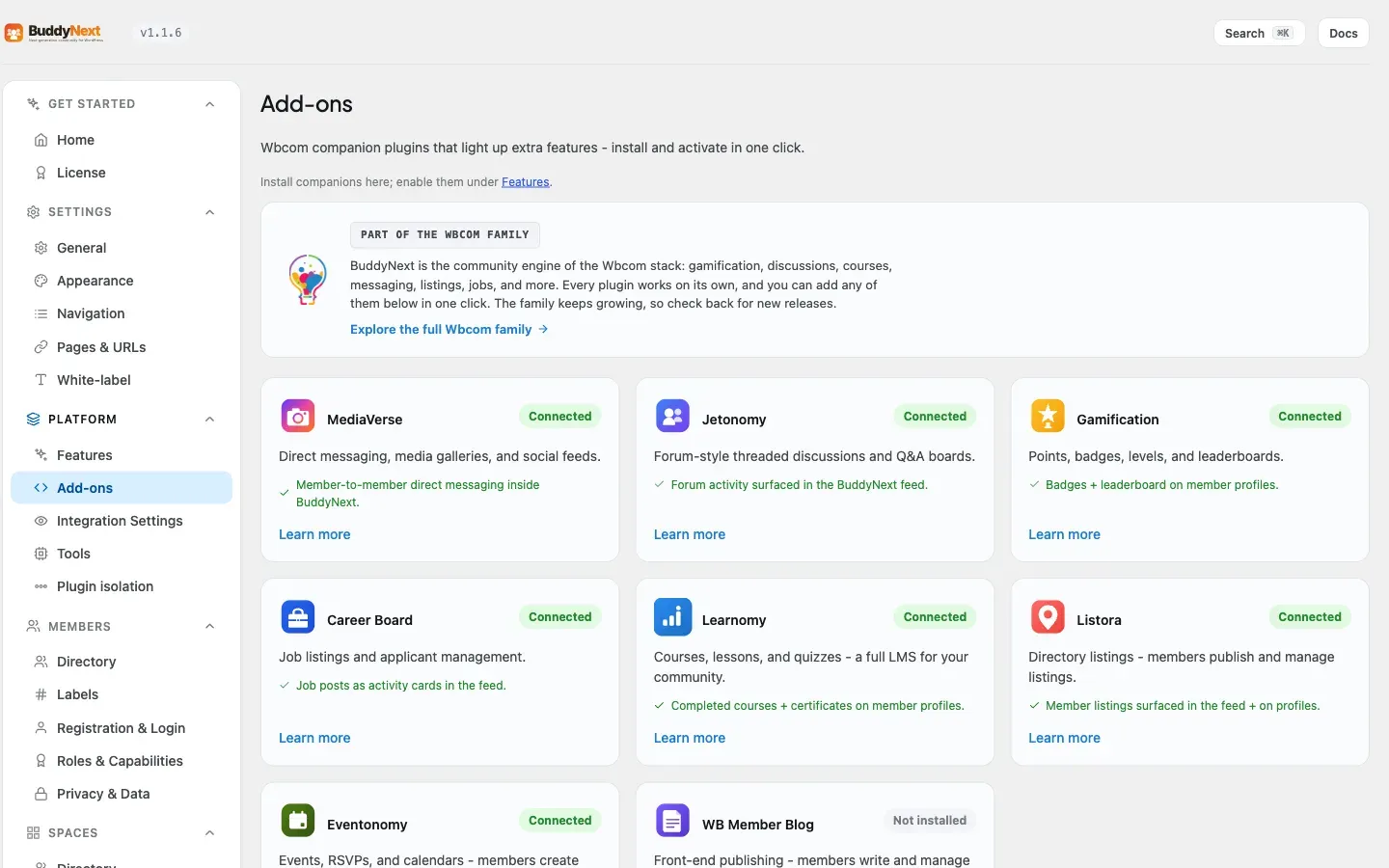
BuddyNext integrates with a set of Wbcom companion plugins (MediaVerse, Jetonomy, Gamification, Career Board, Learnomy, Listora) and can install and activate any of them in one click from the Integrations screen, with no manual zip upload or Plugins-screen search. This page documents that model: the declarative companion registry, the buddynext_companions filter that extends it, the POST /companions/install REST route, and the EDD-backed installer. It is for developers adding a new companion to the catalog or building an addon that wants to be one-click installable from BuddyNext.
Overview / Contract
Section titled “Overview / Contract”The model has three parts, each a class under includes/Integrations/:
CompanionRegistry- a single declarative catalog of companions. Each entry is data, not code. The catalog is filterable viabuddynext_companions.CompanionController- the REST controller exposingPOST /companions/installunderbuddynext/v1.CompanionInstaller- resolves the signed package from the Wbcom store over the companion’s own EDD channel, downloads it through WP core’sPlugin_Upgrader, and activates it.
The Integrations admin tab (rendered by Settings::render_tab_integrations()) reads the registry and paints one card per companion with an Install / Activate / Connected state. The browser code in assets/js/admin/settings.js (initCompanions) wires the Install buttons to the REST route.
Every UI and integration decision keys off a runtime capability probe (is_active()), never a hardcoded plugin path. Capability present -> BuddyNext delegates to the companion; absent -> it offers to install. That is what lets BuddyNext work standalone and avoid duplicating a companion’s features.
[Integrations tab] --reads--> CompanionRegistry::all() (filtered by buddynext_companions) | Install click vPOST buddynext/v1/companions/install { slug } | vCompanionController::install() --validates slug in registry--> | vCompanionInstaller::install() 1. activate free license at the store (edd_action=activate_license) 2. resolve signed package URL (edd_action=get_version) 3. Plugin_Upgrader->install( $package ) [host locked to wbcomdesigns.com] 4. activate_plugin( basename ) | v{ installed, slug, status, redirect_url } -> browser redirects to the companion's setup_urlHow a companion declares itself
Section titled “How a companion declares itself”A companion is one entry in the array returned by CompanionRegistry::all(), keyed by slug. The fields:
| Field | Type | What it is |
|---|---|---|
label |
string | Display name shown on the card. |
why |
string | One-line value proposition. |
detect |
callable | Returns true when the companion’s capability is live (a runtime probe - a class_exists/function_exists/defined check, not a path). |
free |
array | { item_id, key, basename } - the EDD store product id, the baked-in free distribution license key, and the plugin basename for one-click free install. |
store_url |
string | Product page on wbcomdesigns.com for the “Get Pro” link. |
unlocks |
string | What connecting this companion turns on inside BuddyNext. |
setup_url |
string (optional) | Admin path to send the user to after install so the companion’s own setup flow runs. Falls back to plugins.php when absent. |
The free.item_id and free.key for each companion are the exact values baked into that plugin’s own EDD SL SDK setup (its main file). The one-click free install therefore speaks the same delivery channel the companion already uses for its updates - BuddyNext does not invent a second channel.
Note:
detectmust probe a real capability the companion exposes when active (its plugin class or a defined constant), not the plugin file path. A path check returns true for an installed-but-inactive plugin and gives the wrong card state.
Adding a companion via the filter
Section titled “Adding a companion via the filter”Pro and third-party plugins add their own catalog entries through the buddynext_companions filter (introduced in 1.2.0). The installer and admin screen render whatever the filter returns, so an entry added this way is one-click installable with no further wiring.
add_filter( 'buddynext_companions', static function ( array $companions ): array { $companions['my-companion'] = array( 'label' => 'My Companion', 'why' => __( 'What it adds, in one line.', 'my-addon' ), // Runtime capability probe - true only when the plugin is active. 'detect' => static fn(): bool => defined( 'MY_COMPANION_VERSION' ), 'free' => array( 'item_id' => 1660000, // the store product id 'key' => 'wbcomfree...', // the plugin's baked-in free key 'basename' => 'my-companion/my-companion.php', ), 'store_url' => 'https://wbcomdesigns.com/downloads/my-companion/', 'unlocks' => __( 'What connecting this turns on inside BuddyNext.', 'my-addon' ), 'setup_url' => 'admin.php?page=my-companion-settings', // optional ); return $companions;} );CompanionRegistry derives every card state from the entry. status() returns one of:
| Status | Condition |
|---|---|
active |
detect() passes - the companion is installed and active. |
inactive |
The plugin file (free.basename) exists on disk but detect() is false. |
not_installed |
The plugin file is not on disk. |
unknown |
No catalog entry for the slug. |
The install REST route
Section titled “The install REST route”| Method | Path | Auth | Purpose |
|---|---|---|---|
| POST | buddynext/v1/companions/install |
install_plugins capability + cookie wp_rest nonce |
Install and activate a catalog companion by slug. |
Request body:
{ "slug": "jetonomy" }The slug is sanitized with sanitize_key and must exist in the registry; an unknown slug returns 404 before the installer is touched. Success response:
{ "installed": true, "slug": "jetonomy", "status": "active", "redirect_url": "https://example.com/wp-admin/plugins.php"}redirect_url is the companion’s setup_url resolved through admin_url() when declared, otherwise the Plugins screen. The browser navigates there after a successful install so the user lands in the companion’s own setup flow rather than back on the Integrations list.
curl -X POST "https://example.com/wp-json/buddynext/v1/companions/install" \ -H "X-WP-Nonce: <wp_rest nonce>" \ -H "Content-Type: application/json" \ --cookie "<authenticated admin cookies>" \ -d '{"slug":"jetonomy"}'The EDD-backed installer
Section titled “The EDD-backed installer”CompanionInstaller::install() is the no-manual-upload engine. It is idempotent and host-locked:
- Already active -> returns
trueimmediately, nothing to do. - Installed but inactive (
free.basenameexists on disk) -> activates in place, never re-downloads. - Not installed -> activates the free license at the store (
edd_action=activate_licensewithitem_id,license,url), then resolves the signed package URL (edd_action=get_version), then downloads and unpacks it through WP core’sPlugin_Upgrader, then activates the plugin.
EDD Software Licensing authorizes the download only after the free license is activated for the site’s domain, which is why activation happens first; if the store refuses, the installer surfaces the store’s real reason (for example an HTTP 401 with the license message) so the failure is diagnosable rather than a generic “download failed.”
Warning: The installer only ever talks to and downloads from
wbcomdesigns.com. The resolved package URL host is checked and must bewbcomdesigns.comor a*.wbcomdesigns.comsubdomain - it never follows a redirect off-domain. The download URL is resolved through EDD from the registry, never taken from client input.
BuddyNext’s responsibility ends at activation. From that point the companion’s own bundled EDD SL SDK manages its updates - BuddyNext does not proxy or duplicate update delivery.
Notes / gotchas
Section titled “Notes / gotchas”- Capability gate. The route requires the
install_pluginscapability - the same gate WordPress puts on any plugin install - enforced in both the controller’spermission_callbackand again inside the installer. WordPress verifies thewp_restnonce on the cookie-authenticated request. - Slug allow-list. Only registry slugs are installable. The controller rejects anything else with
404before the installer runs. - Filesystem access. Install needs direct filesystem credentials. On hosts that cannot grant them, the installer returns a clear error pointing the admin to install from the Plugins screen instead.
- No path-based detection. Because
detectis a runtime capability probe, the registry can tellactivefrominactivefromnot_installedcorrectly - which is what drives whether the card shows Connected, Activate, or Install. - Companion vs bridge. Installing a companion makes its capability available; the actual integration behaviour (surfacing its events in the feed, on profiles, etc.) is wired by BuddyNext’s bridge classes, which guard on the same capability probe. See the integration bridge documentation for that layer.