

Pro Blocks Reference
WP Career Board Pro adds 16 blocks to the WordPress block inserter. All Pro blocks are registered in the wcb/ namespace and appear in the block inserter only when WP Career Board Pro is active. Every Pro block is listed under the Widgets category in the inserter.
Blocks at a Glance
Section titled “Blocks at a Glance”| Block | Name in Inserter | What It Does |
|---|---|---|
wcb/ai-chat-search |
AI Chat Search | Natural language job search powered by AI |
wcb/application-kanban |
Application Kanban | Drag-and-drop Kanban board for pipeline stages |
wcb/credit-balance |
Credit Balance | Employer credit balance with transaction history |
wcb/featured-candidates |
Featured Candidates | Sidebar widget listing featured public resumes |
wcb/featured-companies |
Featured Companies | Sidebar widget listing featured companies |
wcb/job-alerts |
Job Alerts | Subscription form for saved job search alerts |
wcb/job-map |
Job Map | Interactive map of job locations |
wcb/my-applications |
My Applications | Candidate’s submitted applications list |
wcb/open-to-work |
Open to Work | Sidebar widget listing candidates open to work |
wcb/resume-archive |
Find Resumes | Public archive of candidate resumes |
wcb/resume-builder |
Resume Builder | Multi-step resume editor for candidates |
wcb/resume-form |
Resume Form (Single-Page) | Continuous-scroll resume form, every section expanded |
wcb/resume-form-simple |
Resume Form (Quick Profile) | Short profile-completion form for candidates |
wcb/resume-map |
Resume Map | Map showing candidate locations |
wcb/resume-search-hero |
Resume Search Hero | Full-width resume search form |
wcb/resume-single |
Resume Single | Public-facing view of a single candidate resume |
Note: There is no Board Switcher block. Visitors filter the Job Listings block by board using the board filter chips that the Multi-Board engine adds to the standard Job Filters - see Multi-Board Engine.
Where to Add Each Block
Section titled “Where to Add Each Block”| Block | Recommended Page |
|---|---|
| AI Chat Search | Jobs page - in place of or above the standard Job Search block |
| Application Kanban | Employer Dashboard page (auto-added when Pipeline is enabled) |
| Credit Balance | Employer Dashboard or any employer-facing page |
| Featured Candidates | Homepage sidebar, company pages |
| Featured Companies | Homepage sidebar, jobs page sidebar |
| Job Alerts | Jobs page - below or beside the Job Listings block |
| Job Map | Jobs page - alongside Job Listings and Job Filters |
| My Applications | Candidate Dashboard page |
| Open to Work | Homepage sidebar, employer-facing pages |
| Find Resumes | Any public page - e.g., “Find Candidates” |
| Resume Builder | Candidate Dashboard page or a dedicated Resume page |
| Resume Form (Single-Page) | A dedicated resume page for site owners who prefer one long form over the multi-step builder |
| Resume Form (Quick Profile) | Sidebars, modals, partner pages, onboarding flows |
| Resume Map | Find Candidates page - alongside Find Resumes |
| Resume Search Hero | Find Candidates page - above Find Resumes |
| Resume Single | The wcb_resume post template (auto-assigned by setup) |
Block Details
Section titled “Block Details”wcb/ai-chat-search - AI Chat Search
Section titled “wcb/ai-chat-search - AI Chat Search”Natural language job search powered by semantic AI. Candidates type a conversational query - “remote product manager role with equity” - and get semantically matched results using vector similarity.
Attributes:
| Attribute | Type | Default | Description |
|---|---|---|---|
placeholder |
string | "Describe your ideal job…" |
Input placeholder text |
Usage notes: Requires the AI module to be configured with a provider key. Go to WP Career Board → Settings → AI Settings to connect your AI provider (OpenAI, Claude, or Ollama). Uses the WordPress Interactivity API.
wcb/application-kanban - Application Kanban
Section titled “wcb/application-kanban - Application Kanban”A drag-and-drop Kanban board showing applicant cards organized by pipeline stage. Employers drag cards between columns to advance or reject candidates.
Attributes:
| Attribute | Type | Default | Description |
|---|---|---|---|
jobId |
integer | 0 |
Scope the board to a specific job. 0 shows all jobs. |
Usage notes: Automatically added to the Employer Dashboard when the Application Pipeline module is enabled. See Application Pipeline. Uses the WordPress Interactivity API.
wcb/credit-balance - Credit Balance
Section titled “wcb/credit-balance - Credit Balance”Displays the logged-in employer’s current credit balance, a Buy Credits button, and a recent transaction history panel.
Attributes:
| Attribute | Type | Default | Description |
|---|---|---|---|
showHistory |
boolean | true |
Show or hide the recent transaction list |
historyCount |
integer | 5 |
Number of recent transactions to display |
Usage notes: Reads the logged-in employer’s balance automatically. Shows nothing to non-employer users. Uses the WordPress Interactivity API.
wcb/featured-candidates - Featured Candidates
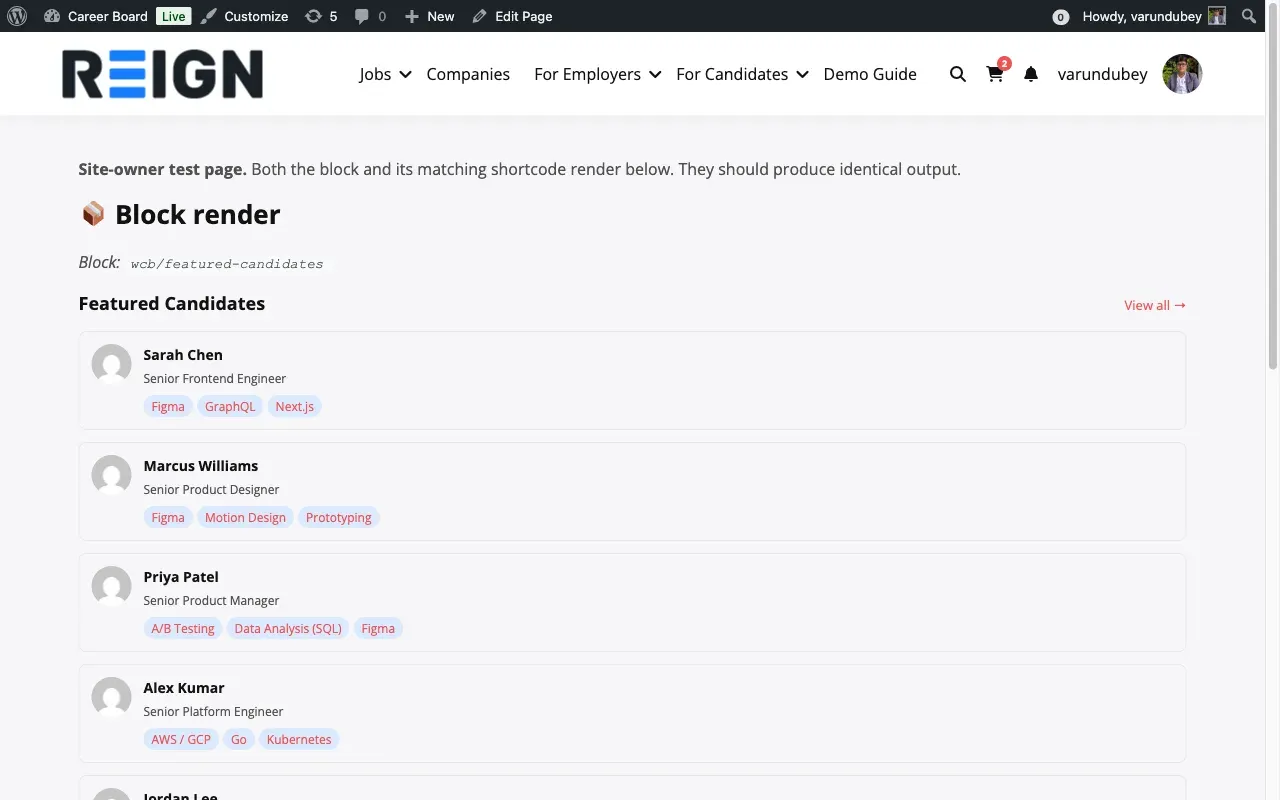
Section titled “wcb/featured-candidates - Featured Candidates”A static sidebar widget listing featured public candidate resumes. Useful for drawing employer attention to available talent.
Attributes:
| Attribute | Type | Default | Description |
|---|---|---|---|
count |
integer | 5 |
Number of candidates to display (1–20) |
title |
string | "" |
Optional heading above the list |
showViewAll |
boolean | true |
Show a “View All” link below the list |
viewAllUrl |
string | "" |
URL for the “View All” link |
Usage notes: Displays candidates who have at least one public resume. Set viewAllUrl to your Find Candidates page URL. Skill pills render directly from the wcb_resume_skill taxonomy and fall back to _wcb_resume_skills meta values when the taxonomy is empty (1.2.0+) - candidates whose skills-sync hook never ran still display correctly.
wcb/featured-companies - Featured Companies
Section titled “wcb/featured-companies - Featured Companies”A static sidebar widget listing featured companies with their open role counts.
Attributes:
| Attribute | Type | Default | Description |
|---|---|---|---|
count |
integer | 5 |
Number of companies to display (1–20) |
title |
string | "" |
Optional heading above the list |
showViewAll |
boolean | true |
Show a “View All” link below the list |
viewAllUrl |
string | "" |
URL for the “View All” link |
Usage notes: Shows companies with at least one active job. Each company card shows the company logo, name, and open job count.
wcb/job-alerts - Job Alerts
Section titled “wcb/job-alerts - Job Alerts”A subscription form that reads the current search state and lets logged-in candidates save their active filters as a job alert.
Attributes: None
Usage notes: Shares the same wcb-search Interactivity API store as Job Listings and Job Filters. When a candidate clicks Save Alert, the current keyword, category, type, location, salary range, and remote filter are saved. Frequency (instant/daily/weekly) is set from the Candidate Dashboard. See Job Alerts.
wcb/job-map - Job Map
Section titled “wcb/job-map - Job Map”An interactive Leaflet map showing job pin locations, synced with the Job Listings block search state. When a visitor filters jobs, the map updates in real time.
Attributes:
| Attribute | Type | Default | Description |
|---|---|---|---|
height |
integer | 480 |
Map canvas height in pixels |
Usage notes: Jobs must have a Location taxonomy term set so they can be geocoded. Coordinates are geocoded automatically when an admin creates the job. Jobs without latitude/longitude are not shown on the map - they can be backfilled from the Jobs admin. The map itself always renders with Leaflet and OpenStreetMap tiles; the Google/Mapbox provider setting changes only the geocoding service, not the rendered map. See Job Map.
wcb/my-applications - My Applications
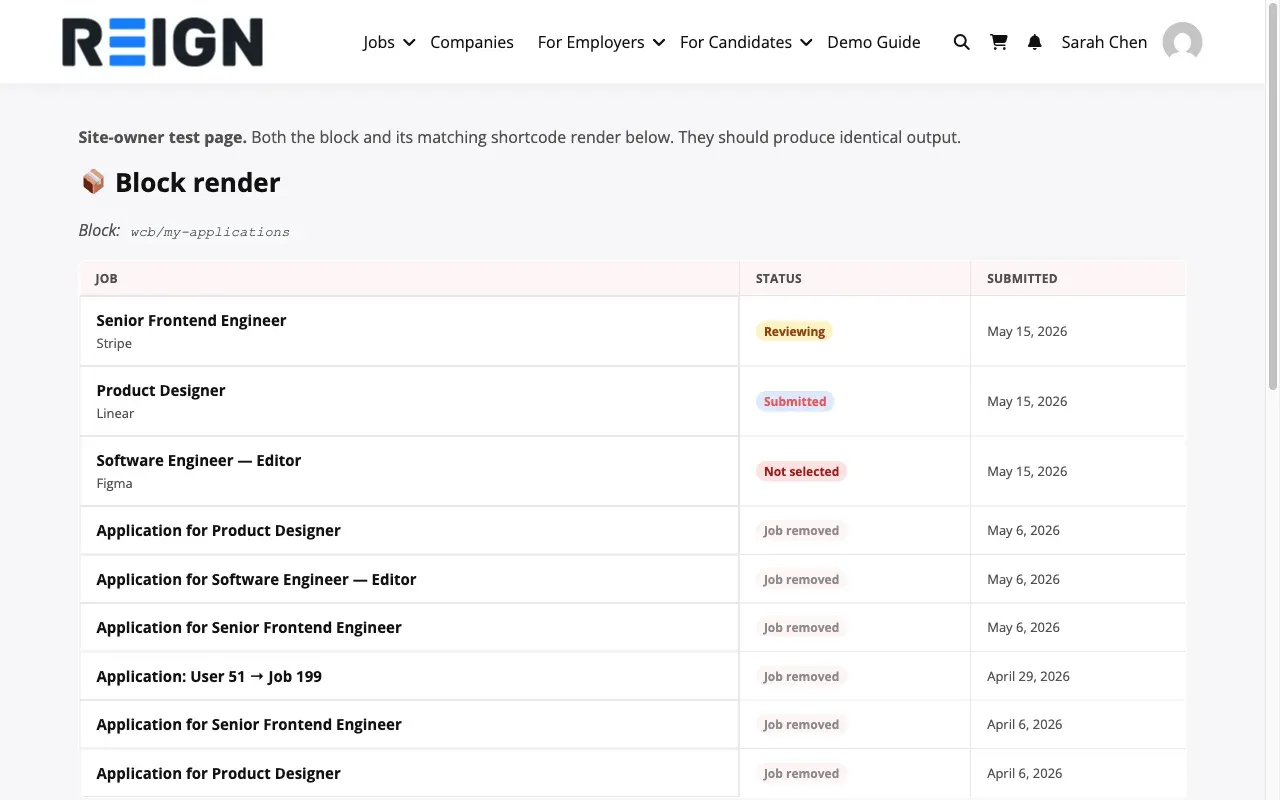
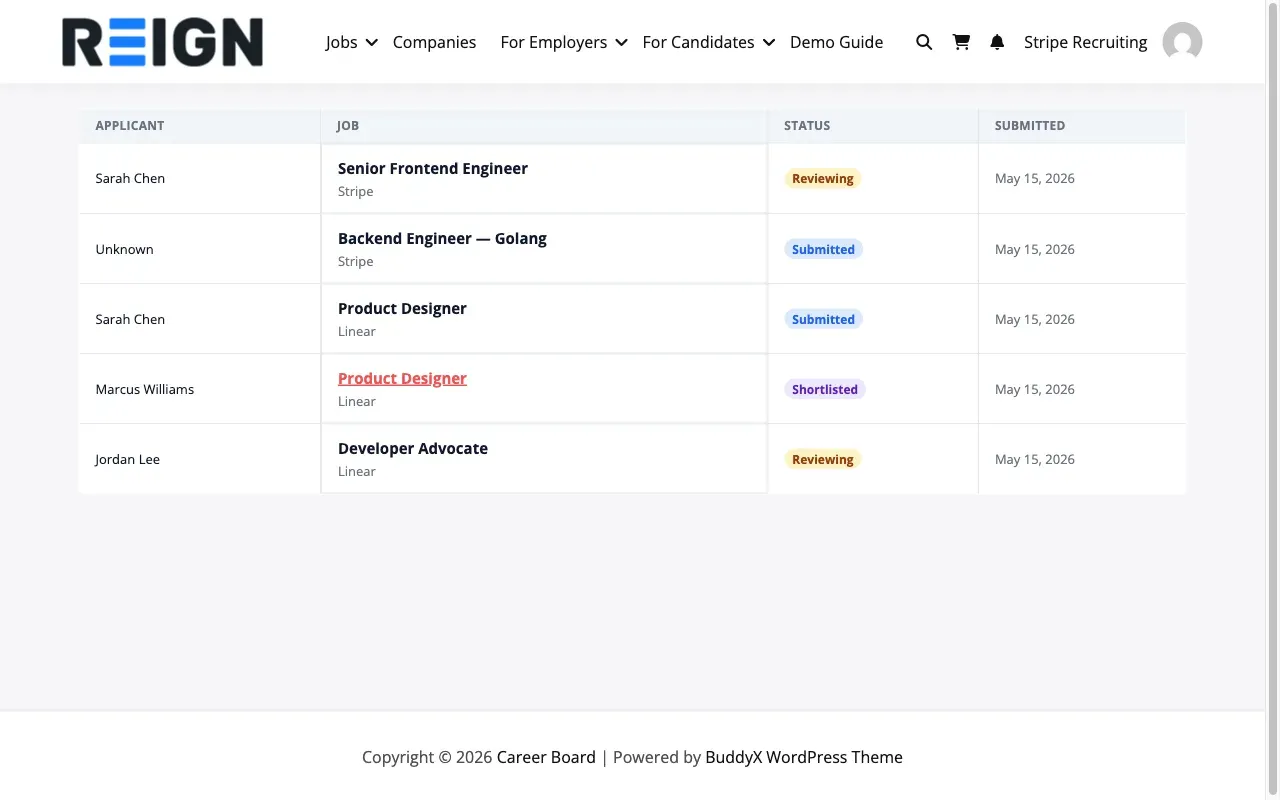
Section titled “wcb/my-applications - My Applications”Renders the current user’s submitted job applications as a semantic table with Job / Status / Submitted column headers (1.2.0+). On narrow viewports it collapses to a card layout via data-label attributes so mobile reads the same structure without horizontal scroll.
Candidate view (default) - shows the current user’s own applications:
Employer view - set the employerId attribute to surface a Job + Applicant view of every application across that employer’s posted jobs:
Attributes:
| Attribute | Type | Default | Description |
|---|---|---|---|
authorId |
integer | 0 |
Show another user’s applications (admin use only). 0 = current user. |
employerId |
integer | 0 |
Switch to employer view. 0 = candidate view. Permission-gated: only the employer themselves or a wcb_manage_settings admin can view another employer’s pipeline. |
perPage |
integer | 20 |
Applications per page |
Usage notes: The Status column always renders a badge (defaults to “Submitted” if the application’s _wcb_status meta is empty), so the column is never blank. Status badges use the same .wcb-status-badge colour tokens as the candidate dashboard. Place on the Candidate Dashboard page (candidate view) or any employer-scoped page (employer view).
wcb/open-to-work - Open to Work
Section titled “wcb/open-to-work - Open to Work”A static sidebar widget listing candidates who have set their profile status to “Open to Work.”
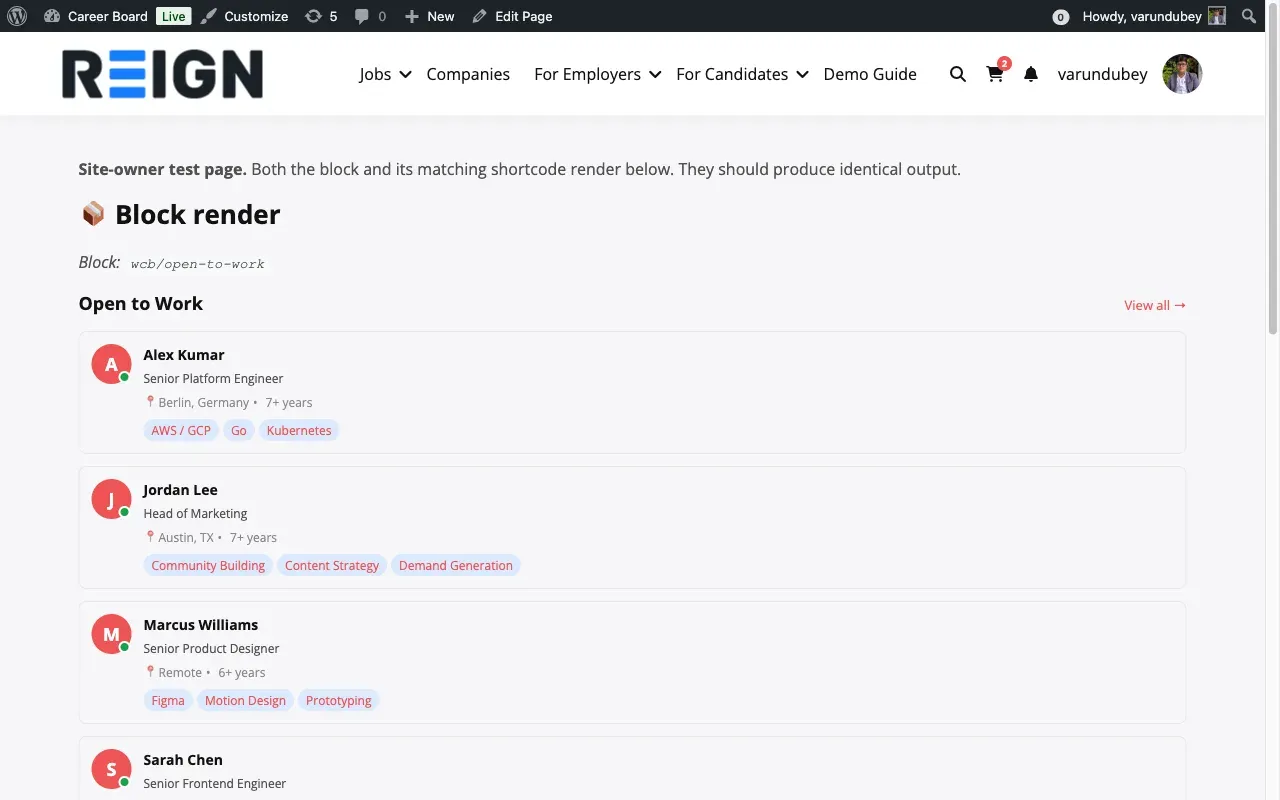
Each candidate card shows (1.2.0+):
- Avatar - pulled from the resume form’s uploaded photo (
_wcb_resume_photo_id), with an initial-letter chip in the brand colour as the fallback. Never falls back to the BuddyPress / Gravatar avatar - the resume form is the canonical source for a candidate’s professional photo on this block. - Name - display name
- Headline - the current/most-recent experience entry’s job title
- Location - resume-level
_wcb_resume_locationmeta, or the current experience entry’s location when the resume-level field is blank - Years of experience - computed from the earliest
start_dateacross all experience entries (e.g. “8+ years”) - Skill pills - top 3 from the
wcb_resume_skilltaxonomy, with the same_wcb_resume_skillsmeta fallback as the Featured Candidates block
Attributes:
| Attribute | Type | Default | Description |
|---|---|---|---|
count |
integer | 5 |
Number of candidates to display (1–20) |
title |
string | "" |
Optional heading above the list |
showViewAll |
boolean | true |
Show a “View All” link below the list |
viewAllUrl |
string | "" |
URL for the “View All” link |
Usage notes: Useful on employer-facing pages to surface actively available candidates. Candidate order is randomised on every load so the widget rotates exposure across everyone who is open to work, rather than always showing the same most-recently-saved set.
wcb/resume-archive - Find Resumes
Section titled “wcb/resume-archive - Find Resumes”A paginated, filterable archive of publicly visible candidate resumes. Displays avatar, name, job title, skills, and location for each resume card.
Attributes:
| Attribute | Type | Default | Description |
|---|---|---|---|
perPage |
integer | 12 |
Resumes per page |
authorId |
integer | 0 |
Scope to a specific user. 0 = all public resumes. |
includePrivate |
boolean | false |
Include private resumes (admin only) |
Usage notes: Pair with wcb/resume-search-hero on the same page for the full “Find Candidates” experience. The Pro Setup Wizard creates this page automatically.
wcb/resume-builder - Resume Builder
Section titled “wcb/resume-builder - Resume Builder”A section-by-section resume editor for candidates covering work experience, education (school and college), skills, languages, certifications, and portfolio links. Supports multiple resumes per candidate.
Attributes: None
Usage notes: Requires the candidate to be logged in. Can run in standalone mode (dedicated page with ?resume_id= parameter) or embedded mode (same page as the Candidate Dashboard). See Resume Builder - Setup.
wcb/resume-form - Resume Form (Single-Page)
Section titled “wcb/resume-form - Resume Form (Single-Page)”A single-page version of the Resume Builder. Every section (School, College, Experience, Certifications, Skills, Languages, Portfolio) is rendered expanded on one continuous-scroll screen instead of the multi-step wizard. It writes to the same resume data as the Resume Builder, so site owners can pick whichever layout they prefer.
Attributes:
| Attribute | Type | Default | Description |
|---|---|---|---|
compact |
boolean | false |
Render the form in a tighter, narrower layout |
Usage notes: Requires the candidate to be logged in. Use this as an alternative to the multi-step Resume Builder when you want the whole form visible at once. See Single-Page Resume Form.
wcb/resume-form-simple - Resume Form (Quick Profile)
Section titled “wcb/resume-form-simple - Resume Form (Quick Profile)”A short profile-completion form for candidates covering only the essentials: headline, summary, top skills, location, open-to-work status, and an optional photo. Designed for sidebars, modals, partner pages, and onboarding flows where the full resume builder would be too heavy.
Attributes:
| Attribute | Type | Default | Description |
|---|---|---|---|
showPhotoField |
boolean | true |
Show or hide the profile photo upload field |
compact |
boolean | false |
Render the form in a tighter, narrower layout |
Usage notes: Requires the candidate to be logged in. Saves to the candidate’s resume so the headline, location, skills, and open-to-work status feed the Open to Work and Featured Candidates blocks. See Quick Resume Form.
wcb/resume-map - Resume Map
Section titled “wcb/resume-map - Resume Map”An interactive Leaflet map showing candidate locations. Clicking a pin navigates to that candidate’s public resume profile.
Attributes:
| Attribute | Type | Default | Description |
|---|---|---|---|
height |
integer | 480 |
Map canvas height in pixels |
Usage notes: Pair with wcb/resume-archive on the Find Candidates page to give employers a spatial view of talent. Candidate coordinates come from their profile location. Uses the WordPress Interactivity API.
wcb/resume-search-hero - Resume Search Hero
Section titled “wcb/resume-search-hero - Resume Search Hero”A full-width search form for the candidate archive. Supports keyword search plus optional skill filter and open-to-work filter.
Attributes:
| Attribute | Type | Default | Description |
|---|---|---|---|
layout |
string | "horizontal" |
Form layout - horizontal or vertical |
placeholder |
string | "" |
Search input placeholder text |
buttonLabel |
string | "" |
Search button label |
showSkillFilter |
boolean | true |
Show the skill filter dropdown |
showOpenToWorkFilter |
boolean | false |
Show the open-to-work toggle filter |
Usage notes: Place above wcb/resume-archive on your Find Candidates page. The Pro Setup Wizard adds both blocks to the Find Candidates page automatically.
wcb/resume-single - Resume Single
Section titled “wcb/resume-single - Resume Single”The public-facing resume view for a single candidate. Renders all resume sections in a formatted layout.
Attributes:
| Attribute | Type | Default | Description |
|---|---|---|---|
resumeId |
integer | 0 |
Show a specific resume by ID. 0 resolves the resume from the current wcb_resume post being viewed. |
Supports: wide and full alignment.
Usage notes: Place on the wcb_resume post type template. The Pro setup assigns this block to the resume template automatically - you typically do not need to add it manually. Does not accept custom HTML.
Adding a Pro Block
Section titled “Adding a Pro Block”- Open any page in the WordPress editor
- Click + to add a block
- Search for the block name (e.g., “Job Map”)
- Click to insert
All Pro blocks appear in the Widgets category in the block inserter.