

Settings — Display tab
The Display tab controls how visits are shown to members. None of these settings affect what gets recorded in the database — they only change what appears in the front-end UI.
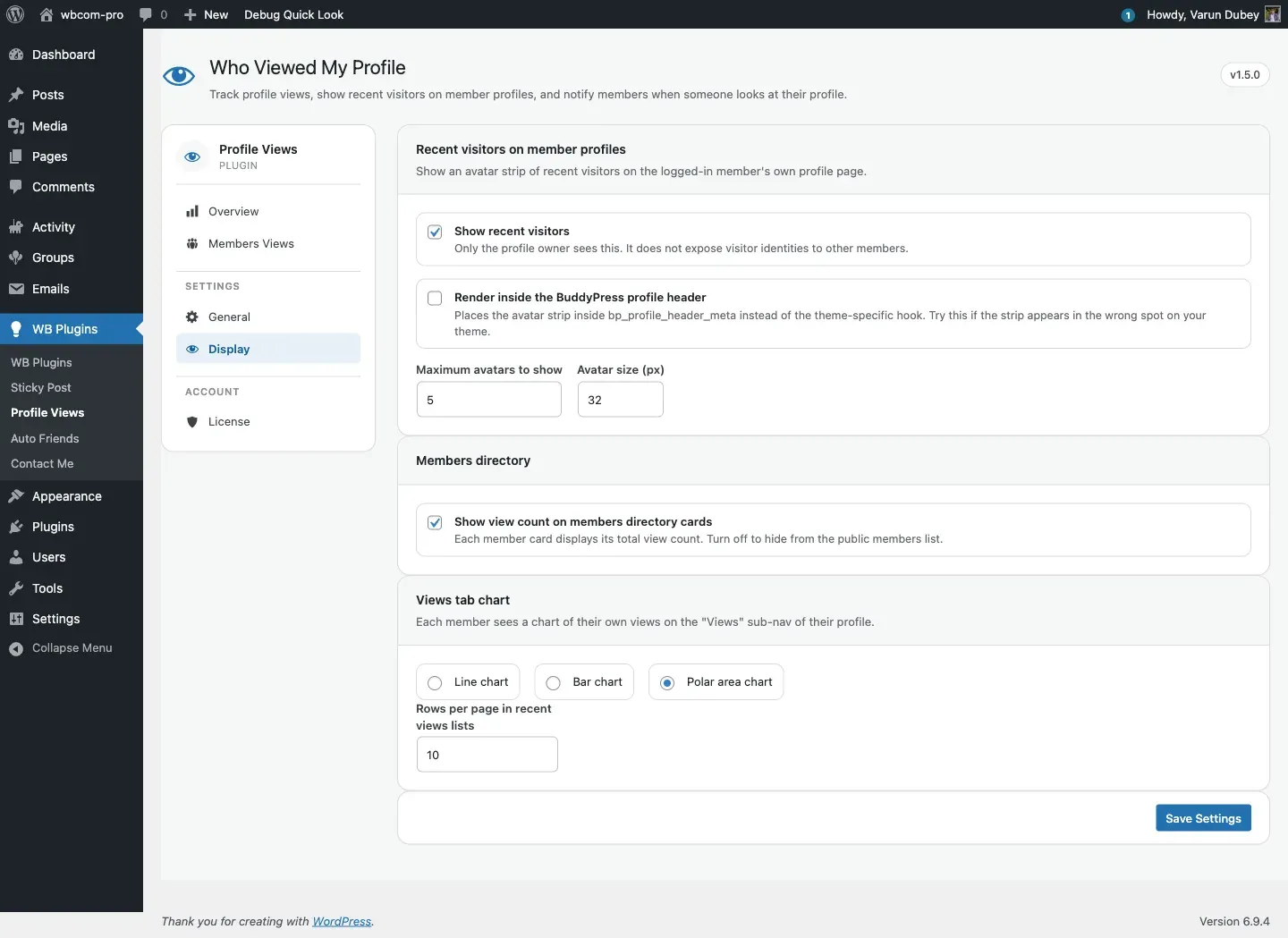
Recent visitors on member profiles
Section titled “Recent visitors on member profiles”An avatar strip showing the people who recently visited a profile. Only the profile owner sees it.
| Option | Key + value | Default | Effect |
|---|---|---|---|
| Show recent visitors | show_recent_members = yes |
Off | Renders the avatar strip on the logged-in member’s own profile header. Other members viewing the same profile do not see the strip. |
| Render inside the BuddyPress profile header | show_inside_header_meta = yes |
Off | Places the strip on the bp_profile_header_meta hook instead of the theme-conditional default hooks. Use this if the strip lands in the wrong position on your theme. |
| Maximum avatars to show | max_display_in_header |
5 |
How many avatars appear in the strip. Accepts 1–50. |
| Avatar size (px) | default_avatar_size |
32 |
Pixel size of avatars in the strip. Accepts 16–128. Applies to the directory badge avatars as well. |
See Recent Visitors strip for theme-specific placement notes and the full list of hooks.
Members directory
Section titled “Members directory”| Option | Key + value | Default | Effect |
|---|---|---|---|
| Show view count on members directory cards | show_in_directory = yes |
Off | Each member card on the /members/ directory shows the total view count for that member. This is visible to all site visitors, not only the profile owner. |
See Members directory badge for rendering details and the hook name.
Views tab chart
Section titled “Views tab chart”Each member can see a chart of their own views on the Views sub-nav of their profile.
| Option | Key + value | Default | Effect |
|---|---|---|---|
| Chart style | chart_style = line | bar | polarArea |
line |
The chart type rendered on the member’s Views tab. Options: line (time-series), bar (daily count), polar area (circular share-of-total). |
| Rows per page in recent views lists | view_member_count |
10 |
Number of view rows fetched for the Views tab and the Most Visited Users widget. Range: 1–100. |
Saving
Section titled “Saving”Submits through the same WordPress register_setting / options.php flow as the General tab. Numeric fields are clamped to their minimum values (max_display_in_header and view_member_count minimum 1; default_avatar_size minimum 16). The sentinel mechanism ensures saving this tab does not clear settings owned by the General tab.
Storage
Section titled “Storage”All keys on this tab live in bp_profile_views_general_options alongside the General tab keys.
Key reference
Section titled “Key reference”| Key | Type | Default | Description |
|---|---|---|---|
show_recent_members |
yes | no |
no |
Show avatar strip on the profile owner’s own profile. |
show_inside_header_meta |
yes | no |
no |
Force strip onto bp_profile_header_meta hook. |
max_display_in_header |
integer (1–50) | 5 |
Avatars shown in the strip. |
default_avatar_size |
integer (16–128) | 32 |
Avatar size in pixels. |
show_in_directory |
yes | no |
no |
Show view count badge on the members directory. |
chart_style |
line | bar | polarArea |
line |
Chart type on the member Views tab. |
view_member_count |
integer (1–100) | 10 |
Rows per page in view lists and the widget. |
- Strip in the wrong spot? Try enabling Render inside the BuddyPress profile header.
- Strip not showing at all? Check that Show recent visitors is on. If the strip is still missing, your theme may not fire the hook the plugin targets. Enabling the header-meta option is the reliable fallback.
- Directory badge not appearing? The Show view count on members directory cards toggle must be on and the member must have at least one recorded view.
Where to next
Section titled “Where to next”- General tab — capture rules, dedupe strategy, notifications, member opt-out.
- License tab — activate your license key.