

Leaderboard and Profile Stats
Leaderboard and Profile Stats
Section titled “Leaderboard and Profile Stats”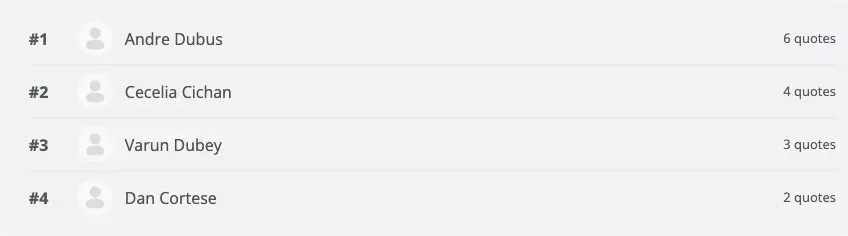
Member Leaderboard
Section titled “Member Leaderboard”The leaderboard ranks members by the number of quotes they have posted, with support for weekly, monthly, and all-time periods.
Displaying the Leaderboard with the Shortcode
Section titled “Displaying the Leaderboard with the Shortcode”Place the [bp_quotes_leaderboard] shortcode anywhere WordPress renders shortcodes — a page, a post, a text widget, or a sidebar widget area.
[bp_quotes_leaderboard]Shortcode attributes:
| Attribute | Default | Options | Description |
|---|---|---|---|
period |
week |
week, month, all |
Time period to rank members over |
count |
10 |
Any positive integer | Number of members to display |
scope |
site |
site |
Scope of the leaderboard (currently site-wide only) |
Examples:
[bp_quotes_leaderboard period="month" count="5"]Shows the top 5 members this month.
[bp_quotes_leaderboard period="all" count="20"]Shows the all-time top 20 members.
Displaying the Leaderboard with the Widget
Section titled “Displaying the Leaderboard with the Widget”- Go to Appearance → Widgets (or the full-site editor if your theme uses block widgets).
- Find the BuddyPress Quotes Leaderboard widget.
- Drag it to the sidebar or widget area where you want it to appear.
- Configure the title, period, and count in the widget settings.
- Save.
The widget renders the same leaderboard as the shortcode.
Member Profile Quote Stats
Section titled “Member Profile Quote Stats”Each member’s BuddyPress profile automatically gains a Quotes tab. The tab shows:
- Total quotes posted — the member’s lifetime total.
- Breakdown by type — how many image quotes, color quotes, and animated quotes they have posted.
- 30-day activity sparkline — a small bar chart showing their quote activity over the past 30 days.
No configuration is required for the profile tab. It appears automatically as long as the plugin is active and the member has posted at least one quote.
Who Can See the Stats Tab
Section titled “Who Can See the Stats Tab”The Quotes tab on a member’s profile is visible to all logged-in members. The tab only appears if the member has posted at least one quote. On profiles with zero quotes, the tab is hidden.
Gamification and the Leaderboard
Section titled “Gamification and the Leaderboard”If you use GamiPress, myCred, BadgeOS, or WP Achievements, the leaderboard works alongside those systems. Points and badges are awarded through the gamification integration (see WP Admin → BuddyPress Quotes → Integrations), but the leaderboard ranking is based purely on quote count, not on gamification points. The two systems are independent.