

Seo Pro
Give every space its own meta titles, Open Graph images, Twitter Cards, schema markup, and sitemap rules - without touching your site-wide SEO plugin.
PRO - This feature requires Jetonomy Pro.
What You Will Learn
Section titled “What You Will Learn”- Why community SEO is different from page/post SEO
- How to set per-space meta titles and descriptions
- How to control Open Graph and Twitter Card previews per space
- How Jetonomy outputs Schema.org structured data automatically
- How to include or exclude spaces from your sitemap
- How to customize robots directives and canonical URLs
Why Community SEO Is Different
Section titled “Why Community SEO Is Different”Your posts and pages have one author, one publish date, and one body. A forum topic has dozens of authors, evolves over time, and the most recent reply is often the most important part. A Q&A thread is really a QAPage with an acceptedAnswer, not a blog post. A sitemap that treats every reply as a top-level URL pollutes your search index.
The free Jetonomy plugin already outputs baseline SEO - canonical URLs, Open Graph tags, Schema.org, and a sitemap provider for spaces and posts. SEO Pro is for when you need to override the defaults on a per-space basis, because different spaces have different audiences, different goals, and different search intent.
Per-Space Meta Title and Description
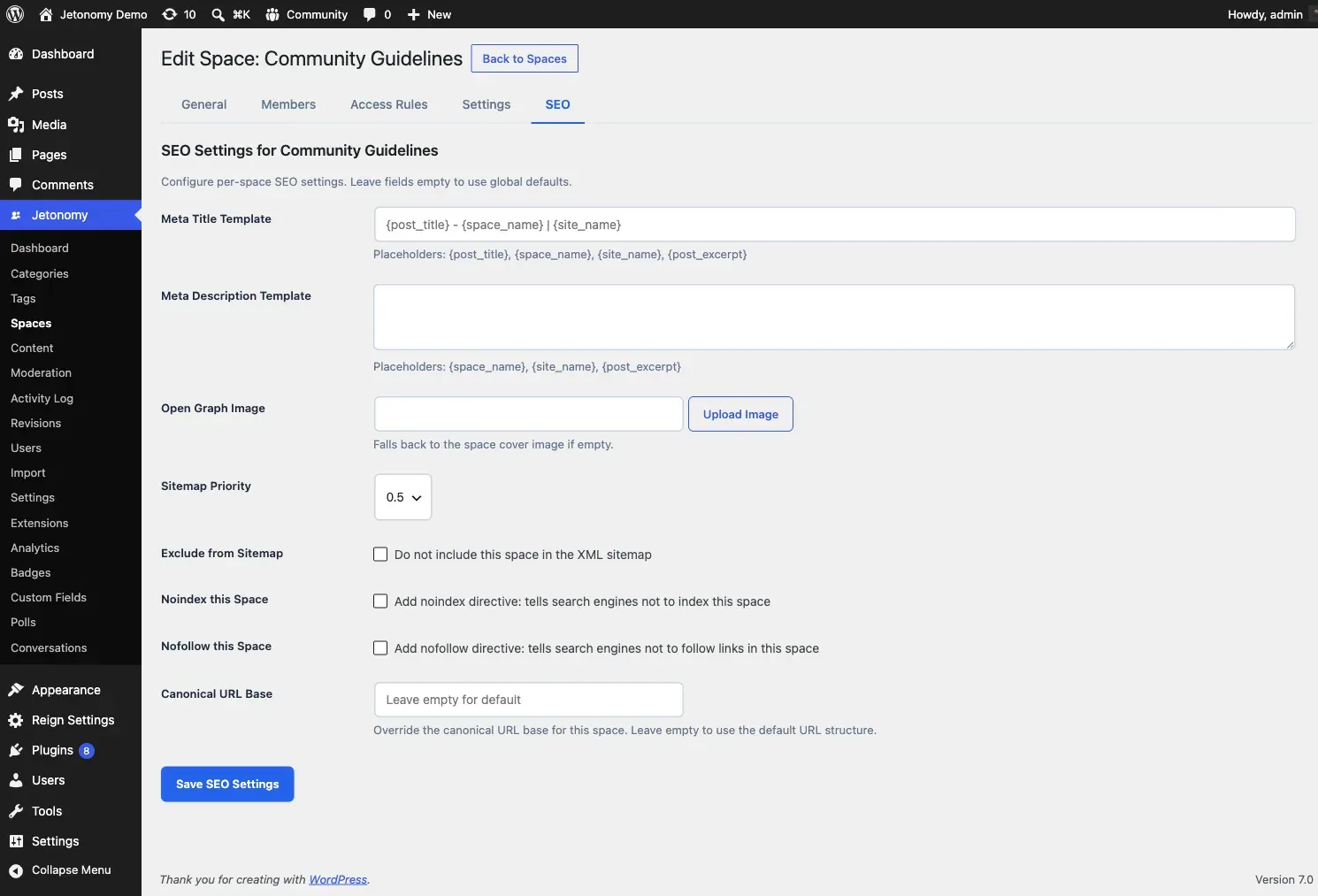
Section titled “Per-Space Meta Title and Description”Every space gets a dedicated SEO tab in its settings panel. Inside that tab:
- Meta Title - defaults to the space name. Override for search engines only (the on-site title stays unchanged).
- Meta Description - defaults to the space description. Override with a keyword-rich summary written for search snippets.
- Meta Keywords - legacy field, not used by Google but some vertical engines still read it. Optional.
Both meta title and description support template tokens: {space_name}, {site_name}, {space_count}, {post_count}. For example, a meta title template of {space_name} - {post_count} discussions | {site_name} produces Python Help - 2,481 discussions | MyForum automatically.
Open Graph and Twitter Cards
Section titled “Open Graph and Twitter Cards”SEO Pro lets you upload a custom Open Graph image per space - a 1200x630 image used when the space URL is shared on Facebook, LinkedIn, and Slack. It also lets you override:
- Open Graph title (defaults to meta title)
- Open Graph description (defaults to meta description)
- Twitter Card type (summary or summary_large_image)
- Twitter Card image
If you skip these fields, Jetonomy falls back to the meta title/description and uses the default OG image from your main settings.
Schema.org Structured Data
Section titled “Schema.org Structured Data”For every space and every post, Jetonomy Pro emits JSON-LD structured data:
- Space pages -
DiscussionForumPostingwith post count and date - Topic pages (Forum) -
DiscussionForumPostingwith author, date, and answer count - Topic pages (Q&A) -
QAPagewithacceptedAnswer(if marked) andsuggestedAnswerentries - Topic pages (Ideas) -
CreativeWorkwithabout(the idea) - User profiles -
PersonwithmemberOfthe space list - Breadcrumbs -
BreadcrumbListon every community page
You do not need to configure any of this. Enabling SEO Pro turns it on automatically. The free plugin emits a subset of these (basic DiscussionForumPosting and BreadcrumbList) - SEO Pro adds the richer types.
Sitemap Controls
Section titled “Sitemap Controls”Jetonomy core registers a sitemap provider for spaces and posts. SEO Pro adds:
- Include / exclude per space - mark a private support space as excluded from the sitemap with one click
- Priority per space - boost your flagship space above others in the sitemap XML
- Change frequency per space - hint at how often a space updates (always, hourly, daily, weekly, monthly)
- Maximum URLs per sitemap - split large sitemaps into chunks that search engines can crawl without timing out
All sitemap changes take effect on the next request - no flush needed.
Robots Directives and Canonical URLs
Section titled “Robots Directives and Canonical URLs”- Robots meta per space - set
noindex,nofollow,noarchive, or any combination on a space-by-space basis. Useful for staff-only spaces that should not appear in search results. - Custom canonical URL - override the default canonical URL on a space or topic. Useful when you syndicate content from an external blog and want Google to credit the original.
- robots.txt directives - add SEO Pro specific rules to your site’s virtual
robots.txtwithout touching a file.
Enabling SEO Pro
Section titled “Enabling SEO Pro”- Go to Jetonomy → Extensions and enable SEO Pro.
- Open any space in Jetonomy → Spaces.
- Click the SEO tab inside the space settings panel.
- Fill in the fields you want to override. Leave the rest blank to inherit the site defaults.
- Save.
No site-wide settings page - SEO Pro is intentionally per-space, so you do not accidentally change defaults that other spaces depend on.
REST API
Section titled “REST API”| Method | Endpoint | Description |
|---|---|---|
GET |
/spaces/{id}/seo |
Get the current SEO settings for a space |
PATCH |
/spaces/{id}/seo |
Update the SEO settings for a space |
Both endpoints require the manage_jetonomy capability or space-admin role.
Compatibility With Site-Wide SEO Plugins
Section titled “Compatibility With Site-Wide SEO Plugins”SEO Pro does not replace Yoast, Rank Math, or All in One SEO. It handles the community area only - URLs under /community/ - and leaves your blog, pages, and WooCommerce products entirely alone. If a site-wide SEO plugin already writes og:title for a community URL, SEO Pro’s tags take precedence on community pages.
What’s Next?
Section titled “What’s Next?”Feature an important post at the top of every space across your whole community.