

Following Members
Following is a one-directional relationship: you follow a member to see more of their activity, and they do not have to follow you back. It is the lightweight way to keep up with someone without asking for anything in return.
Why use it
Section titled “Why use it”Following is how members shape what they see. When you follow someone, their posts get more weight in your feed, so your home feed fills up with the people and topics you actually care about instead of a flat stream of everything on the site.
For a site owner, following lowers the barrier to engagement. A new member can start building a personalized feed on day one - no waiting for anyone to accept a request, no mutual agreement required. This is the same model X (Twitter) and Instagram use: follow freely, and let each member curate their own view. It also gives popular contributors a visible audience, which encourages them to keep posting.
Following pairs with two-way Connections (see Connections). Following is the open, public signal; connections are the closer, mutual relationship. Most members will follow many people and connect with a smaller circle.
How it works (for members)
Section titled “How it works (for members)”Follow a member
Section titled “Follow a member”Open a member’s profile and select the Follow button. The button flips to Following and that member’s follower count goes up by one. You will now see their activity surfaced in your feed.
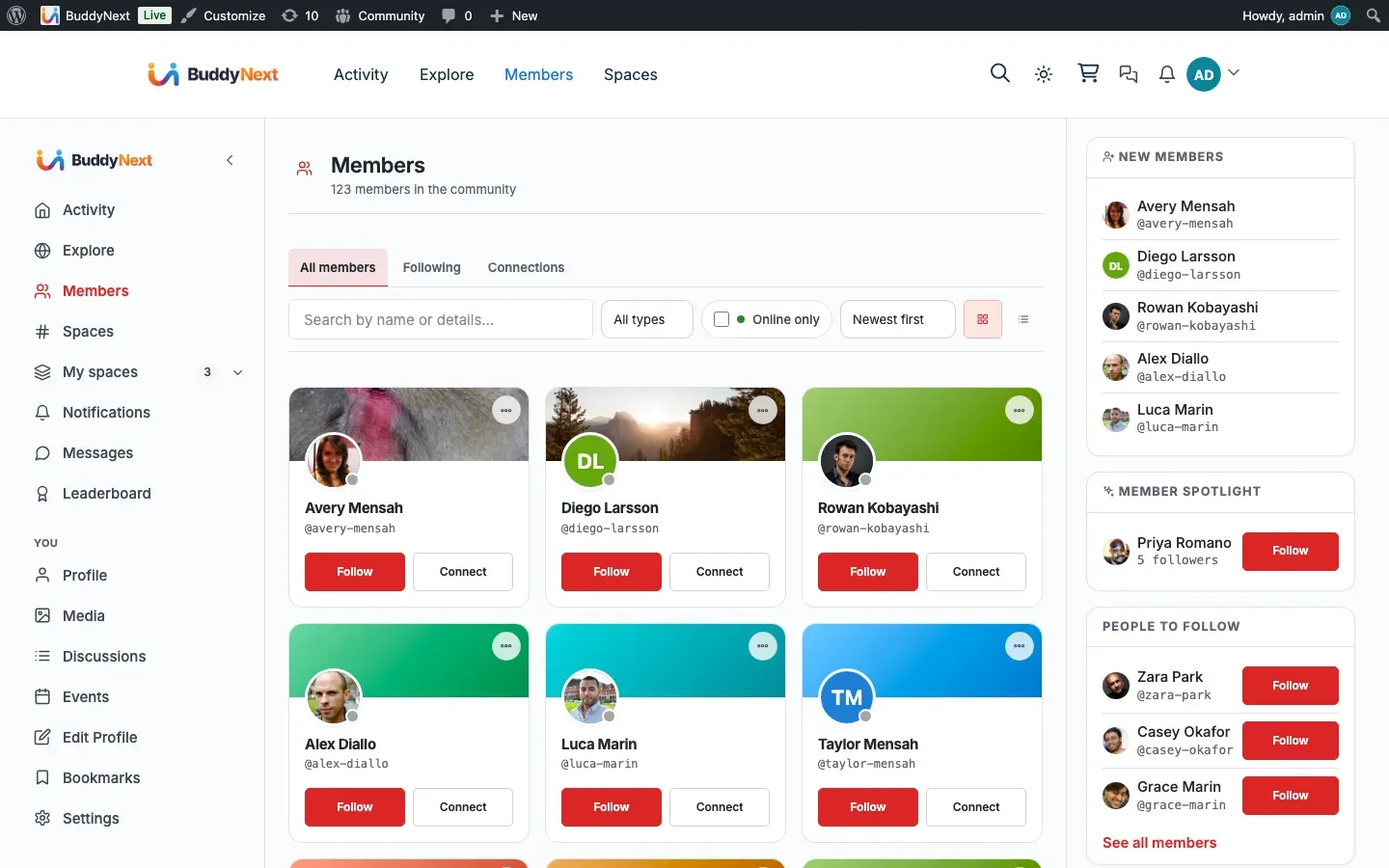
You can also follow from a member card - the compact profile tile that appears in the member directory, in followers and following lists, and in sidebars. The follow button works the same way wherever it appears.
Unfollow a member
Section titled “Unfollow a member”Select the Following button on the member’s profile or card. It flips back to Follow, and their activity stops getting extra weight in your feed. Unfollowing is silent - the other member is not notified.
Followers and following lists
Section titled “Followers and following lists”Every profile has a followers list (everyone who follows that member) and a following list (everyone that member follows). These lists are public, so members can discover new people to follow by browsing who someone else follows.
Note: A brand-new account with no follow relationships yet will show empty followers and following lists. That is the expected empty state, not a missing feature.
Follow suggestions
Section titled “Follow suggestions”BuddyNext can suggest members for you to follow. Suggestions are drawn from members you do not already follow, and they are ranked so the most relevant people rise to the top: members followed by people you already follow (friends-of-friends) and members who share your interests are surfaced first. The list refreshes as you follow more people and as you edit your interests. Members you have blocked, or who have blocked you, are never suggested.
Follow requests on private accounts
Section titled “Follow requests on private accounts”If a member keeps their account private, following them sends a follow request instead of following immediately. The member sees a pending request they can approve or reject, and a count of how many requests are waiting. Once approved, the follow takes effect. On public accounts there is no request step - the follow is instant.
Setting it up (for owners)
Section titled “Setting it up (for owners)”Following works out of the box with no required configuration. There is no on/off switch for following itself - it is a core part of the social layer.
The one owner-facing control that touches following is the notification default for new follows, which lives with the notification settings:
| Setting | What it does | Default |
|---|---|---|
| Notify on new follower | Sets whether members are notified by default when someone follows them. Members can still change their own preference. | On |
Tip: Leave new-follower notifications on. The notification is a small but real reason members come back, and it is the moment they discover who is paying attention to their posts.
Good to know
Section titled “Good to know”- You cannot follow yourself. Attempting to follow your own account is rejected. Self-follow would not mean anything, so the button never offers it on your own profile.
- Blocking prevents following. If you have blocked a member, or a member has blocked you, neither side can follow the other, and existing follow relationships are filtered out. See Blocking and Muting for how blocks work.
- Follower and following lists respect blocks. Members you have blocked, and members who have blocked you, are removed from these lists, so a block stays a clean break in both directions.
- Unfollowing is private. The member you unfollow is not told. Following and unfollowing are low-stakes by design.
- Following is not the same as connecting. Following is one-way and instant on public accounts; a connection is a two-way relationship that both members agree to. See Connections.
- There is a ceiling on how many accounts one member may follow. A member can follow up to 5,000 accounts; past that, the Follow button tells them to unfollow someone first. This matches the limit mainstream social networks apply, and it keeps a member’s home feed fast. There is no limit on how many followers a member can have - a popular account can be followed by as many people as want to follow it.
The Follow Button block
Section titled “The Follow Button block”The Follow control renders automatically in profile context - the profile header and member cards - so members get a one-click Follow / Following button, including the pending state for follow requests on private accounts, without any setup. The standalone Follow button block is no longer offered in the block inserter.
The control only does something for a logged-in member viewing another member - it will not offer a self-follow.
Related
Section titled “Related”- Connecting With Members - the two-way relationship following pairs with
- Blocking and Muting - why a block cuts off following both ways
- Member Interests - how interests power the follow suggestions