

Group Questions by Subject
Group Questions by Subject
Section titled “Group Questions by Subject”A single quiz can pull questions from several subjects and keep each subject together during the attempt, then show a per-subject score on the results screen. This turns one quiz into a multi-subject exam (for example a certification paper with a JavaScript section, a React section, and an HTML and CSS section) without building a separate quiz per subject.
What you can do
Section titled “What you can do”- Run one exam that covers several subjects and keep each subject’s questions together instead of interleaved, so a candidate answers all of one subject before moving to the next.
- Show a per-subject score breakdown on the results screen (“JavaScript 4 / 5 (80%)”, “React 3 / 5 (60%)”) on top of the overall pass or fail score.
- Reuse the same question categories you already manage in the Question Bank, so a question tagged “Algebra” counts toward the Algebra subject in every quiz that uses it.
- Keep it optional and additive: the setting is off by default, and a quiz with it off behaves exactly as before (no subject headings, no breakdown).
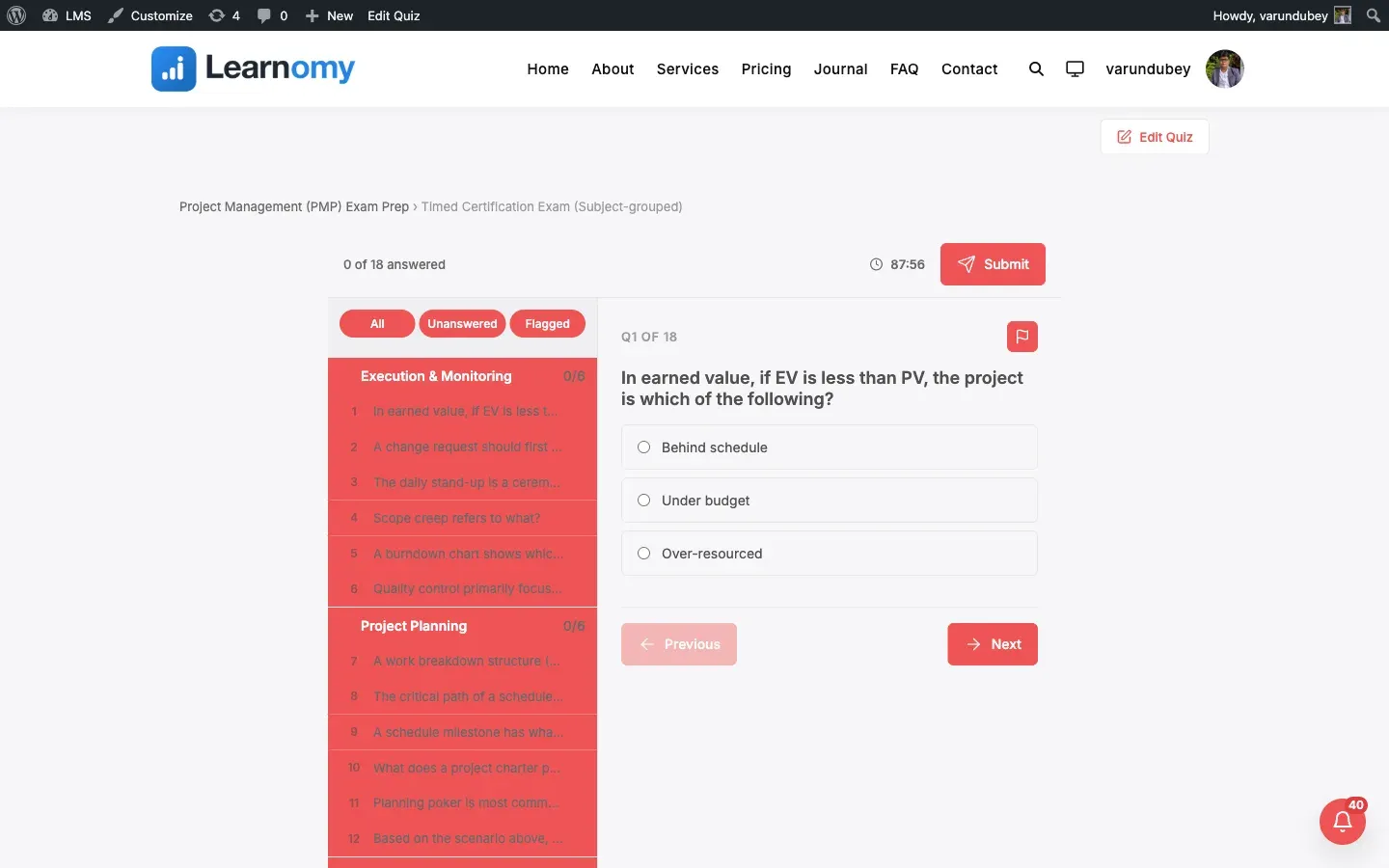
- Turn it on for any layout: the all-at-once (Classic) layout gets subject headings, the one-at-a-time layouts show the current question’s subject above the prompt, and the Pro Review board layout turns its navigator into collapsible per-subject groups with an answered count.
- Author the setting from three places that stay in sync: the wp-admin quiz editor, the REST API, and the Pro front-end course builder.
How to use it
Section titled “How to use it”- Give your questions a category. In Learnomy > Question Bank, open each question and set its Category (for example JavaScript, React, HTML and CSS). Question categories are their own hierarchy, separate from course categories. A question with no category falls into an “Uncategorized” group.
- Open the quiz in Learnomy > Quizzes and edit it, or add a new one.
- Add the questions you want from the bank as normal. They can be added in any order; grouping is applied at attempt time.
- In the quiz settings, tick Group questions by category. The help text reads “Show questions under their category heading, and a per-category score on the results screen.”
- Optional: choose a Display template. Grouping works on every layout; the Pro Review board layout adds a collapsible per-subject navigator with an answered count per subject.
- Save and publish the quiz.
What the student sees at attempt time:
- On the Classic (all-at-once) layout, the questions are ordered by subject and each subject run has one heading above it, for example an “Algebra” heading over its questions and a “Geometry” heading over the next set. The heading is shown once per subject, not repeated on every question.
- On the one-at-a-time layouts (Focused, Sectioned, Conversational), the current question’s subject is shown as a small label above the question, so the candidate always sees which subject they are in.
- On the Pro Review board layout, the left navigator splits into collapsible groups, one per subject, each with an answered / total count.
- After the student submits, the results card shows a Score by category block: one row per subject with its name and its earned / possible (percentage). Those per-subject scores reconcile to the overall attempt percentage.
Settings and options
Section titled “Settings and options”These are set on the quiz editor (Learnomy > Quizzes > edit a quiz) and stored on the quiz.
| Setting | Field name | Values | Notes |
|---|---|---|---|
| Group questions by category | group_by_category |
0 (off, default), 1 (on) |
When on, questions are ordered and headed by their question category, and the results screen adds a per-category score breakdown. |
| Display template | display_template |
classic, focused, sectioned, conversational, review-board (Pro) |
Grouping is honoured by every template. Only the Pro Review board renders the collapsible per-subject navigator. |
| Question category | (set per question in the Question Bank) | — | The category a question belongs to is what the grouping and the per-subject score are built from. Managed in Learnomy > Question Bank, not on the quiz. |
Notes on behaviour:
- The per-subject Score by category breakdown only appears when the quiz’s feedback timing already reveals per-question correctness. If the quiz is set to hide answers, the breakdown is withheld too, so it cannot leak which answers were right.
- Grouping needs the quiz to have more than one category to show anything meaningful. With a single category (or none) the attempt just runs as a normal quiz.
- Turning the setting off and retaking removes all subject headings and the breakdown; a normal quiz is completely unaffected.
For developers
Section titled “For developers”- Database:
group_by_categoryis a column onlrn_quizzes(tinyint(1), default0), added in migration3_11_0(no new table). The per-question subject comes fromlrn_question_categoriesvia each question’scategory_id. - REST: the quiz create and update endpoints (
learnomy/v1/quizzes) acceptgroup_by_categoryas a boolean (string"1"is coerced) and return it on the quiz resource.POST /learnomy/v1/quizzes/{id}/startreturns each item indata.questions[]withcategory_idandcategory_name, ordered category-contiguous.GET /learnomy/v1/attempts/{id}includes acategory_breakdownkey only whengroup_by_category = 1and the feedback timing exposes the per-question review. - One query for the breakdown:
QuestionResponse::score_by_category( $attempt_id )is a single grouped query (responses joined to questions and categories), so the per-subject score has no per-row N+1. - Frontend store: the shared
learnomy/quizInteractivity store holdsstate.groupByCategoryand exposesstate.currentCategoryLabelfor the one-at-a-time layouts. The Classic layout binds a real<h2 class="lrn-quiz-classic__category-heading">per subject run. The Review board player (assets/js/quiz-view-review-board.js) adds the grouped navigator viastate.groupedQuestionList(gated bystate.showGroupedList). - Template override: each layout renders from
templates/quiz/{classic,focused,sectioned,conversational,review-board}.php. Copy the one you use totheme/learnomy/quiz/<layout>.phpto override it through the Template Loader.