

Sticky Sidebar Guide
Make your sidebar widgets stay visible while users scroll down the page. This keeps important navigation, calls-to-action, and widgets always accessible without requiring users to scroll back to the top.
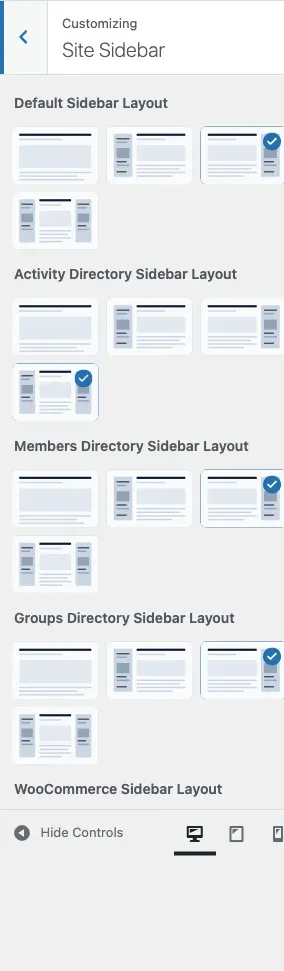
What Is Sticky Sidebar?
Section titled “What Is Sticky Sidebar?”A sticky sidebar “follows” users as they scroll down the page. When enabled, your sidebar widgets remain visible in the viewport, making them accessible at all times. This is perfect for:
- Navigation menus
- Search boxes
- Contact forms
- Call-to-action buttons
- Shopping carts
- Course progress indicators
What You Can Do
Section titled “What You Can Do”- Enable or disable sticky behavior globally
- Sidebar automatically stops at footer
- Works with left, right, or both sidebars
- Adjusts automatically for different screen sizes
- Disabled on mobile devices for better usability
Visual Example
Section titled “Visual Example”WITHOUT STICKY SIDEBAR: WITH STICKY SIDEBAR:
┌─────────────┬──────────┐ ┌─────────────┬──────────┐│ │ │ │ │ ││ Content │ Sidebar │ │ Content │ Sidebar ││ │ │ │ │ (Fixed) │├─────────────┤ │ ├─────────────┤ ││ │ │ │ │ ││ Content │ (gone │ │ Content │ Sidebar ││ │ above │ │ │ (Still ││ │ fold) │ │ │ visible) │├─────────────┤ │ ├─────────────┤ ││ │ │ │ │ ││ Content │ │ │ Content │ Sidebar ││ │ │ │ │ (Follows)│└─────────────┴──────────┘ └─────────────┴──────────┘ ↑ User scrolled ↑ Sidebar follows Sidebar is gone Sidebar stays visibleHow Sticky Sidebar Works
Section titled “How Sticky Sidebar Works”Desktop Behavior
Section titled “Desktop Behavior”When you scroll down:
- Sidebar follows your scroll position
- Stays visible within the browser viewport
- Stops when it reaches the footer
- Scrolls with the page when footer is visible
Mobile Behavior
Section titled “Mobile Behavior”On mobile devices (under 768px width):
- Sticky behavior is automatically disabled
- Sidebar appears below content (normal flow)
- Prevents sidebar from covering content
- Improves mobile usability
Enable Sticky Sidebar
Section titled “Enable Sticky Sidebar”Method 1: WordPress Customizer
Section titled “Method 1: WordPress Customizer”- Log in to your WordPress dashboard
- Go to Appearance → Customize
- Navigate to the Site Sidebar section
- Find the Sticky Sidebar ? option
- Toggle the switch to Yes
- Click Publish
Method 2: Quick Settings
Section titled “Method 2: Quick Settings”- While logged in, visit your site
- Click Customize in the admin bar
- Go to the Site Sidebar section
- Enable Sticky Sidebar ?
- Click Publish
Settings Reference
Section titled “Settings Reference”Sticky sidebar is a single on/off toggle - there is no offset, distance, or per-page setting.
| Option | Key | Default | Description |
|---|---|---|---|
| Sticky Sidebar ? | sticky_sidebar_option |
On (Yes) | Makes sidebars follow scroll on desktop |
Where Sticky Works
Section titled “Where Sticky Works”Sticky sidebar works on all pages with sidebars:
Supported Page Types
Section titled “Supported Page Types”- Blog posts
- Pages
- Archives
- Category pages
- Tag pages
- Search results
- Custom post types
Plugin-Specific Pages
Section titled “Plugin-Specific Pages”- BuddyPress: Activity, members, groups directories
- WooCommerce: Shop, product pages
- bbPress: Forum pages
- LearnDash: Course archives
- LearnPress: Course pages
- LifterLMS: Course archives
- FluentCart: Product pages
Where Sticky Doesn’t Work
Section titled “Where Sticky Doesn’t Work”Sticky sidebar is disabled on:
- Mobile devices (under 768px)
- Full-width page templates
- Pages with “No Sidebar” layout
- 404 error pages
- Some custom page templates
Browser Compatibility
Section titled “Browser Compatibility”Sticky sidebar works in all modern browsers:
- Chrome 90+
- Firefox 88+
- Safari 14+
- Edge 90+
- Opera 76+
Older browsers will show the sidebar in normal (non-sticky) mode.
Performance Considerations
Section titled “Performance Considerations”Impact on Site Speed
Section titled “Impact on Site Speed”Sticky sidebar has minimal performance impact:
Good:
- Uses native CSS when possible
- JavaScript only for advanced positioning
- No external library dependencies
- Optimized scroll events
Best Practices:
- Keep sidebar widgets lightweight
- Avoid heavy images in sticky sidebars
- Limit number of widgets (3-5 recommended)
- Use caching plugins
Long Sidebars
Section titled “Long Sidebars”If your sidebar is longer than the screen height:
- Scrollable Sidebar: Sidebar scrolls independently
- Smart Positioning: Shows top of sidebar initially
- Footer Stop: Sidebar stops at footer regardless of height
Customization Tips
Section titled “Customization Tips”Ideal Widget Height
Section titled “Ideal Widget Height”For best results, keep sticky sidebar height reasonable:
Recommended:
- 3-5 widgets maximum
- Total height: 600-1000px
- Leave room for footer
Not Recommended:
- 10+ widgets in sticky sidebar
- Very tall widgets (over 1500px)
- Infinite scrolling widgets
Widget Recommendations for Sticky Sidebars
Section titled “Widget Recommendations for Sticky Sidebars”Great for sticky sidebars:
- Search box
- Navigation menu
- Contact form
- Social media links
- Call-to-action button
- Newsletter signup
- Shopping cart (e-commerce)
Not ideal for sticky sidebars:
- Very long lists
- Large images
- Video widgets
- Infinite scroll feeds
- Heavy widgets with many queries
Troubleshooting
Section titled “Troubleshooting”Sidebar Isn’t Sticking
Section titled “Sidebar Isn’t Sticking”Check these settings:
-
Sticky Sidebar is enabled
- Go to Customize → Site Sidebar
- Verify Sticky Sidebar ? is set to “Yes”
-
Sidebar layout is not “None”
- Check Sidebar Layout setting
- Must be “Left”, “Right”, or “Both”
-
Page has widgets
- Go to Appearance → Widgets
- Add at least one widget to the sidebar
-
Not on mobile device
- Sticky is disabled under 768px width
- Test on desktop or tablet
-
Browser console errors
- Press F12 to open developer tools
- Check for JavaScript errors
- Disable conflicting plugins
Sidebar Overlaps Footer
Section titled “Sidebar Overlaps Footer”If sidebar extends over footer content:
- Theme Update: Update to latest theme version
- Cache Clear: Clear all caches (site, browser, CDN)
- Plugin Conflict: Disable other sticky plugins
- Footer Height: Ensure footer has content
Sidebar Jumps or Flickers
Section titled “Sidebar Jumps or Flickers”Possible causes:
- CSS Conflicts: Another plugin may have conflicting styles
- JavaScript Errors: Check browser console for errors
- Heavy Widgets: Reduce number of widgets
- Slow Server: Improve hosting performance
Solutions:
- Clear all caches
- Deactivate plugins one-by-one to find conflict
- Reduce sidebar widgets
- Update theme and plugins
Sidebar Doesn’t Work on Specific Pages
Section titled “Sidebar Doesn’t Work on Specific Pages”Some page templates override sidebar behavior:
- Full-Width Template: Choose different page template
- Custom Page Builder: Page builders may disable sidebars
- Plugin Override: Some plugins hide sidebars
- Theme Settings: Check per-page sidebar settings
Mobile Optimization
Section titled “Mobile Optimization”Why Sticky Is Disabled on Mobile
Section titled “Why Sticky Is Disabled on Mobile”Mobile devices need different behavior:
Reasons:
- Limited screen height
- Sidebars stack below content
- Touch scrolling is different
- Prevents content blocking
- Better mobile UX
Mobile Sidebar Behavior
Section titled “Mobile Sidebar Behavior”On mobile devices:
- Sidebar appears below main content
- Full width layout for better readability
- Widgets stack vertically
- Normal scroll behavior
Mobile-Friendly Alternatives
Section titled “Mobile-Friendly Alternatives”Instead of sticky sidebar on mobile:
- Sticky Header: Keep navigation in header
- Floating Button: Add floating call-to-action
- Off-Canvas Menu: Use slide-out panel (see Side Panel Settings)
- Bottom Bar: Sticky footer bar for important actions
Advanced Use Cases
Section titled “Advanced Use Cases”E-Commerce Sites
Section titled “E-Commerce Sites”Product Pages:
- Sticky cart widget
- Product filters
- Category navigation
- Featured products
Shop Archive:
- Price filters
- Category filters
- Sort options
- Special offers
Community Sites
Section titled “Community Sites”BuddyPress Pages:
- Online members widget
- Activity shortcuts
- Group filters
- Member search
Forum Pages:
- Forum navigation
- Recent topics
- Active users
- Quick post button
Learning Sites
Section titled “Learning Sites”Course Pages:
- Course navigation
- Progress tracker
- Course materials
- Related courses
Course Archive:
- Course filters
- Category navigation
- Instructor list
- Featured courses
Membership Sites
Section titled “Membership Sites”Member Areas:
- Member navigation
- Account shortcuts
- Support links
- Upgrade prompt
Protected Content:
- Access information
- Download links
- Membership status
- Renewal reminder
Best Practices
Section titled “Best Practices”- Keep sticky sidebar shorter than screen height
- Use 3-5 widgets for best performance
- Test on multiple screen sizes
- Place most important widgets at top
- Clear cache after making changes
- Test with real content
Don’ts
Section titled “Don’ts”- Don’t add too many widgets
- Don’t use very large images
- Don’t add infinite scrolling widgets
- Don’t forget to test on mobile
- Don’t stack multiple sticky elements
- Don’t ignore footer overlap
Common Questions
Section titled “Common Questions”Does sticky sidebar work with both left and right sidebars?
Section titled “Does sticky sidebar work with both left and right sidebars?”Yes! If you have both sidebars enabled, both will become sticky when the feature is turned on.
Can I make only one sidebar sticky in a two-sidebar layout?
Section titled “Can I make only one sidebar sticky in a two-sidebar layout?”Not through the theme settings. The sticky option applies to all sidebars. To customize this, you would need custom CSS or a child theme.
Will sticky sidebar slow down my site?
Section titled “Will sticky sidebar slow down my site?”No, the sticky sidebar feature is optimized for performance and has minimal impact on load times. However, heavy widgets in the sidebar can affect performance regardless of sticky behavior.
Can I disable sticky sidebar on specific pages?
Section titled “Can I disable sticky sidebar on specific pages?”Currently, sticky sidebar is a global setting. To disable it on specific pages, you would need:
- Custom CSS to hide it on specific page IDs
- A plugin that controls sticky behavior per page
- A child theme with custom code
Why does my sidebar stop scrolling mid-page?
Section titled “Why does my sidebar stop scrolling mid-page?”This is intentional! The sidebar stops when it reaches the footer to prevent overlapping footer content. This ensures footer information remains visible.
Can logged-out users see sticky sidebars?
Section titled “Can logged-out users see sticky sidebars?”Yes, sticky sidebar behavior is the same for all users (logged in and logged out). The sidebar content may differ based on widgets you’ve added for different user states.
Does sticky sidebar work with page builders?
Section titled “Does sticky sidebar work with page builders?”Compatibility depends on the page builder:
Compatible:
- WordPress Block Editor (Gutenberg)
- Elementor (with theme locations)
- Beaver Builder (with theme layouts)
May Need Adjustment:
- Page builders with custom layouts
- Builders that override theme sidebars
Test sticky sidebar with your page builder. If issues occur, use the page builder’s own sticky features.
Can I add a sticky widget to a non-sticky sidebar?
Section titled “Can I add a sticky widget to a non-sticky sidebar?”Yes, with a plugin like “Q2W3 Fixed Widget” or “Sticky Sidebar Widgets”. These plugins add sticky options to individual widgets, independent of theme sticky settings.
Related Settings
Section titled “Related Settings”- Sidebar Layouts - Choose sidebar position and layout
- Widget Areas - Manage sidebar widgets
- Side Panel Settings - Configure off-canvas menu
Need Help?
Section titled “Need Help?”If you need assistance with sticky sidebar:
Documentation:
- BuddyX Pro documentation
- WordPress sidebar guide
- Browser developer tools guide
Support:
- Email us at support@wbcomdesigns.com
- Support forum: https://wbcomdesigns.com/support/
- Knowledge base: https://docs.wbcomdesigns.com/docs/buddyx-theme/
Useful Plugins:
- Q2W3 Fixed Widget - Make individual widgets sticky
- Widget Options - Advanced widget control
- WP Sticky - Additional sticky options