

Permissions Compatibility
Solutions to permission errors, performance issues, plugin conflicts, theme compatibility, and post-migration problems.
Permission Issues
Section titled “Permission Issues”“You do not have permission” error
Section titled ““You do not have permission” error”An error message appears when trying to create or manage polls.
Solutions:
- Verify your user role has poll permissions in both “Poll User Roles” and “Who Can Create Polls”
- Ensure you are logged in with the correct account
- Clear browser cookies and log in again
Cannot edit a poll
Section titled “Cannot edit a poll”The edit button is missing or produces an error.
Solutions:
- Verify you are the original poll creator
- Polls with existing votes cannot be edited to maintain data integrity
- Administrators can edit polls from the WordPress admin area
Cannot delete a poll
Section titled “Cannot delete a poll”The delete button does not respond.
Solutions:
- Confirm you are the poll owner or an administrator
- Try deleting from the WordPress admin Posts list instead
- Contact a site administrator if you lack sufficient permissions
Performance Issues
Section titled “Performance Issues”Polls loading slowly
Section titled “Polls loading slowly”Pages with polls take a long time to load.
Solutions:
- Check if many large media files are attached to poll options
- Reduce image sizes and optimize media files
- Enable a caching plugin on your site
- Check your server resources and hosting plan
AJAX timeout errors
Section titled “AJAX timeout errors”Poll actions fail with a timeout message.
Solutions:
- Check server response times
- Increase the PHP
max_execution_timesetting - Disable other plugins temporarily to check for conflicts
- Review the server error logs for details
Compatibility Issues
Section titled “Compatibility Issues”Polls broken after a plugin update
Section titled “Polls broken after a plugin update”Features that previously worked now fail.
Solutions:
- Clear all caches including plugin cache, browser cache, and server cache
- Deactivate and reactivate WB Polls
- Check the browser console for JavaScript errors
- Review the changelog for any breaking changes in the update
Conflict with other plugins
Section titled “Conflict with other plugins”Polls work until another plugin is enabled.
Solutions:
- Disable the suspected plugin to confirm the conflict
- Check for duplicate jQuery loading
- Look for JavaScript errors in the browser console
- Report the conflict to WB Polls support with both plugin names and versions
Theme compatibility issues
Section titled “Theme compatibility issues”Polls display incorrectly or styles appear broken.
Solutions:
- Test with a default WordPress theme (such as Twenty Twenty-Four) to confirm the issue is theme-related
- Check for CSS conflicts using the browser inspector
- Verify the theme supports shortcodes
- Add custom CSS to your theme to fix specific styling issues
After a Site Migration
Section titled “After a Site Migration”Missing polls after migration
Section titled “Missing polls after migration”Polls disappear after moving your site to a new server or domain.
Solutions:
- Verify the database was fully migrated including all tables
- Check the
wp_postmetatable for poll meta data with_wbpoll_prefix keys - Ensure BuddyPress activity meta (
bp_activity_meta) was migrated for activity polls - Review migration logs for any errors during the process
Enabling Debug Mode
Section titled “Enabling Debug Mode”Enable WordPress debug mode to capture detailed error information:
define( 'WP_DEBUG', true );define( 'WP_DEBUG_LOG', true );define( 'WP_DEBUG_DISPLAY', false );Add these lines to your wp-config.php file. Check the wp-content/debug.log file for error details.
Getting Help
Section titled “Getting Help”Check the built-in FAQ for quick answers to common questions. Navigate to WP Admin > BuddyBoss > WB Polls > FAQ.
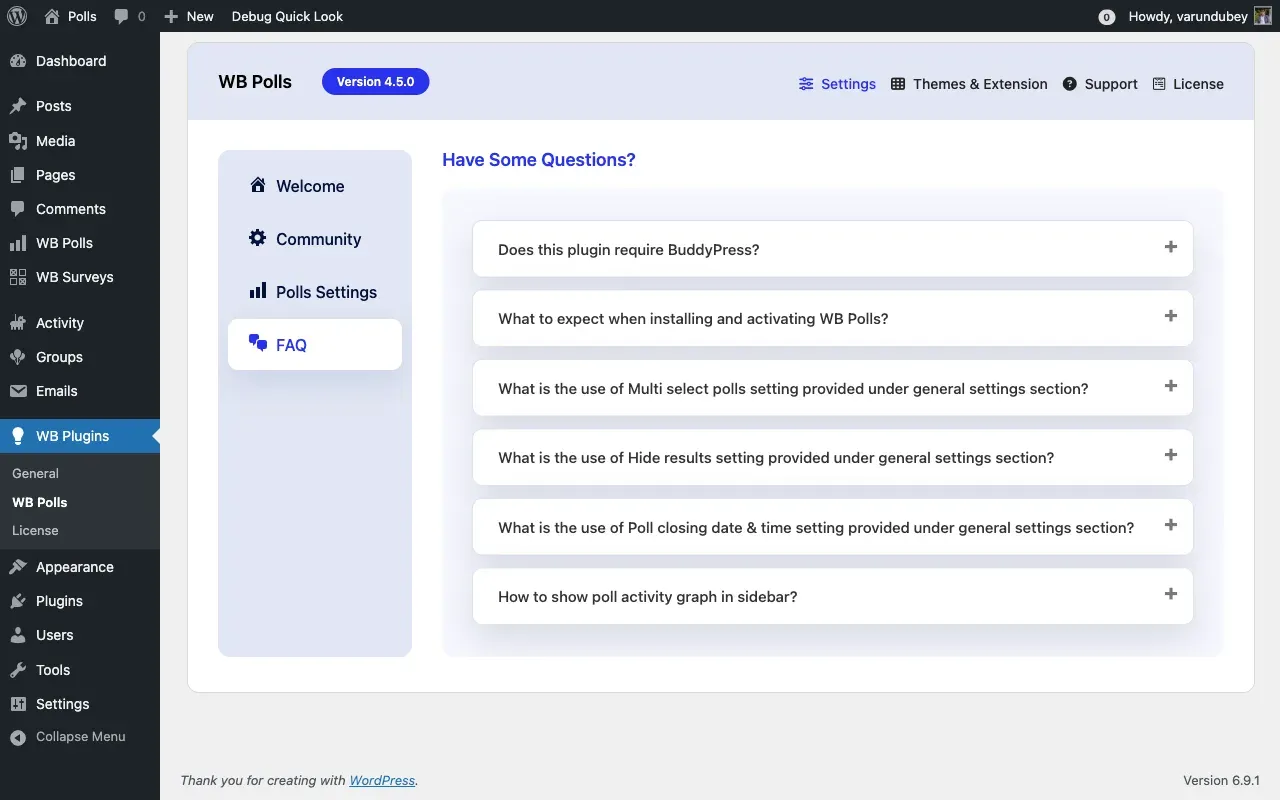
When contacting support, include the following information:
- WordPress version
- BuddyPress or BuddyBoss version
- WB Polls version
- PHP version
- Exact error messages
- Steps to reproduce the issue
- Screenshots if applicable
- Browser and device information