

Unique Identifier Feature
The Unique Identifier feature enhances member privacy by using secure random profile URLs instead of username-based URLs. This is particularly valuable for dating sites, private communities, therapy platforms, or any site where member anonymity is important.
What is the Unique Identifier?
Section titled “What is the Unique Identifier?”Instead of using usernames in profile URLs, the Unique Identifier feature generates a random hash for each member’s profile link.
Example:
- Standard URL:
https://example.com/members/john_doe/ - Unique Identifier URL:
https://example.com/members/aum5f8a3c9b1/
The random identifier is permanently tied to the user account and doesn’t change when the username changes.
Benefits of Using Unique Identifiers
Section titled “Benefits of Using Unique Identifiers”Enhanced Privacy
Section titled “Enhanced Privacy”Members can change their usernames without affecting their profile URL. This prevents others from tracking username changes or finding profiles based on known usernames.
Prevents Profile Stalking
Section titled “Prevents Profile Stalking”Random URLs make it impossible to guess or search for member profiles by username. This is especially important for:
- Dating and relationship sites
- Mental health and therapy communities
- Support groups and recovery platforms
- Private membership sites
- Anonymous discussion forums
Stable Profile Links
Section titled “Stable Profile Links”Even when users change their usernames, their profile URL remains the same. This means:
- Shared profile links continue to work
- Bookmarks don’t break
- Search engine rankings are preserved
- External references remain valid
Professional Appearance
Section titled “Professional Appearance”Random identifiers can give your site a more professional, enterprise-level feel similar to platforms like LinkedIn or modern social networks.
Availability
Section titled “Availability”Important: The Unique Identifier feature is only available for BuddyPress sites. It does not work with BuddyBoss Platform.
Requirements:
- BuddyPress 5.0 or higher installed and active
- Advanced Username Manager plugin activated
How to Enable Unique Identifier
Section titled “How to Enable Unique Identifier”Step 1: Access General Settings
Section titled “Step 1: Access General Settings”- Log in to your WordPress admin dashboard
- Navigate to WB Plugins → Advanced Username Manager
- Click the General Settings tab
Step 2: Change Profile Link Format
Section titled “Step 2: Change Profile Link Format”- Scroll down to the User Profile Link Format option
- Select Unique Identifier from the dropdown menu
- Click Save Changes at the bottom
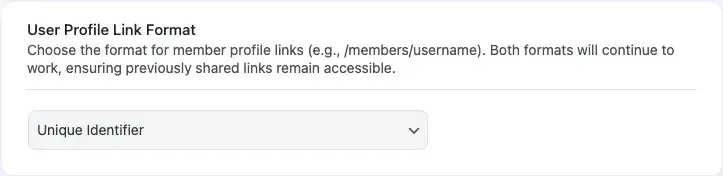
Step 3: Generate Identifiers
Section titled “Step 3: Generate Identifiers”After enabling this feature, the plugin automatically generates unique identifiers for all existing users when you save the settings. The generation processes users in batches of 50.
Process:
- Identifiers are generated in batches of 50 users
- Each identifier is a 12-character random hash
- The prefix “aum” is added by default
- Identifiers are cached for performance
How Unique Identifiers Work
Section titled “How Unique Identifiers Work”Identifier Format
Section titled “Identifier Format”Each unique identifier follows this format:
aum + random hashExample: aum5f8a3c9b1d4e6
The identifier is:
- 12 characters long (including the prefix)
- Lowercase letters and numbers only
- Permanently unique per user
- Stored in user metadata as
aum_profile_slug
URL Resolution
Section titled “URL Resolution”When someone visits a profile URL with a unique identifier:
- BuddyPress checks if the URL contains a unique identifier
- The plugin looks up which user owns that identifier
- The profile loads with the correct user data
- The username displayed is the current username (not the identifier)
URL Behavior
Section titled “URL Behavior”When Unique Identifier mode is active, profile URLs use the identifier:
- Unique identifier URL:
https://example.com/members/aum5f8a3c9b1/
Important: Username-based URLs (e.g., /members/john_doe/) only work if the username hasn’t changed. Once a user changes their username, the old username-based URL will no longer resolve. The unique identifier URL always works regardless of username changes, which is the primary benefit of this feature.
BuddyPress Profile Slug Behavior
Section titled “BuddyPress Profile Slug Behavior”When Unique Identifier is Enabled
Section titled “When Unique Identifier is Enabled”Profile URLs will display the random identifier:
https://example.com/members/aum5f8a3c9b1/https://example.com/members/aum5f8a3c9b1/activity/https://example.com/members/aum5f8a3c9b1/profile/https://example.com/members/aum5f8a3c9b1/friends/When Username Format is Selected
Section titled “When Username Format is Selected”Profile URLs will use the actual username:
https://example.com/members/john_doe/https://example.com/members/john_doe/activity/https://example.com/members/john_doe/profile/https://example.com/members/john_doe/friends/Switching Between Formats
Section titled “Switching Between Formats”You can switch between Username and Unique Identifier formats at any time.
Switching to Unique Identifier
Section titled “Switching to Unique Identifier”- Go to General Settings
- Change User Profile Link Format to Unique Identifier
- Click Save Changes
Effect:
- New profile links use unique identifiers
- Identifiers are generated for users who don’t have them
- Username-based links work only if the username hasn’t changed
Switching Back to Username
Section titled “Switching Back to Username”- Go to General Settings
- Change User Profile Link Format to Username
- Click Save Changes
Effect:
- Profile links revert to using usernames
- Unique identifier links still work
- Identifiers are preserved in the database
Important: Unique identifiers are never deleted, even if you switch back to username format. This ensures old links always work.
Cache Management
Section titled “Cache Management”The plugin uses WordPress object caching to optimize performance:
- Cache Key:
aum_user_profile_slug_{user_id} - Cache Group:
aum - Cache Duration: 1 hour (3600 seconds)
When a username changes, the plugin automatically clears relevant caches to ensure profile URLs work correctly.
Customizing the Identifier Prefix
Section titled “Customizing the Identifier Prefix”Developers can customize the “aum” prefix using the filter hook:
add_filter( 'advanced_username_manager_profile_slug_prefix', function( $prefix ) { return 'mysite'; // Change to your preferred prefix} );This would generate identifiers like: mysite5f8a3c9b1
See the Hooks and Filters documentation for more customization options.
Use Cases and Examples
Section titled “Use Cases and Examples”Use Case 1: Dating Website
Section titled “Use Case 1: Dating Website”Scenario: Members want to keep their profiles private and change display names frequently.
Solution:
- Enable Unique Identifier format
- Allow username changes with 7-day cooldown
- Members can share stable profile URLs while maintaining privacy
Benefit: Even if someone discovers a member’s current username, they can’t find the profile URL if the member changes their username.
Use Case 2: Support Group Community
Section titled “Use Case 2: Support Group Community”Scenario: Anonymous support group where members need complete privacy.
Solution:
- Enable Unique Identifier format
- Use random usernames or allow frequent changes
- Disable member directory listings
Benefit: Profile URLs don’t reveal any personal information or usernames.
Use Case 3: Professional Network
Section titled “Use Case 3: Professional Network”Scenario: Business networking site similar to LinkedIn.
Solution:
- Enable Unique Identifier format
- Restrict username changes to 30-day cooldown
- Use identifiers for clean, professional URLs
Benefit: Stable, professional-looking URLs that don’t change when users update their profile information.
Frequently Asked Questions
Section titled “Frequently Asked Questions”Do I need to enable this feature?
Section titled “Do I need to enable this feature?”No, it’s completely optional. If you don’t enable it, profile URLs will use usernames as normal.
Can I use this with BuddyBoss Platform?
Section titled “Can I use this with BuddyBoss Platform?”No, this feature is only available for BuddyPress. BuddyBoss handles profile slugs differently and this feature is not compatible.
What happens to old profile links when I enable this?
Section titled “What happens to old profile links when I enable this?”When you enable unique identifiers, the profile URL switches to the identifier format. Username-based URLs still work as long as the username hasn’t changed. After a username change, only the unique identifier URL is guaranteed to work.
Can users see their unique identifier?
Section titled “Can users see their unique identifier?”Yes, it appears in their profile URL. However, the identifier doesn’t reveal any personal information.
Will this affect SEO?
Section titled “Will this affect SEO?”No. Search engines can still crawl and index member profiles. The unique identifier becomes the new canonical URL for the profile.
Can I change the identifier format or length?
Section titled “Can I change the identifier format or length?”The length and format are fixed (12 characters with “aum” prefix) for security and consistency. Developers can customize the prefix using a filter hook.
What happens if I deactivate the plugin?
Section titled “What happens if I deactivate the plugin?”The unique identifiers remain in the database. Profile URLs will revert to standard BuddyPress behavior (using usernames).
How are identifiers generated?
Section titled “How are identifiers generated?”The plugin uses a SHA1 hash of the user ID plus a random 40-character password, then takes the first 12 characters. This ensures each identifier is cryptographically unique.
Can two users have the same identifier?
Section titled “Can two users have the same identifier?”No. The generation process ensures each identifier is unique. The plugin checks for existing identifiers before assigning new ones.
Performance Considerations
Section titled “Performance Considerations”The Unique Identifier feature is optimized for performance:
- Bulk Generation: Processes users in batches of 50 to prevent memory issues
- Object Caching: Uses WordPress object cache to minimize database queries
- One-Time Generation: Identifiers are generated once and stored permanently
- Efficient Lookups: Database queries are optimized and cached
For large sites, identifiers are generated in batches of 50 users at a time when settings are saved. Very large sites (10,000+ members) may experience a delay while identifiers are generated.
Troubleshooting
Section titled “Troubleshooting”Unique Identifier Option Not Showing
Section titled “Unique Identifier Option Not Showing”Cause: You’re using BuddyBoss Platform or BuddyPress is not active.
Solution: This feature only works with BuddyPress (not BuddyBoss).
Profile Links Still Show Usernames
Section titled “Profile Links Still Show Usernames”Cause: Setting wasn’t saved or cache needs clearing.
Solution:
- Verify the setting is saved in General Settings
- Clear your site cache
- Clear BuddyPress cache (if using a caching plugin)
- Test in a private/incognito browser window
Old Identifier Links Not Working
Section titled “Old Identifier Links Not Working”Cause: User’s identifier wasn’t generated or database issue.
Solution:
- Deactivate and reactivate the plugin to trigger identifier generation
- Check if the user has the
aum_profile_slugmeta field in the database - Contact support if the issue persists
Related Documentation
Section titled “Related Documentation”- General Settings - Configure all plugin options
- BuddyPress Integration - Learn about BuddyPress features
- Hooks and Filters - Customize identifier behavior
- Troubleshooting Guide - Fix common issues