

Backgrounds Settings
Backgrounds Settings
Section titled “Backgrounds Settings”Go to WP Admin → BuddyPress Quotes → General to manage all background types.
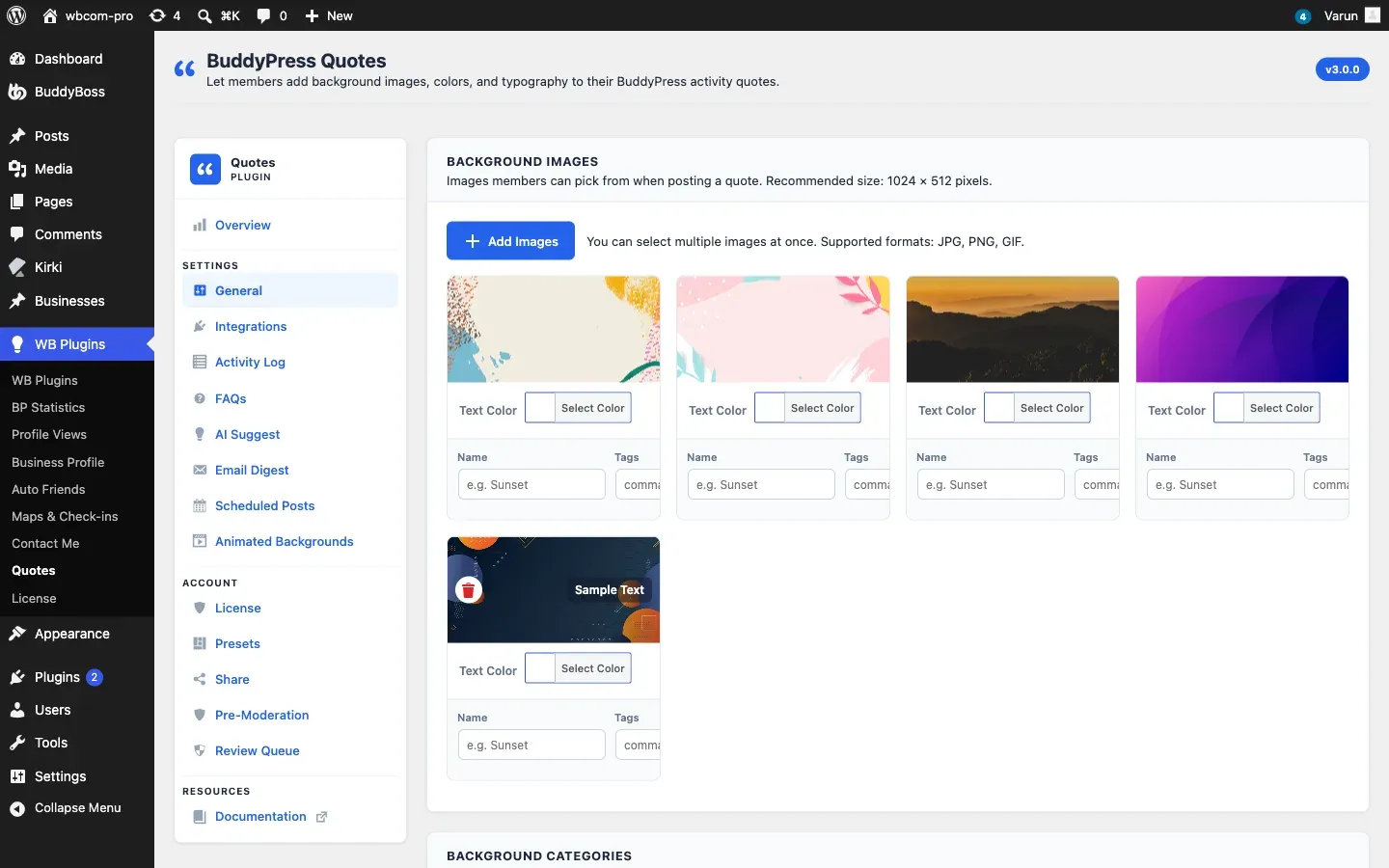
Background Images
Section titled “Background Images”These are the photo or illustration backgrounds members see in the picker.
Recommended image size: 1024 × 512 pixels. The plugin scales images inside the card, but starting at this ratio prevents blurry results on high-density screens.
Supported formats: JPG, PNG, GIF.
Adding Images
Section titled “Adding Images”- Click Add Images.
- Select one or more files from the WordPress media library (or upload new ones).
- Each image appears as a card in the grid. Fill in the fields for each card:
| Field | Purpose | Notes |
|---|---|---|
| Name | Label shown to members in the picker | Keep it short and descriptive |
| Tags | Comma-separated search keywords | Members can search by tag |
| Category | Assigns the image to a category tab | Must match a category name defined in the Categories field below |
| Text color | Force a specific text color when this image is used | Leave blank to let the plugin auto-detect based on background brightness |
Removing an Image
Section titled “Removing an Image”Click the × button on an image card, then save settings. This removes the background from the picker but does not delete the file from your media library.
Solid and Gradient Color Backgrounds
Section titled “Solid and Gradient Color Backgrounds”Color backgrounds let you define two-color entries: a background fill and an inverted (text) color.
Adding a Color Background
Section titled “Adding a Color Background”- Scroll to the Color Backgrounds section.
- Click Add Color.
- Fill in each row:
| Field | Purpose |
|---|---|
| Background color | The card fill (hex color, color picker, or CSS gradient string) |
| Text color | The text color overlaid on this background |
| Name | Label shown to members |
| Tags | Search keywords |
| Category | Category tab assignment |
To create a gradient background, enter a full CSS gradient string in the background color field, for example:
linear-gradient(135deg, #667eea 0%, #764ba2 100%)The picker renders the gradient exactly as specified.
Background Categories
Section titled “Background Categories”Categories create tabs in the member-facing picker, making it easier to navigate a large library.
- Add category names (one per line) in the Background Categories field.
- A category tab only appears in the picker when two or more categories have been defined.
- Assign images and colors to categories using the Category field on each background card.
- An All tab is always shown so members can browse the full library.
Random Selection
Section titled “Random Selection”Turn on Allow random background selection to let the plugin choose a background automatically for members who do not want to pick one. The random button appears in the picker as a dice icon. This setting is on by default.
Typography
Section titled “Typography”These settings control how quote text looks on all backgrounds.
| Option | Default | Description |
|---|---|---|
| Font family | inherit |
The font used for quote text. inherit uses the site’s body font. |
| Font size | 18 (px) | Base font size for quote text |
| Font weight | Normal | Normal or Bold |
| Line height | 1.4 | Line spacing multiplier |
| Text alignment | Center | Left, Center, or Right |
| Letter spacing | 0 | Additional letter spacing in pixels |
| Text shadow | Off | Adds a subtle drop shadow to improve readability on busy images |
| Uppercase | Off | Forces all quote text to uppercase |
| Italic | Off | Renders quote text in italic |
Typography settings apply globally to all background types. You cannot set different typography per background.