

API and Performance
API and Performance
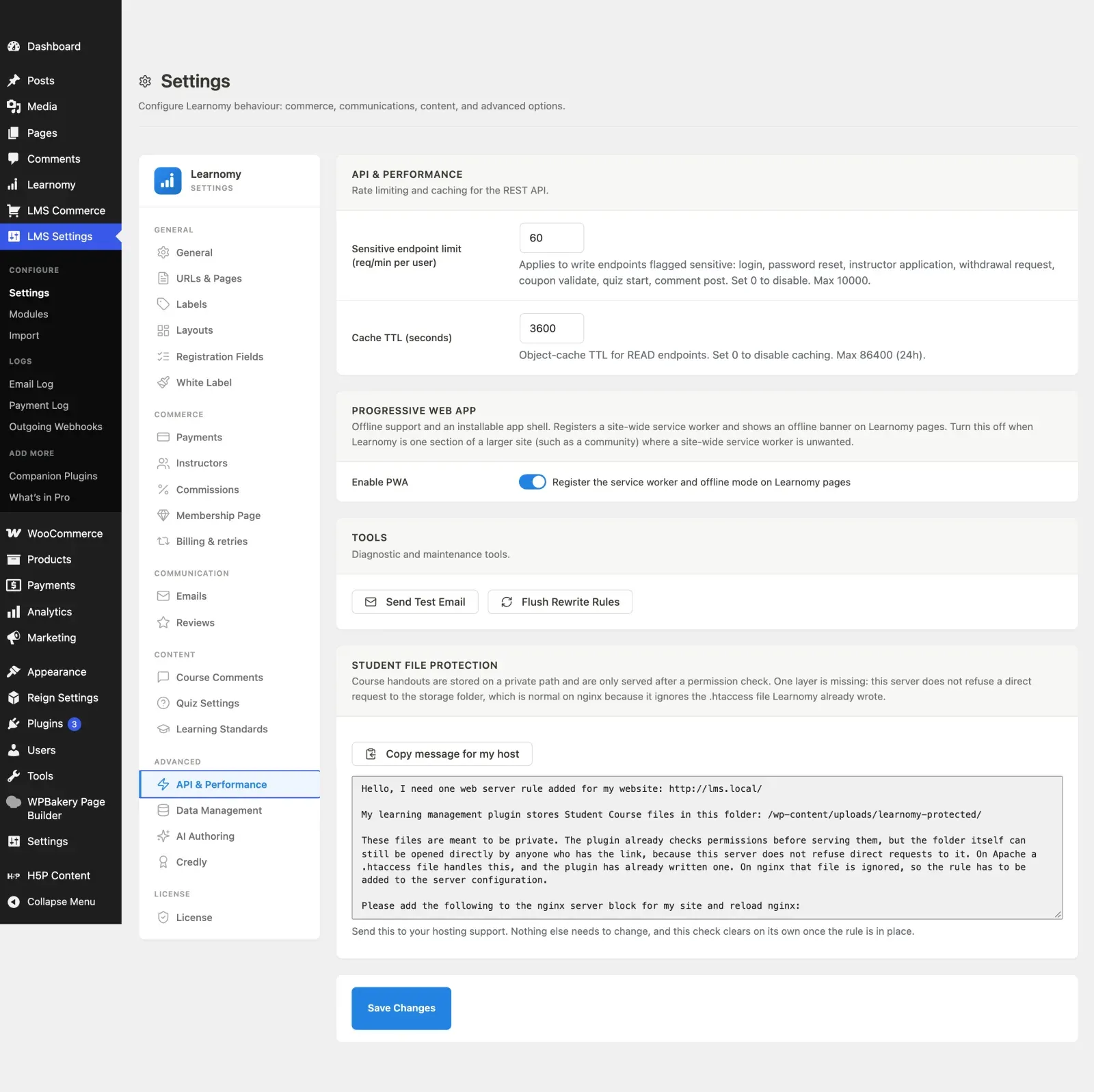
Section titled “API and Performance”The API and Performance section controls rate limiting and caching for the REST API, the Progressive Web App (offline) mode, and two maintenance tools. It lives under the Advanced group in the Settings sidebar.
What you can do
Section titled “What you can do”- Set a per-user rate limit on sensitive write endpoints (login, password reset, and more).
- Set the object-cache lifetime for read endpoints, or disable caching entirely.
- Turn the Progressive Web App (service worker and offline mode) on or off.
- Send a test email to confirm your mail configuration works.
- Flush WordPress rewrite rules without visiting Settings > Permalinks.
How to use it
Section titled “How to use it”Step 1 – open API and Performance
Section titled “Step 1 – open API and Performance”Go to LMS Settings and click API & Performance in the sidebar.
Step 2 – set the API limits
Section titled “Step 2 – set the API limits”In the API & Performance card:
- Sensitive endpoint limit (req/min per user) – the per-minute cap for write endpoints flagged sensitive: login, password reset, instructor application, withdrawal request, coupon validate, quiz start, and comment post. Set to 0 to disable. Maximum 10000.
- Cache TTL (seconds) – the object-cache lifetime for read endpoints. Set to 0 to disable caching. Maximum 86400 (24 hours).
Step 3 – choose whether to enable the PWA
Section titled “Step 3 – choose whether to enable the PWA”In the Progressive Web App card, toggle Register the service worker and offline mode on Learnomy pages. Turn this off when Learnomy is only one section of a larger site (such as a community) where a site-wide service worker is unwanted.
Step 4 – save
Section titled “Step 4 – save”Click Save Changes to store the settings above.
Step 5 – use the Tools (optional)
Section titled “Step 5 – use the Tools (optional)”The Tools card has two buttons that run immediately:
- Send Test Email – dispatches a test notification to the admin email address. Use this to prove mail works before relying on notifications; see Emails and Announcements for why WordPress usually needs an SMTP plugin first.
- Flush Rewrite Rules – regenerates permalink rules without a visit to Settings > Permalinks.
Settings and options
Section titled “Settings and options”| Field | Option key | Notes |
|---|---|---|
| Sensitive endpoint limit | api_rate_limit |
Requests per minute per user. 0 disables. Max 10000. Default 60. |
| Cache TTL (seconds) | cache_ttl |
Read-endpoint object-cache lifetime. 0 disables. Max 86400. Default 3600. |
| Enable PWA | enable_pwa |
Toggle. Defaults to on when the key is unset. |
The Tools buttons are one-off actions, not saved settings.
For developers
Section titled “For developers”\Learnomy\pwa_enabled()– resolves whether the PWA is active, combining theenable_pwasetting with the filter below.learnomy_enable_pwa– filter that overrides the PWA on/off state in code. When false, the service-worker registration,/learnomy-sw.js, the manifest, and the offline routes are not loaded.