

Video Script - 2-Minute Product Tour
A scripted, scene-by-scene walkthrough showing what a real Listora directory looks like and what site owners + vendors + visitors can do. Hand to a voiceover artist + screen-recording editor.
Total length: 1:55 - 2:05 Audience: prospective site owners / agencies evaluating directory plugins Hook: “Watch a directory go from empty site to first paid listing in two minutes.”
SCENE 1 - Hook (0:00 - 0:08)
Section titled “SCENE 1 - Hook (0:00 - 0:08)”On screen: Quick montage - 3 different directory homepages flickering by (food guide, real estate, job board). Voiceover:
Every great directory starts as an idea. The hard part is everything between idea and a site real businesses want to list on. Watch a directory go from empty WordPress install to first paid listing - in two minutes.
SCENE 2 - Setup Wizard (0:08 - 0:25)
Section titled “SCENE 2 - Setup Wizard (0:08 - 0:25)”On screen: Screen-record of the Listora Setup Wizard, ticking through 4 steps in fast-forward, finishing on a populated Directory page with 20 demo listings. Voiceover:
Download WB Listora from wbcomdesigns.com. The setup wizard walks you through your listing types, taxonomies, default pages, and loads demo content for the verticals you pick. By minute three you have a working directory with real-looking restaurants, hotels, or whatever vertical you chose. Real listings, real reviews, real categories - not lorem ipsum.
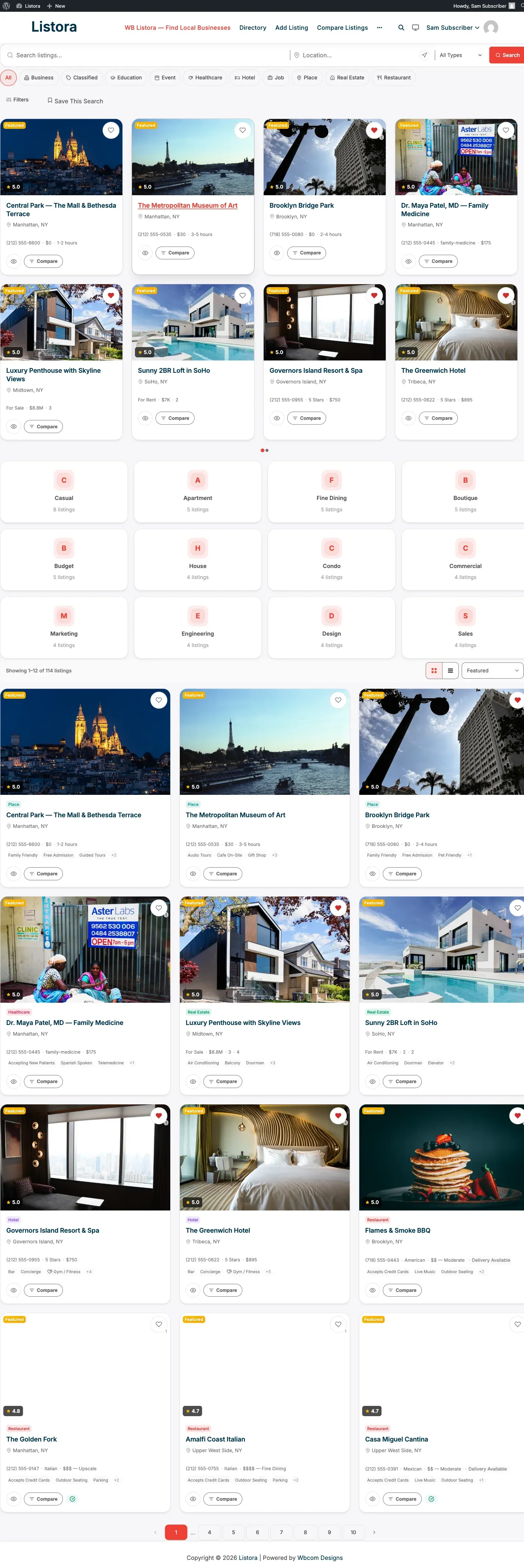
Cut to: home-frontend.png style shot - the live directory with featured carousel + categories grid + listing grid below.
SCENE 3 - What the visitor experiences (0:25 - 0:50)
Section titled “SCENE 3 - What the visitor experiences (0:25 - 0:50)”On screen: Visitor walkthrough - homepage → search “italian” → Near Me click → click into a listing → reviews tab with multi-criteria stars + photos → Add to Compare. Voiceover:
Visitors get what they expect from a directory in 2026: keyword search that suggests as you type, Near-Me geolocation, faceted filters in the sidebar, and a detail page with everything - gallery, hours, services, reviews with photos, map, and a contact form that emails the owner without ever exposing their address. They can save favorites, compare 2-4 listings side by side, and write reviews with multi-criteria ratings - food, service, value, ambiance - each scored separately.
Reference shots: search-and-filters.png, multi-criteria-reviews.png, compare-listings.png.
SCENE 4 - Vendor dashboard (0:50 - 1:15)
Section titled “SCENE 4 - Vendor dashboard (0:50 - 1:15)”On screen: Switch to a logged-in vendor on /my-listings/. Show the dashboard tabs - Listings, Reviews, Favorites, Saved Searches, Needs, My Responses. Demonstrate one Renew click + the credit deduction.
Voiceover:
Vendors never see wp-admin. They get a clean frontend dashboard at
/my-listings/. They can edit any owned listing, reply to reviews, renew with one click, feature their listing for credits, deactivate temporarily, and see incoming leads. Pro adds saved searches with email alerts and a Needs tab showing buyer requests that match their type and location.
Reference shots: listing-lifecycle-dashboard.png, user-dashboard.png.
SCENE 5 - Monetization (1:15 - 1:40)
Section titled “SCENE 5 - Monetization (1:15 - 1:40)”On screen: Admin walkthrough of Pricing Plans page + Credits + Coupons + a vendor checkout flow on /buy-credits/. End on the Transactions admin page with several real entries.
Voiceover:
Pro adds the business model. Define pricing plans - free Basic, paid Featured, premium Premium - with credit costs, durations, and entitlements. Vendors buy credit packs through any payment integration: Stripe, PayPal, WooCommerce, MemberPress, PMPro - bridged out of the box. Credits hold-and-commit on plan activation, so a half-paid listing never half-publishes. Add coupons. Track every transaction in the audit log.
Reference shots: pricing-plans-admin.png, credits-and-plans.png, buy-credits-page.png, transactions.png, coupons.png.
SCENE 6 - The reverse marketplace (1:40 - 1:55)
Section titled “SCENE 6 - The reverse marketplace (1:40 - 1:55)”On screen: Quick cut to the Needs Marketplace - buyer-posted requests in a grid, then a vendor clicking one and submitting a quote. Voiceover:
And one more thing - Pro includes the Needs Marketplace. Instead of vendors waiting to be found, buyers post what they need - “caterer for 200 guests in Brooklyn” - and matching businesses respond with quotes. A second flywheel built right into the directory.
Reference shot: needs-marketplace.png.
SCENE 7 - Call to action (1:55 - 2:05)
Section titled “SCENE 7 - Call to action (1:55 - 2:05)”On screen: Logo + URL “Free + Pro at wbcomdesigns.com” - short, punchy. Voiceover:
Free + Pro at wbcomdesigns.com. Run your directory the way you want - without the limits of a plugin built ten years ago. WB Listora.
Production notes
Section titled “Production notes”- Pace: Each scene transition should be 0.3-0.5s with a soft chime.
- Music: Mid-tempo, optimistic, no vocals. Royalty-free options: Epidemic Sound’s “Confidence” library.
- Voice: Neutral US English, conversational pace (~165 words/min). Avoid hype voice.
- Color treatment: Use the Listora brand palette - primary ocean blue with coral accent.
- Captions: Burned-in captions for every voiceover line (auto-play with sound off is the dominant social viewing pattern).
- Aspect ratios: Master at 16:9 for YouTube + landing page. Re-cut at 9:16 for Reels / Shorts (just scenes 2, 3, and 7). Re-cut at 1:1 for LinkedIn (scenes 1, 4, 5).
Asset checklist (everything captured already)
Section titled “Asset checklist (everything captured already)”| Scene | Asset |
|---|---|
| 2 | setup-wizard-step1.png, home-frontend.png |
| 3 | search-and-filters.png, multi-criteria-reviews.png, compare-listings.png, business-claims.png |
| 4 | listing-lifecycle-dashboard.png, user-dashboard.png, saved-searches.png |
| 5 | pricing-plans-admin.png, credits-and-plans.png, buy-credits-page.png, transactions.png, coupons.png |
| 6 | needs-marketplace.png |
Related
Section titled “Related”- Hero Pitch - written versions of the same narrative.
- Video Scripts - Per Feature - 60-second clips per major Pro feature.
- Landing Headlines - pull copy from the script for landing-page headlines.