

Activity Feed
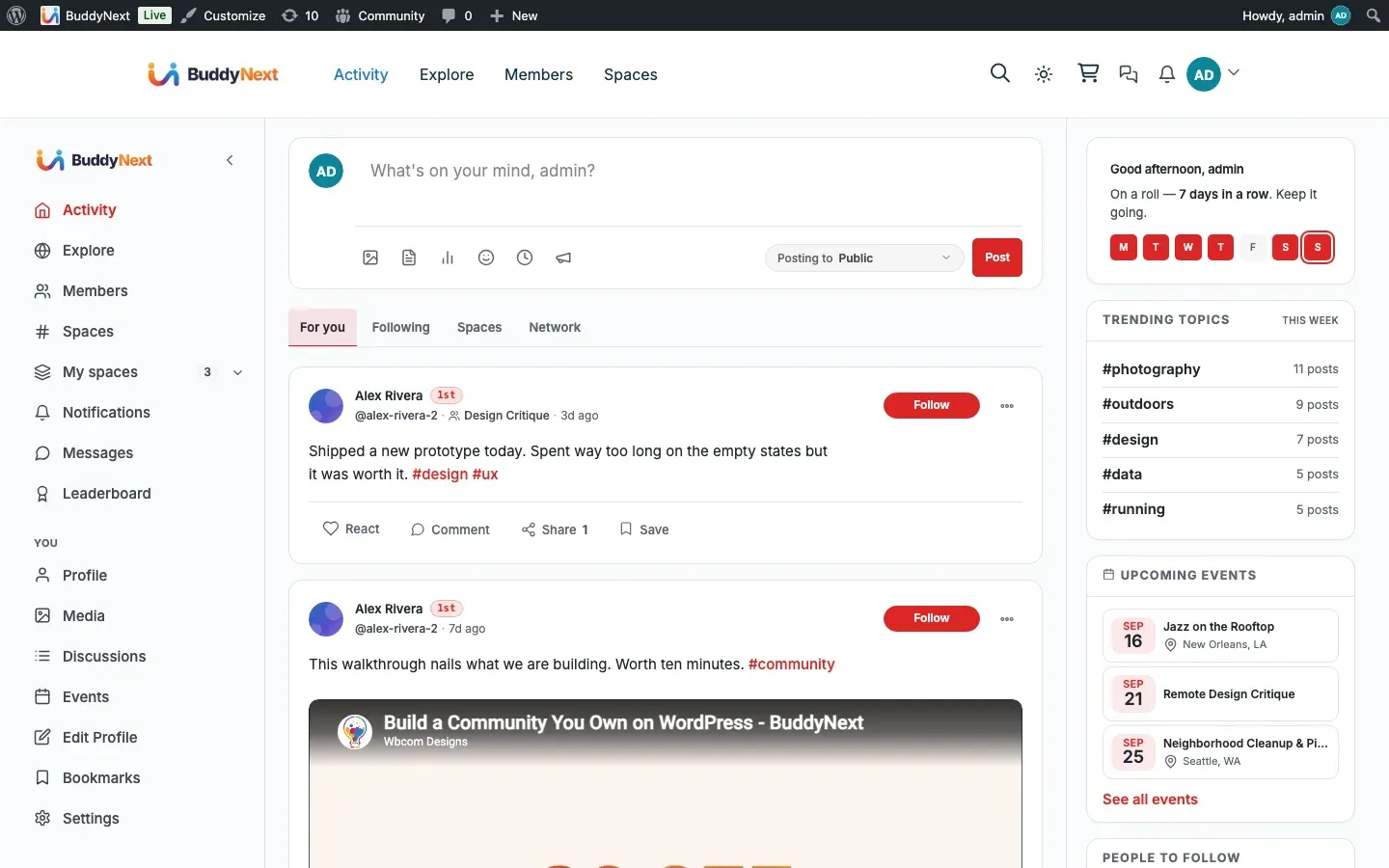
The Activity Feed is the stream of posts members see when they open your community. It comes in two views: the personalized Home feed (signed-in members) and the public Explore feed (open to anyone, including logged-out visitors). Each post can be opened on its own permalink page.
Why use it
Section titled “Why use it”The feed is the heartbeat of the community. It is the first thing a member sees, the place conversations start, and the surface that brings people back day after day. Without a feed, a community is a directory of profiles with nothing happening in the middle.
For members, the feed answers “what is new and worth my attention right now” without making them hunt through profiles or spaces. The filter tabs let one person follow close contacts while another scans the whole network, so the same feed serves a quiet lurker and a power user equally.
For owners, the feed is your retention engine and your front door. The public Explore view gives search engines and first-time visitors something real to land on, which turns a closed community into a discoverable one. You decide whether that front door is open and what the default audience for new posts is, so the feed matches whether you run an open public community or a members-only space.
How it works (for members)
Section titled “How it works (for members)”The Home feed and its filter tabs
Section titled “The Home feed and its filter tabs”When a signed-in member opens the activity page, they land on the Home feed with a set of filter tabs across the top. Each tab is a different slice of the same stream:
| Tab | What it shows |
|---|---|
| For you | A blended feed of the member’s own posts, posts from people they follow, posts in spaces they belong to, and posts under hashtags they follow. In the Pro version this tab is re-ranked by relevance. In Free it is ordered chronologically (with a light “connections-first” weighting). |
| Following | Posts from accounts the member follows. |
| Spaces | Posts from the spaces the member is a member of. |
| Network | Posts from the member’s accepted connections. |
Each tab carries a live count so members can see where new activity is. Switching tabs reloads that slice without leaving the page.
The “N new posts” pill
Section titled “The “N new posts” pill”While a member is reading, the feed quietly checks for new activity in the background (about once a minute, and only while the browser tab is in view to avoid wasted requests). When new posts have arrived above the current scroll position, a “N new posts” pill appears at the top. Clicking it loads the new posts into view. Members are never interrupted mid-read; they choose when to pull in what is new.
The count is capped at 99+, the way every mainstream feed caps it. A busy community reads as alive rather than overwhelming, and nobody acts on “3,412 new posts” differently than on “99+”.
Infinite scroll
Section titled “Infinite scroll”The feed loads a page of posts at a time. As a member scrolls toward the bottom, the next page loads and appends automatically, so reading is continuous without a “next page” click. This keeps the feed fast even in a large community because only what is on screen is ever loaded.
The announcement banner
Section titled “The announcement banner”An administrator can pin one announcement to the top of the feed. It shows as a banner above the stream. A member can dismiss it, and once dismissed it stays gone for that member. Announcements can also carry an expiry, after which they stop pinning on their own. See Post Composer for how announcements are created.
The Explore feed
Section titled “The Explore feed”Explore is the public, community-wide view. It surfaces public activity from across the whole community rather than a member’s personal follow graph. When the public Explore view is turned on, logged-out visitors can browse it too (they see a sign-in prompt to participate). Explore uses the same infinite scroll as Home. Only public content appears here; private posts, followers-only posts, connections-only posts, and posts inside hidden or secret spaces are never shown on Explore.
Single-post permalinks
Section titled “Single-post permalinks”Every post has its own page at a permalink. Opening it shows the full post with its comment thread expanded, plus reactions, shares, and bookmarks. Permalinks respect the same privacy rules as the feed: a post the viewer is not allowed to see renders a “This post is private or unavailable” state rather than leaking its contents. See Post Privacy and Visibility for the full set of rules.
Setting it up (for owners)
Section titled “Setting it up (for owners)”The feed works out of the box. Two owner settings shape its behavior, and a few related toggles control which engagement actions appear on each post.
| Setting | What it does | Default |
|---|---|---|
| Public Explore feed | Whether the Explore feed is visible to the public, including logged-out visitors. Turn this off to keep all activity behind sign-in. | On |
| Default post visibility | The audience a new post gets when the member does not pick one. See Post Privacy and Visibility for the available levels. | Public |
| Polls | Whether members can create poll posts in the feed. This is a feature toggle under Platform > Features, not a feed setting. | On |
| Re-shares | Whether the share action appears on posts. Toggled under Platform > Features. | On |
| Bookmarks | Whether the bookmark action appears on posts. Toggled under Platform > Features. | On |
Tip: If you run a members-only community, turn off the public Explore feed. Members still get their full Home feed after signing in; only the logged-out public view goes away.
Placing the feed with blocks
Section titled “Placing the feed with blocks”The feed is available as an editor block, so you can place it on any page or build a custom landing layout. In the block editor, look for the Activity Feed block in the BuddyNext block category and drop it onto any page. The composer is built into the activity feed and posts to it in place; it is not offered as a separate block in the inserter.
Good to know
Section titled “Good to know”- Empty states are per tab. A brand-new member who follows no one will see the For you tab fall back to a discovery-style view rather than a blank page, while the Following and Network tabs show a friendly “nothing here yet” prompt that points them toward people and spaces to follow. The Spaces tab is empty until they join a space. None of these are errors.
- An empty community. On a fresh install with no posts, the feed correctly shows its empty state. Seed a few posts and follows to see the blended view.
- Link previews load shortly after posting. When a member shares a link, the preview thumbnail and title are fetched in the background, so a freshly posted link may appear for a moment without its preview card before it fills in.
- Moderation is respected everywhere. Posts from suspended or shadow-banned authors are hidden from the feed, Explore, and permalinks for everyone except the author and moderators, so moderators can still review them.
Free vs Pro
Section titled “Free vs Pro”Free includes the complete feed: Home with all four filter tabs, the public Explore view, single-post permalinks, the “N new posts” pill, infinite scroll, and the announcement banner.
Pro adds AI relevance ranking to the For you tab. In Free, For you is ordered chronologically with a connections-first weighting; in Pro it is re-ranked so the posts most likely to matter to each member rise to the top. Everything else in this page is the same in both editions.
Related
Section titled “Related”- Post Composer - the box that publishes into the feed
- Post Privacy and Visibility - the audience rules the feed enforces
- Explore - the public, community-wide discovery view
- Announcements - the admin banner pinned above the stream