

Settings — Members Views tab
The Members Views tab shows a leaderboard of the top 100 members sorted by total profile views. Use it to spot which profiles attract the most attention, identify active community members, or confirm that view tracking is working.
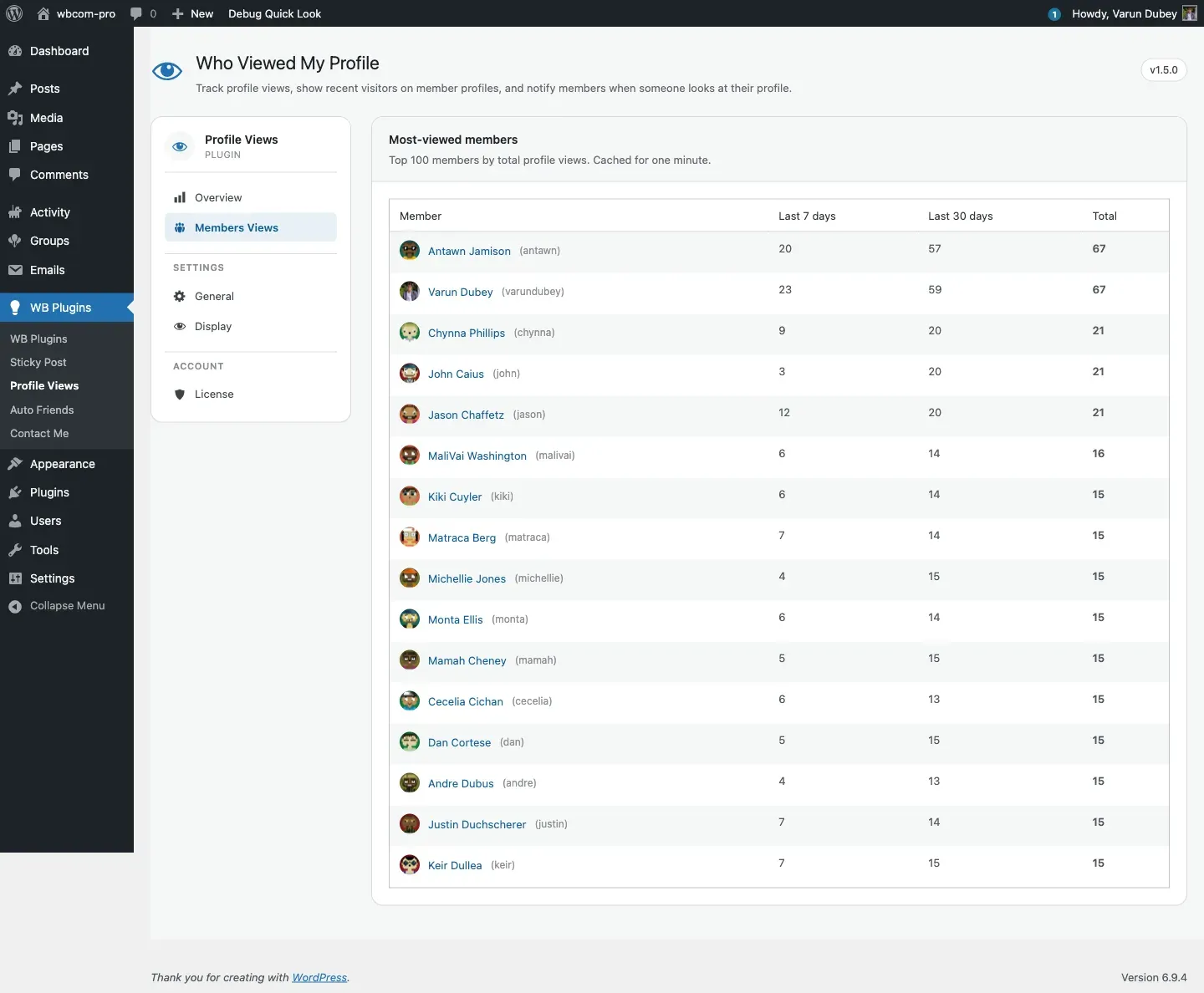
Columns
Section titled “Columns”| Column | What it shows |
|---|---|
| Member | Avatar (24px) + display name + (user_login). The name links to the member’s BuddyPress profile. |
| Last 7 days | Views recorded for this member’s profile in the last 7 days. |
| Last 30 days | Views recorded for this member’s profile in the last 30 days. |
| Total | Lifetime view count — shown in bold. |
All three counts include logged-out visitor rows. The Exclude logged-out visitors setting on the General tab does not apply here — the leaderboard always counts every row.
Empty state
Section titled “Empty state”When no views have been recorded yet, the tab shows a message: “No views recorded yet. As members browse each other’s profiles, their view counts will show up here.” This is expected on a fresh install.
Caching
Section titled “Caching”The leaderboard is cached in the WordPress object cache (using wp_cache_set) with a one-minute TTL. On sites without a persistent object cache (Redis or Memcached), the cache is per-request only — it does not survive between page loads and the full query runs on every visit. On sites with a persistent cache, you may see data up to one minute old.
The cache is also invalidated immediately whenever a new view row is inserted, so on low-traffic sites the leaderboard data is always current.
The underlying query
Section titled “The underlying query”SELECT user_id, COUNT(*) AS total_views, SUM( CASE WHEN created >= DATE_SUB( CURDATE(), INTERVAL 7 DAY ) THEN 1 ELSE 0 END ) AS week_views, SUM( CASE WHEN created >= DATE_SUB( CURDATE(), INTERVAL 30 DAY ) THEN 1 ELSE 0 END ) AS month_viewsFROM {prefix}bp_profile_viewsGROUP BY user_idORDER BY total_views DESCLIMIT 100One query returns all three columns. There is no viewer_id filter — logged-out visits are always counted.
Performance on large sites
Section titled “Performance on large sites”On installs with millions of rows the GROUP BY + COUNT query can take several seconds. A few things to know:
- Since 1.5.3 the table ships a
(user_id, created)composite index, which is what this leaderboard queries on. Existing installs are migrated automatically on update. If loads are still slow, the usual cause is the absence of a persistent object cache (the results are cached for one minute, which is per-request only without Redis or Memcached). See Database schema. - The one-minute object cache reduces how often the full query runs, but on sites without Redis/Memcached it runs on every page view.
- Archiving or deleting old rows keeps the table small. Example:
wp db query "DELETE FROM \`$(wp db prefix)bp_profile_views\` WHERE created < DATE_SUB( NOW(), INTERVAL 1 YEAR );"See Database schema for the full table layout and indexing recommendations.
What changed in 1.5.0
Section titled “What changed in 1.5.0”Before 1.5.0 this tab loaded an ag-Grid data grid that shipped roughly 800 KB of JavaScript. The 1.5.0 rewrite replaced it with a server-rendered PHP table — same data, much less page weight, plus the object-cache layer. The legacy wp_ajax_get_views AJAX endpoint that powered the old grid still exists and still requires the bp-member-view-nonce nonce, so any third-party code that was calling it continues to work. As of 1.5.0 no built-in JavaScript calls that endpoint.