

Settings — Overview tab
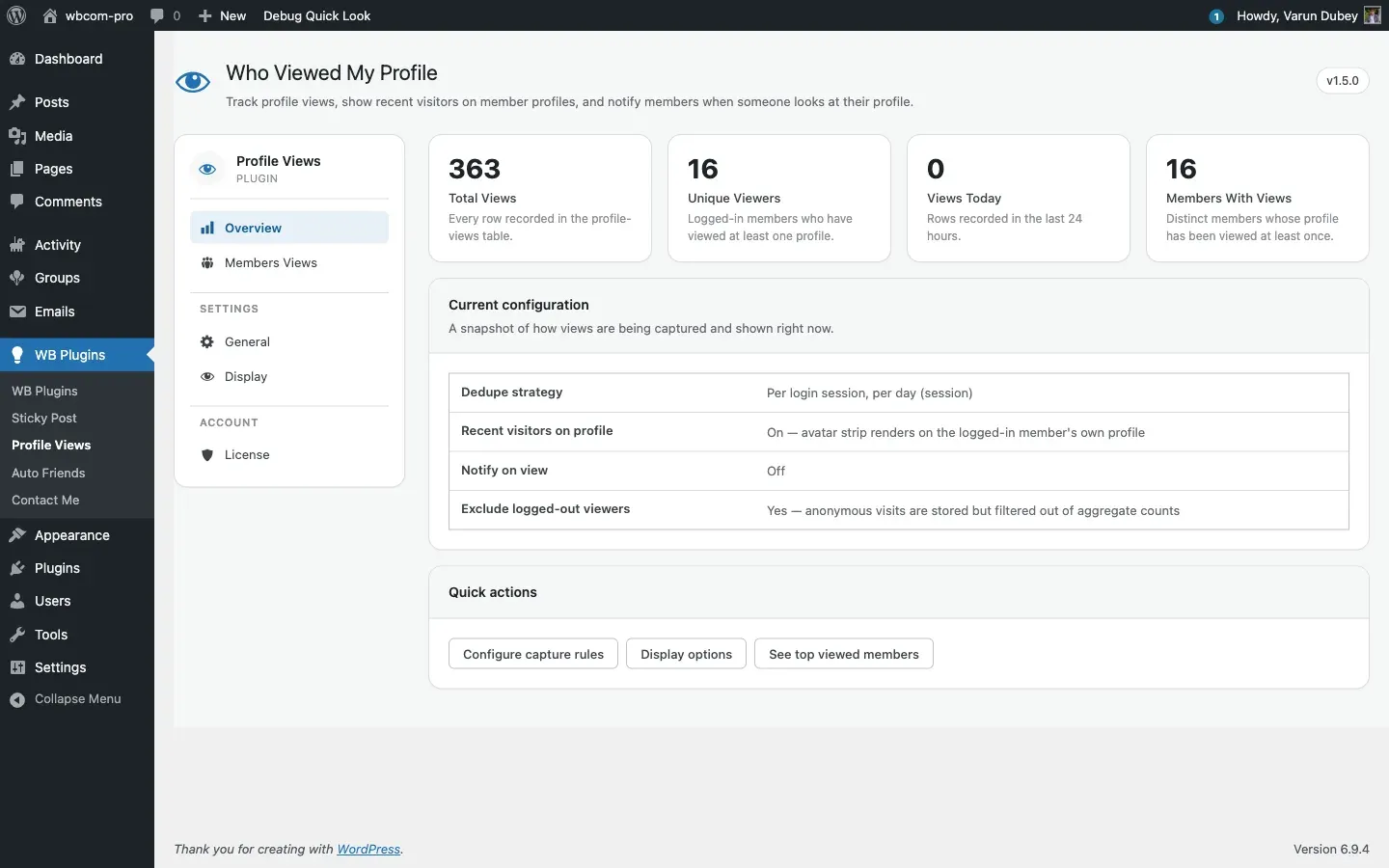
The Overview tab is a read-only dashboard showing the state of your install. It opens by default when you click WB Plugins → Profile Views in the WordPress admin menu.
Stat cards
Section titled “Stat cards”The four cards at the top pull live counts from the {prefix}bp_profile_views table on every page load. Results are cached for one minute via the WordPress object cache — on sites without a persistent cache (Redis / Memcached) the cache is per-request only and will not survive between page loads.
| Card | What it counts |
|---|---|
| Total Views | Every row in the table — all rows regardless of whether the viewer was logged in or not. |
| Unique Viewers | Distinct viewer_id values greater than 0 — logged-in members who have viewed at least one profile. Anonymous (viewer_id = 0) rows are never included here. |
| Views Today | Rows where the date portion of created matches today’s calendar date (server timezone). Note: this is a calendar-day boundary, not a rolling 24-hour window. |
| Members With Views | Distinct user_id values — profiles that have been viewed at least once. |
The Exclude logged-out visitors setting on the General tab does not affect Total Views or Views Today. Those two cards always count every row. Unique Viewers always excludes anonymous rows regardless of that setting.
Current configuration snapshot
Section titled “Current configuration snapshot”Below the stat cards is a read-only table reflecting four key settings:
| Row | Setting it reflects |
|---|---|
| Dedupe strategy | save_count_by — shows “Per login session, per day (session)” or “Per HTTP referer (referer)”. |
| Recent visitors on profile | show_recent_members — On or Off. |
| Notify on view | allow_user_notification — On or Off. |
| Exclude logged-out viewers | exclude_logout_user_count — Yes or No. |
Each row carries a link to the control that owns it, so a status is never a dead end:
- A row reading Off shows Turn on.
- A row that is already configured shows Change.
Following either one opens the right tab, scrolls to the exact setting, and flashes it briefly so you can see which control you were sent to.
| Row | Link goes to |
|---|---|
| Dedupe strategy | General → How views are counted |
| Recent visitors on profile | Display → Recent visitors on member profiles |
| Notify on view | General → Notifications |
| Exclude logged-out viewers | General → Viewer types |
This snapshot is informational only. To change any of these, use the Quick actions links or navigate directly to the General or Display tabs.
Quick actions
Section titled “Quick actions”Three buttons link directly to the tabs where you’d most often need to make a change:
- Configure capture rules — jumps to the General tab.
- Display options — jumps to the Display tab.
- See top viewed members — jumps to the Members Views tab.
When BuddyPress is not active
Section titled “When BuddyPress is not active”If BuddyPress is deactivated while the plugin is still active, a warning notice appears at the top of the tab. The admin panel itself still loads, but no views will be captured and the stat cards will show 0 until BuddyPress is activated again.
Where the data lives
Section titled “Where the data lives”All counts read from the same custom table. See Database schema for the full column layout.