

Advanced Member Search (Pro)
Pro adds five member-search filters on top of the free search - filter members by membership plan, by space, by member label, by when they joined, and by how recently they were active - plus saved searches so members can store a search and run it again later. The filters fill themselves from your community’s own data, so the options always match what your site actually has.
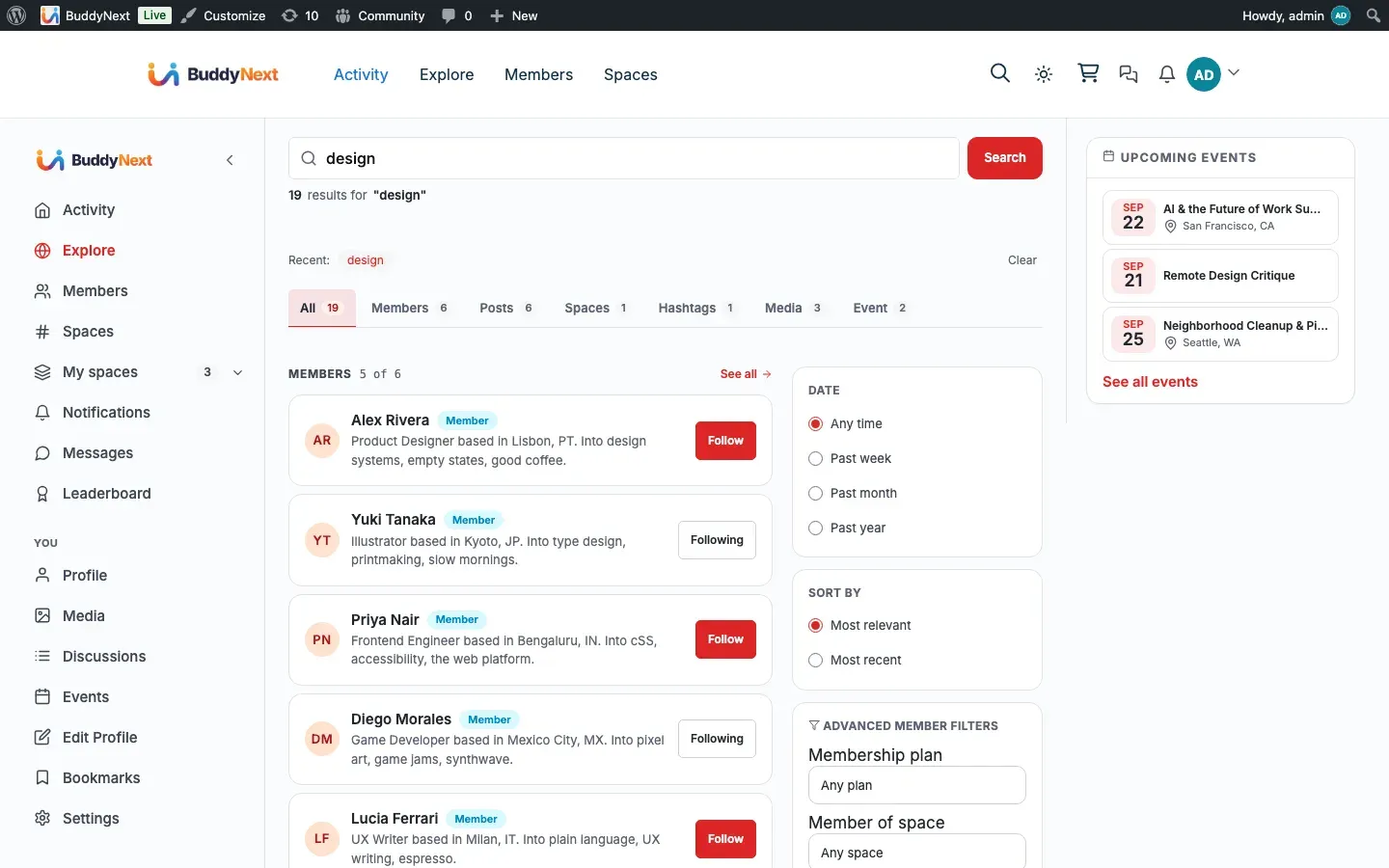
Before you start: These filters and saved searches come with BuddyNext Pro. With Pro active, they appear automatically on the search results page - there is nothing to switch on. This page covers the Pro filters and saved searches. For the base search experience, see Search.
Why use it
Section titled “Why use it”In a small community you can scroll the member list and find who you need. Past a few hundred members that stops working, and “find the right people” becomes the job search has to do well.
The Pro filters target the questions large communities actually ask:
- “Show me everyone on the Premium plan” - by membership plan.
- “Show me members of the Design space” - by space.
- “Show me everyone we have marked Verified” - by member label.
- “Show me people who joined this month” - by join date.
- “Show me members active in the last week” - by recent activity.
Each filter narrows a long member list to the slice that matters, and the filters combine, so you can ask for active Premium members of one space in a single search. For members who run the same search often - a moderator checking new joiners, an organiser finding active members of their space - saved searches turn a multi-filter query into one click.
The filters read from your real data. The plan list shows the plans you actually offer, the space list shows spaces the searcher already belongs to, and the label list shows the labels you created. There are no empty or irrelevant options to wade through.
How it works (for members)
Section titled “How it works (for members)”A member runs a normal search, then opens the advanced member filters on the results page. They pick any combination of the controls below and apply them; the results narrow to members matching every filter set. Applying filters is a plain page reload - it works without JavaScript.
- Membership plan - choose a plan to see only members holding an active subscription to it.
- Space - choose one of the spaces you belong to, to see only its active members.
- Member label - choose a label to see only members assigned it.
- Joined after - pick a date to see only members who registered on or after it.
- Active within - set a number of days to see only members active in that window.
The same five filters are available through the API the website uses, so any connected client narrows results the same way.
Note: The advanced member filters apply on the search results page when a search term is present. They refine an active member search rather than the empty-query directory browse.
Saved searches
Section titled “Saved searches”A member can save the search they are running - filters and all - under a name, then return to it later from their saved searches and run it again with one action. Saved searches are per member: each person keeps their own list. A member can save up to 50 searches.
Tip: Saved searches are most useful for the searches you repeat - new members this week, active members of your space, everyone on a given plan. Save the query once and rerun it instead of rebuilding the filters each time.
Setting it up (for owners)
Section titled “Setting it up (for owners)”There are no admin settings to switch the advanced filters on. They activate with Pro and populate themselves from your existing data:
- The membership plan filter lists the plans you have configured. See Membership for setting plans up.
- The space filter lists spaces; each searcher sees only the spaces they belong to.
- The member label filter lists the labels you created. See Member Labels for creating them.
- The joined-after and active-within filters need no configuration - they read registration dates and recorded activity.
If a data source is empty - no plans, no labels - that filter’s dropdown simply does not appear, and the remaining filters still work. The join-date and active-within filters always work because every member has a registration date.
Good to know
Section titled “Good to know”- Results respect visibility and safety rules: searches return public members, exclude anyone the searcher has blocked, and exclude suspended or shadow-banned members. The space filter only offers spaces the searcher already belongs to, so it never reveals private membership lists.
- Filters are checked before they run - the plan, label, and space must be real ones, the join date must be a valid date, and active-within is kept between 1 and 365 days. An out-of-range or malformed filter is simply ignored rather than applied.
- The filters refine the active member search. They run when a search term is present, not on the empty-query directory list. See Search for how the base directory browse differs from a search.
- The plan, space, and label dropdowns appear only when there is data to populate them. On a fresh site with no plans or labels yet, members see the join-date and active-within filters and a hint pointing to the data they would need.
- Each member’s saved searches are private to them and capped at 50. Running a saved search re-applies its stored filters against current data, so the results stay current even though the query is saved.
Free vs Pro
Section titled “Free vs Pro”Free search covers the unified search across members, posts, spaces, and hashtags, and the member directory browse. See Search for that baseline.
Pro adds the five member filters (plan, space, label, joined after, active within) by extending the free search, plus per-member saved searches. The filters draw their options from your community’s real plans, spaces, and labels, so what you can filter by always matches what your site has.
Note: If you have turned Memberships on and chosen a default plan, this becomes a plan perk: members only get it if their plan grants it. With Memberships off (the default), it works for every member. See Membership Plans.
Related
Section titled “Related”- Search - the base search these filters extend.
- Member Labels - one of the attributes you can filter by.
- Membership Plans - advanced search can be a plan perk.