

Email Digest Settings
Email Digest Settings
Section titled “Email Digest Settings”Go to WP Admin → BuddyPress Quotes → Digest to configure the weekly quote digest.
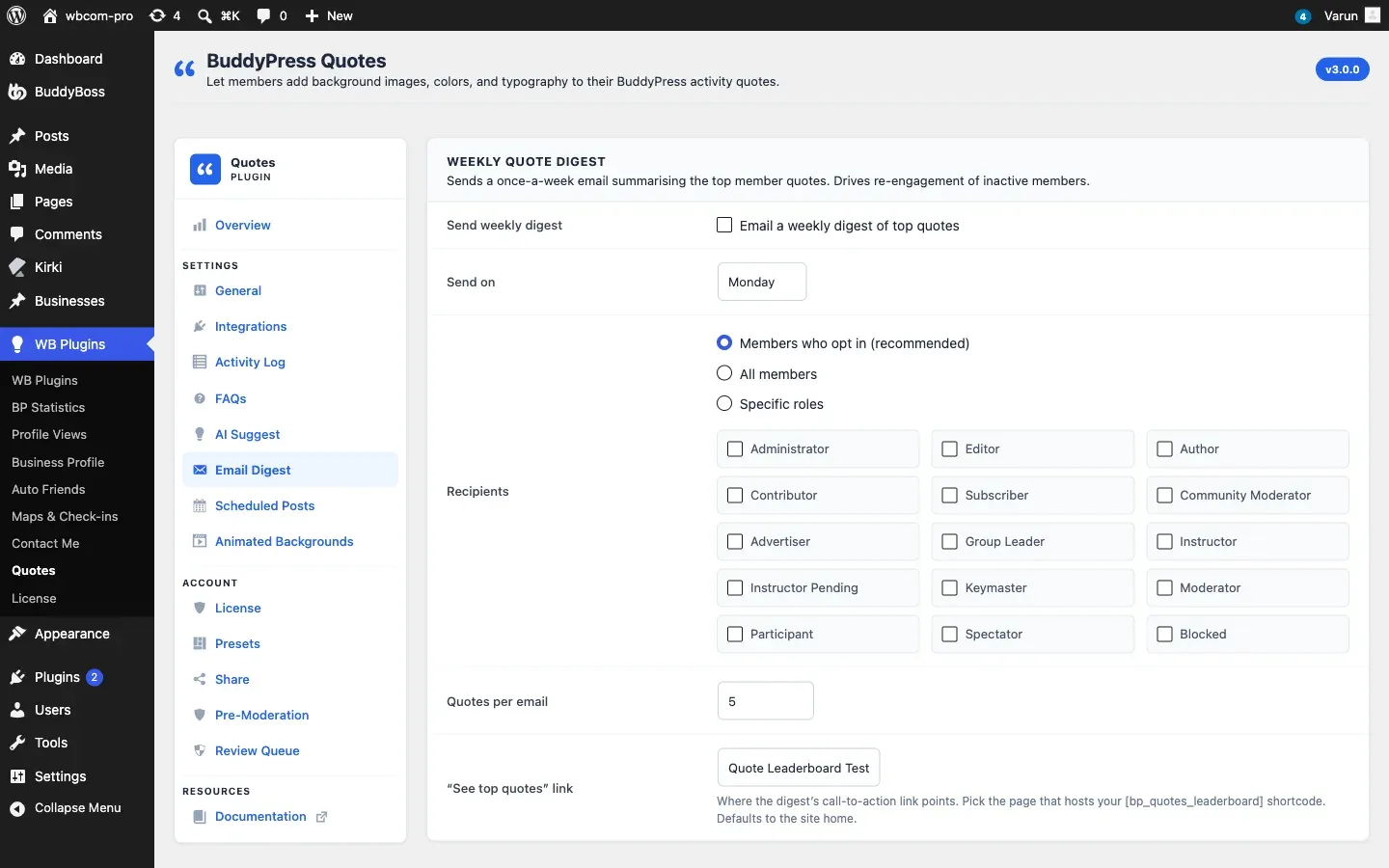
What Is the Digest?
Section titled “What Is the Digest?”The weekly digest is an automated email that highlights the top-performing quotes from the past seven days. It is sent once per week on the day you configure. The email uses the BuddyPress email template system, so it inherits your site’s email branding.
Settings
Section titled “Settings”Enable Weekly Digest
Section titled “Enable Weekly Digest”| Option | Default |
|---|---|
| Enable weekly digest | Off |
Turn this on to activate the weekly cron job. When off, no digest emails are sent.
Send Day
Section titled “Send Day”Choose which day of the week the digest is sent. Options are Monday through Sunday. The cron job fires on that day at the scheduled time set by WordPress (determined when the cron is first registered).
Recipients
Section titled “Recipients”Choose who receives the digest email:
| Mode | Who receives the email |
|---|---|
| All members | Every registered member on the site |
| Specific roles | Members who belong to the roles you select in the Roles field that appears when you choose this option |
| Opt-in only | Members who have turned on the digest subscription in their BuddyPress notification settings (Profile → Notifications → BuddyPress Quotes Digest) |
The opt-in mode is the most considerate option for established communities because it only emails members who actively want the digest.
Quotes Per Email
Section titled “Quotes Per Email”| Option | Default | Range |
|---|---|---|
| Quotes per email | 5 | 1–20 |
This controls how many quotes are included in each digest email. The plugin picks the quotes with the highest share or activity counts from the past seven days.
Top Quotes Landing Page
Section titled “Top Quotes Landing Page”Optionally specify a WordPress page to use as the “See all top quotes” link in the digest email footer. If left blank, the link points to the site’s main activity feed.
The landing page URL is filterable with bpquotes_digest_landing_url. See the Hooks Reference.
How the Digest Query Works
Section titled “How the Digest Query Works”By default the digest selects the N most-shared or most-engaged quotes from the past 7 days from the plugin’s activity log. You can customise the query arguments using the bpquotes_digest_query_args filter. This lets you change the sort criteria, date range, or add additional filters. See the Hooks Reference.
Member Opt-In
Section titled “Member Opt-In”When recipient mode is set to Opt-in only, members can subscribe or unsubscribe from their BuddyPress profile:
- Go to Profile → Notifications.
- Find the BuddyPress Quotes Digest row.
- Toggle the checkbox on or off.
The preference is saved immediately.