

Analytics Dashboard
The analytics dashboard is a Pro admin area that turns your community’s activity into numbers you can read at a glance: how many people show up, what content lands, who your most active members are, and how your spaces are doing. It also gives each member a private “who viewed your profile” count, with an opt-out for people who would rather not be tracked.
Why use it
Section titled “Why use it”Running a community without analytics means guessing. You can’t tell whether last month’s changes brought people back, which posts pulled comments and reactions, or which spaces are quietly dying. The dashboard answers those questions with real data from your own site, so your decisions about content, spaces, and outreach are grounded in what actually happened.
A few concrete situations it solves:
- You launched a new space and want to know whether anyone is posting in it or whether joins are stalling.
- You want to reward your most active members but don’t know who they are.
- You changed your onboarding flow and want to see whether daily active users went up afterward.
- A member wants to know who has been looking at their profile, the way they would on a professional network.
The dashboard is read-only insight, not a control panel. It tells you what is happening so you can decide what to do next.
How it works (for members)
Section titled “How it works (for members)”Most of the dashboard is admin-only, but one piece is member-facing: profile views.
Who viewed your profile
Section titled “Who viewed your profile”When Pro is active, a “who viewed your profile” panel appears on a member’s own profile page. It is visible only to the profile owner - other people viewing the profile never see it.
Note: This member-facing panel is a plan perk (Personal Analytics). If you have turned Memberships on and chosen a default plan, a member sees it only if their plan grants it. With Memberships off (the default), every member gets it. The admin analytics dashboard below is unaffected either way - it is yours, not a member perk. See Membership Plans.
The panel shows:
- A count of views in the last 7 days.
- A total view count.
- A short list of recent viewers, with a link to see the full list.
Opting out of profile-view tracking
Section titled “Opting out of profile-view tracking”Any member can turn off profile-view tracking for themselves. When a member opts out, their visits are no longer counted toward other people’s “who viewed your profile” totals, and they are excluded from the recent-viewers lists other members see.
Note: The member opt-out is honored everywhere a member can see another member’s viewers. Site administrators viewing the same data from the admin dashboard can still see the underlying counts, because that view is for site management rather than member-to-member visibility.
Setting it up (for owners)
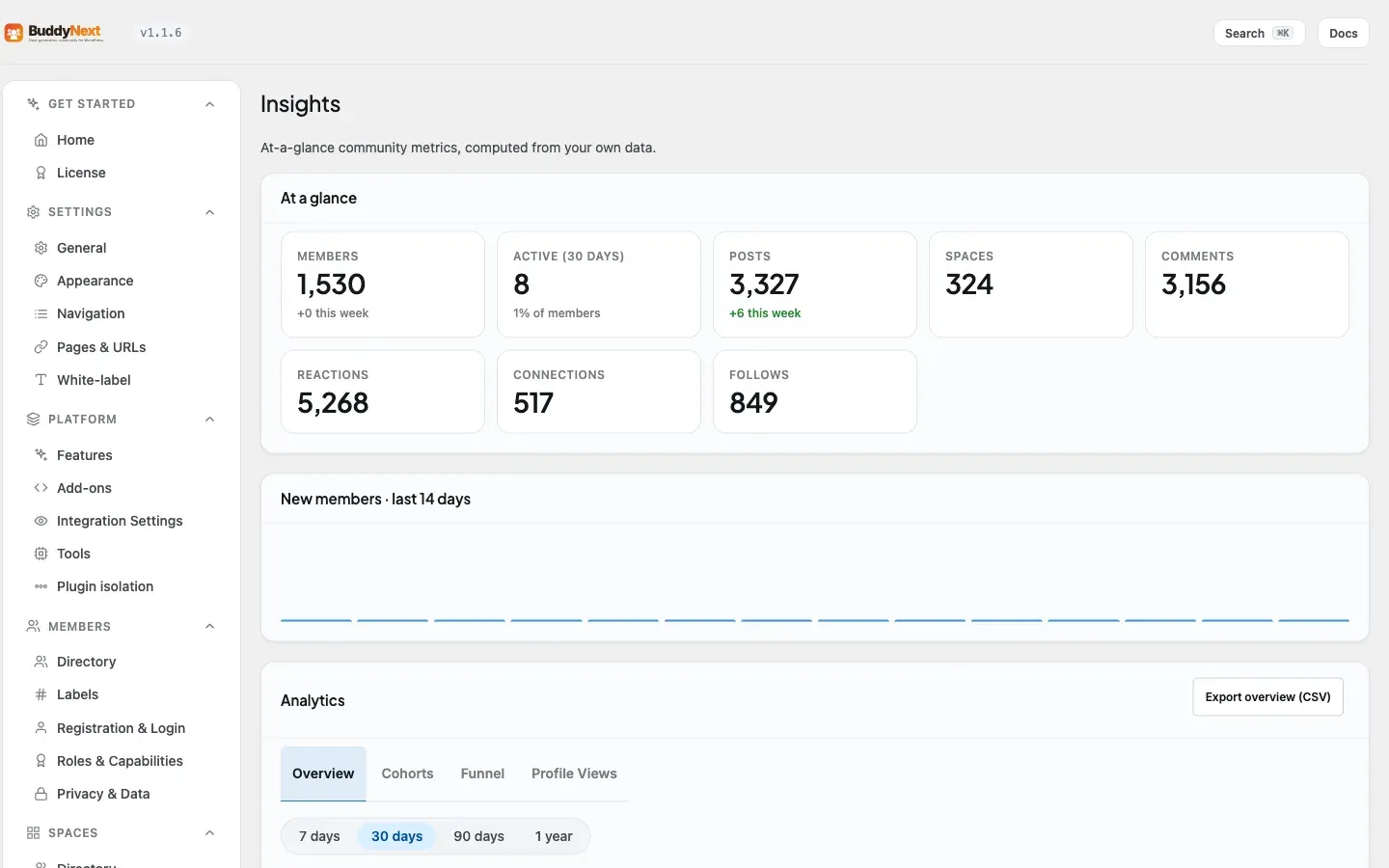
Section titled “Setting it up (for owners)”The dashboard lives inside the BuddyNext admin menu, on the Engagement → Insights tab - the analytics suite renders below the at-a-glance summary there. It requires BuddyNext Free to be active, because the page is part of the Free admin menu and reads activity that Free records. Only users who can manage options (administrators) can open it. (The older standalone Analytics URL still works but redirects to the Insights tab.)
The views
Section titled “The views”The dashboard is organized into views you switch between at the top of the page.
| View | What it shows |
|---|---|
| Overview | Stat cards for daily, weekly, and monthly active users (DAU / WAU / MAU) plus posts today, engagement rate, and new signups; a daily-activity chart; and Top content (ranked by engagement - reactions plus comments) and Top members (ranked by tracked actions) tables. |
| Cohorts | Retention grouped by when members joined, so you can see whether newer or older cohorts stay engaged. |
| Funnel | Step-by-step conversion through a sequence of actions (the default sequence: sign up, first post, first reaction received, first follow). |
| Profile Views | Profile-view data, including the administrator view that can look up any member’s profile views. |
Note: Top content and top members appear as tables inside the Overview view, not as separate views. Per-space health metrics are available through the REST API and the app rather than as a dashboard view.
Note: DAU, WAU, and MAU stand for daily, weekly, and monthly active users - the count of distinct members who took at least one tracked action in that window.
Exporting to CSV
Section titled “Exporting to CSV”The exportable views each have an Export CSV button in the section header. Overview exports the member-growth series (date and new registrations), Cohorts exports the retention matrix, and Funnel exports the step-by-step conversion report. Profile Views is not exportable. Each file is spreadsheet-friendly, so you can keep records, chart it elsewhere, or share it with your team.
Settings
Section titled “Settings”The dashboard has no required configuration. It starts collecting and displaying data as soon as Pro is active. The only member-level control is the per-member profile-view opt-out described above, which members manage themselves.
| Setting | What it does | Default |
|---|---|---|
| Profile-view tracking (per member) | Each member can opt out of having their profile visits counted. Set by the member, not the owner. | On (visits counted) |
How long analytics data is kept
Section titled “How long analytics data is kept”Analytics events are an append-only log, so they need pruning or they grow without limit. A background job trims them against the same data retention setting the rest of the suite honours, and it covers both the analytics events and the AI signal log. Set retention to “keep forever” and the job stands down.
The job is always armed otherwise, including on sites that never switched on AI moderation - retention belongs to the data, not to whichever feature happens to read it.
On a large community it now catches up (1.1.5). Each run deletes in bounded batches, so no single statement holds a long table lock, but the per-run ceiling used to sit below the rate at which busy sites wrote new events - so the backlog grew every night and the prune could never reach it. A site with ten million aged rows would have needed years of nightly runs while still writing faster than it deleted. The ceiling is now high enough that a backlog drains in a few nights.
You do not need to do anything for this; it is a background job. It matters only if you were watching the analytics table grow and wondering why the nightly prune never seemed to help.
Good to know
Section titled “Good to know”- Empty state shows zeros. On a brand-new site, or before any activity has happened, the stat cards read 0 and the tables show “no data” rows. This is expected, not a fault. Seed some activity (members logging in, posting, joining spaces) and the numbers populate.
- Admin-only for site-wide views. Every view except the member’s own profile-view panel requires administrator access. Non-admins who try to reach the analytics data are refused.
- Counts are distinct actors. Active-user counts measure distinct members, so one member taking ten actions in a day still counts as one daily active user.
- CSV export is per view. The Export button downloads the active view’s dataset - the member-growth series on Overview, the retention matrix on Cohorts, or the funnel report on Funnel. Profile Views is not exportable.
- Data depends on activity being recorded. Analytics is built from the events your community generates over time. The longer Pro has been active, the richer the history. It does not backfill activity from before it was installed.
Free vs Pro
Section titled “Free vs Pro”Analytics is a Pro feature in full. BuddyNext Free records community activity and powers the live surfaces members use, but the analytics dashboard - the DAU/WAU/MAU cards, content and member rankings, space health, cohorts, funnel, CSV export, and the member-facing profile-views panel - is part of Pro.
Related
Section titled “Related”- Community Insights - the free at-a-glance summary the dashboard renders below.
- Membership Plans - the member profile-views panel can be a plan perk.