

Standalone Settings
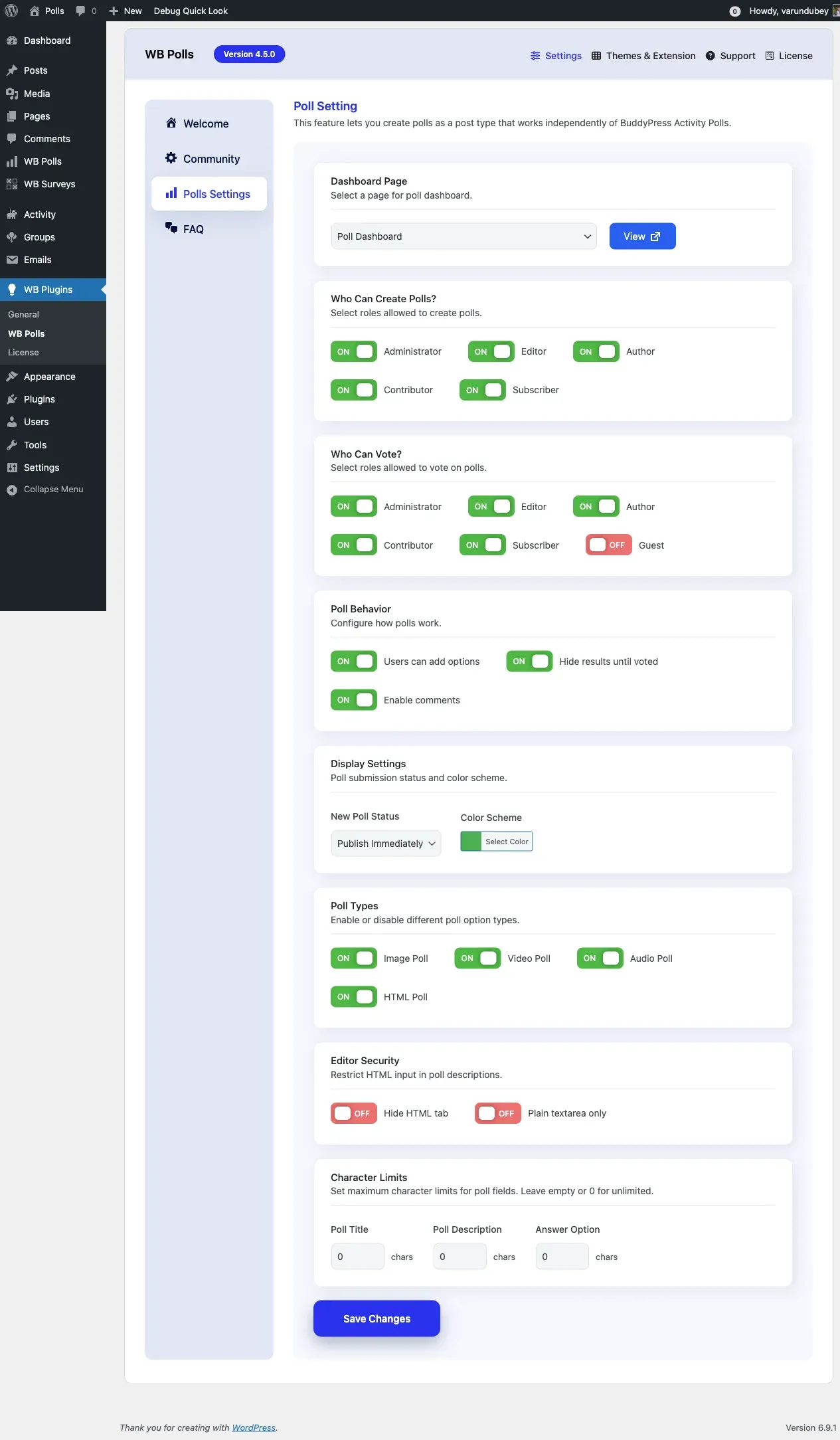
The Polls Settings tab controls all settings for standalone polls with dedicated pages. Configure page assignments, creation permissions, voting access, poll types, and editor options from this tab.
Accessing Standalone Settings
Section titled “Accessing Standalone Settings”Navigate to WP Admin > BuddyBoss > WB Polls and open the Polls Settings tab.
Page Configuration
Section titled “Page Configuration”Poll Dashboard Page
Section titled “Poll Dashboard Page”Select the WordPress page that displays the user poll dashboard. A page is auto-created when you activate the plugin.
Create Poll Page
Section titled “Create Poll Page”Select the WordPress page containing the poll creation form. This page is also auto-created on activation.
Both pages are template-based. The plugin injects content automatically, so the pages should have empty content with no shortcode.
Poll Creation
Section titled “Poll Creation”Default Submit Status
Section titled “Default Submit Status”Control what status new polls receive when users create them.
| Status | When to Use |
|---|---|
| Publish | Trust users. Polls go live immediately. |
| Pending | Review polls before publishing. Recommended for public communities. |
| Draft | Users must explicitly publish later. |
Who Can Create Polls
Section titled “Who Can Create Polls”Select which user roles can access the poll creation form. Administrators can always create polls.
Allow User Extra Options
Section titled “Allow User Extra Options”Let voters suggest additional answer options. Poll creators can review and approve suggestions.
Result Display
Section titled “Result Display”Hide Results Until Voted
Section titled “Hide Results Until Voted”When checked, results stay hidden until the user casts their vote.
Show Comments
Section titled “Show Comments”Enable comments on standalone poll pages for discussion.
Who Can Vote
Section titled “Who Can Vote”User Roles
Section titled “User Roles”Restrict voting to specific user roles. Leave empty to allow all registered users.
Guest Voting
Section titled “Guest Voting”Allow non-logged-in visitors to vote. When “Guest” is selected:
- Visitors do not need an account
- Votes are tracked by browser cookies
- IP-based duplicate prevention applies
Guest voting is useful for public opinion polls, website feedback, and social media shared polls. Consider that guest voting provides less accurate tracking and may be susceptible to manipulation.
Poll Types
Section titled “Poll Types”- Enable Image Polls adds the “With Images” poll type
- Enable Video Polls adds video attachments for standalone polls
- Enable Audio Polls adds audio attachments for standalone polls
- Enable HTML Polls allows rich HTML content in poll options
Editor Settings
Section titled “Editor Settings”- Disable HTML Editor removes the visual editor from poll creation
- Use Simple Textarea replaces the rich editor with a basic text field
Character Limits
Section titled “Character Limits”| Setting | Purpose | Recommended |
|---|---|---|
| Poll Title Limit | Maximum title length | 100-200 characters |
| Poll Description Limit | Maximum description length | 500-1000 characters |
| Answer Option Limit | Maximum per-option length | 100-200 characters |
Set to 0 for unlimited. Unlimited is not recommended for public-facing sites.
Appearance
Section titled “Appearance”Background Color
Section titled “Background Color”Set a custom color for standalone poll result bars.