

Contact Form
Availability: Free + Pro. When Pro’s Lead Forms feature is enabled, it replaces this Free contact form.
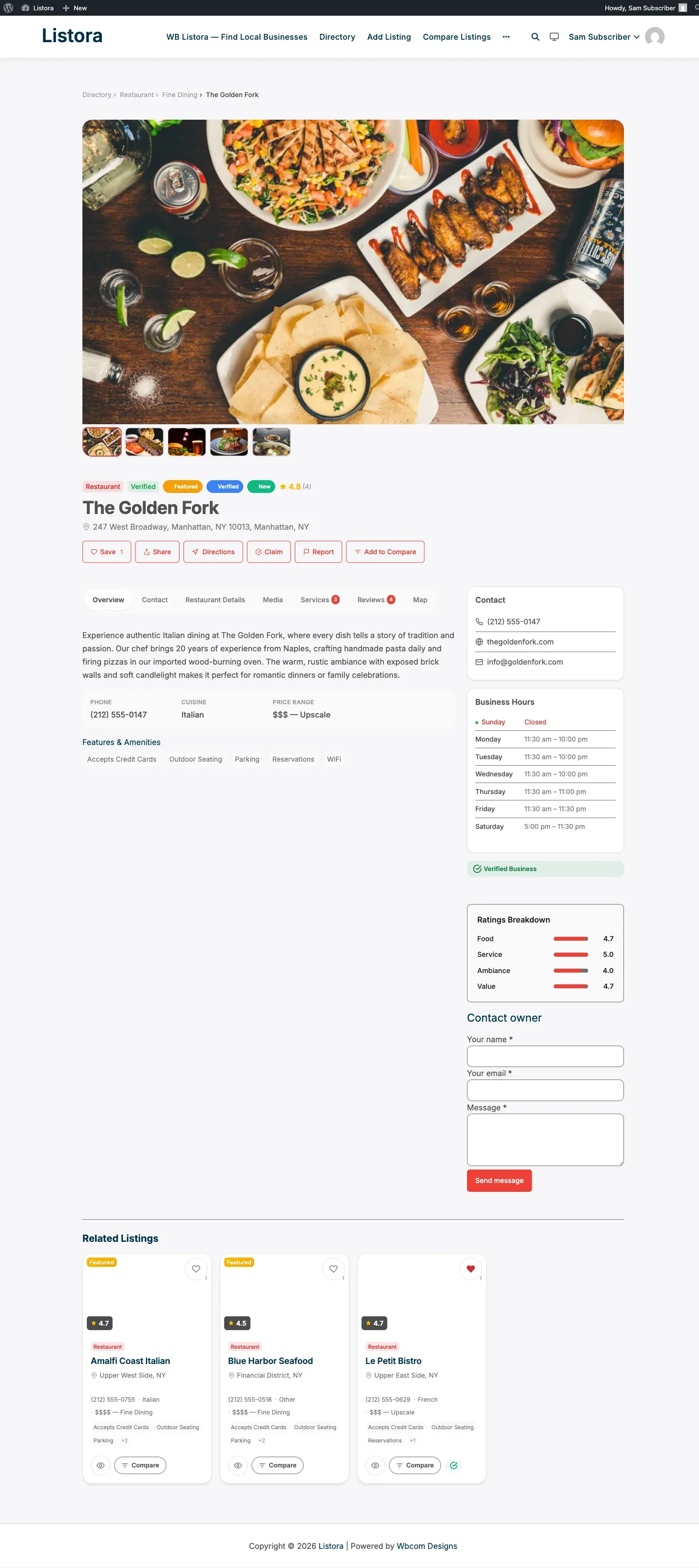
A “Contact owner” form on every listing detail page. Visitors send a private message to the listing owner; the owner gets an email; no personally-identifying data is stored on the site. Honeypot + Akismet + per-IP and per-listing rate limits in front of every submission - and when Pro’s Lead Forms feature is on, this Free surface automatically stands down so the two never render together.
What it is
Section titled “What it is”A minimal contact-owner surface for sites that don’t need full Pro lead capture:
- Renders inline on every listing detail page (after the fields, before reviews) - no shortcode or block placement required.
- Three required inputs: name, email, message. Plus a hidden honeypot field bots can’t resist filling.
- Submits to
POST /listora/v1/listings/{id}/contact-formwith a per-listing nonce. - Anti-spam pipeline runs before any email is dispatched: honeypot rejection, keyword blacklist + URL density + Akismet, per-IP rate limit (3 messages per hour per listing), per-listing daily cap (default 20 - configurable via
wb_listora_contact_form_per_listing_daily_capfilter). - Owner receives a plain-text email at their WordPress account email.
Reply-Tois set to the sender so a one-click reply goes straight back to the visitor - without exposing the owner’s email to the sender on the page. - Self-suppresses for the listing owner viewing their own page (no “contact yourself” affordance).
- Coupling rule: when Pro’s
lead_formfeature toggle is ON,should_render()returns false and the Free form hides - Pro’s analytics-enriched lead form takes over with the same UX shape. Set thewb_listora_render_contact_formfilter totrueto force the Free form on top of Pro (rarely useful).
How you use it
Section titled “How you use it”As an admin / site operator
Section titled “As an admin / site operator”- Activate WB Listora - the contact form is on by default.
- Confirm your site’s outgoing email works. Try Settings → Notifications → Send Test Email with the “New listing submitted” template - if that arrives, the contact form’s
wp_mail()will too. - Tune the per-listing daily cap if needed: 20 is right for most directories. Reduce for low-traffic high-value listings, raise for high-volume vendors.
- Listing owners get messages at their profile email (WordPress account email). Encourage them to keep that current.
As a visitor
Section titled “As a visitor”- Open any listing detail page.
- Scroll past the fields tab to Contact owner.
- Enter your name, your email, and a message of any length.
- Submit. The page shows “Your message has been sent to the listing owner.” inline.
- The owner replies directly to your email address - replies do NOT route back through the site.
As a listing owner
Section titled “As a listing owner”- New messages arrive at the email address on your WP profile.
- Subject format:
New message from {sender} about {your listing title}. - Hit reply in your mail client - your reply goes straight to the visitor’s email (we set
Reply-To). - The site itself never stores the visitor’s name / email / message text. If you need a record, save the email in your mail archive.
Anti-spam layers
Section titled “Anti-spam layers”The form runs every submission through the same anti-spam pipeline as listings, reviews, and claims:
| Layer | What it catches | Configurable |
|---|---|---|
Honeypot (hp field) |
Bots that fill every input. Silent reject - bots think they won. | (no setting - built in) |
| Per-IP rate limit | 3 messages per hour per listing per IP. Returns HTTP 429. | (no setting - built in) |
| Per-listing daily cap | 20 messages per listing per day across all IPs. Returns HTTP 429. | wb_listora_contact_form_per_listing_daily_cap filter |
| Keyword blacklist | Banned words from Settings → Security → Banned Words. | Settings → Security |
| URL density cap | Submissions over the per-event URL limit. | Settings → Security |
| Akismet | Spam content check via the Akismet API. Falls open on outage. | Akismet plugin |
See Spam Protection for the layered defence and Rate Limiting for the per-IP windows.
Settings & options
Section titled “Settings & options”| Setting | Default | Where |
|---|---|---|
| Per-listing daily cap | 20 | wb_listora_contact_form_per_listing_daily_cap filter |
| Per-IP cap | 3 / hour / listing | (no setting - built in) |
| Email subject template | New message from %s about %s |
(translatable string) |
| Reply-To header | Sender’s email | (filterable via wb_listora_contact_form_email_headers) |
| Render gate | On when Pro lead_form is OFF |
wb_listora_render_contact_form filter |
Developer hooks
Section titled “Developer hooks”// Raise the per-listing daily cap for verified listings.add_filter( 'wb_listora_contact_form_per_listing_daily_cap', function ( $cap, $listing_id ) {if ( wb_listora_is_verified( $listing_id ) ) {return 50;}return $cap;}, 10, 2 );
// Add a BCC for compliance archiving.add_filter( 'wb_listora_contact_form_email_headers', function ( $headers, $post ) {$headers[] = 'Bcc: compliance@example.com';return $headers;}, 10, 2 );
// Force the Free form to render even when Pro's lead form is active.add_filter( 'wb_listora_render_contact_form', '__return_true' );After every successful send, do_action( 'wb_listora_after_contact_form_submit', $listing_id, $context, $request ) fires - Pro’s Audit Log + Analytics features listen here to record the event.
Free / Pro coupling
Section titled “Free / Pro coupling”| Scenario | What renders |
|---|---|
| Free only | Free contact form (this page) |
Pro active, lead_form toggle ON (default) |
Pro Lead Forms - analytics-enriched, custom fields, integrations |
Pro active, lead_form toggle OFF |
Free contact form (this page) |
Pro active, lead_form ON, filter override |
Both render (use carefully) |
Related
Section titled “Related”- Lead Forms (Pro) - analytics-enriched replacement with custom fields, source attribution, integrations.
- Spam Protection - the multi-layer defence the contact form runs through.
- Rate Limiting - per-IP sliding window windows on every write endpoint.
- Email Templates - message template customization.
- REST API -
POST /listora/v1/listings/{id}/contact-formendpoint reference.