

Map Settings
Map Settings
Section titled “Map Settings”Access map settings at Listora > Settings > Map.
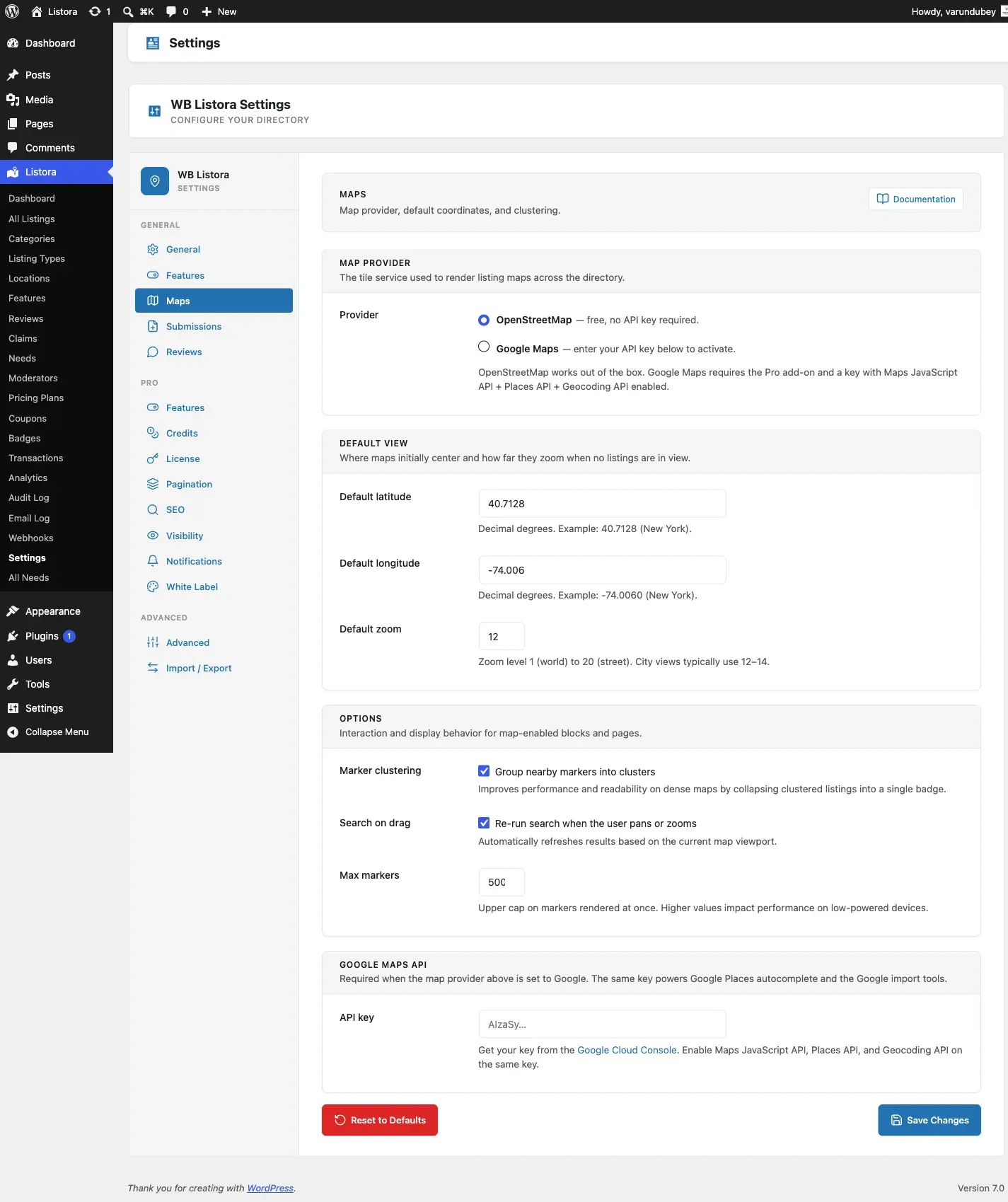
Map Provider
Section titled “Map Provider”- OpenStreetMap (default): Free, no API key required. Uses Leaflet.js with OpenStreetMap tiles.
- Google Maps (Pro): Requires a Google Maps API key. Provides autocomplete, Street View, and custom styling.
Default Map Center
Section titled “Default Map Center”Set the latitude and longitude for the default map center. This is used when no location context is available.
Default Zoom Level
Section titled “Default Zoom Level”The initial zoom level for maps (1-18). Recommended: 12 for city-level, 6 for country-level.
Marker Clustering
Section titled “Marker Clustering”Group nearby markers into clusters at lower zoom levels. Recommended for directories with many listings.
Search on Map Drag
Section titled “Search on Map Drag”Automatically search for listings when the user pans or zooms the map.
Google Maps Settings (Pro)
Section titled “Google Maps Settings (Pro)”When using Google Maps via WB Listora Pro:
- API Key: Your Google Maps JavaScript API key
- Map Style: Choose from preset styles or enter custom JSON
- Places Autocomplete: Enable address autocomplete in search